
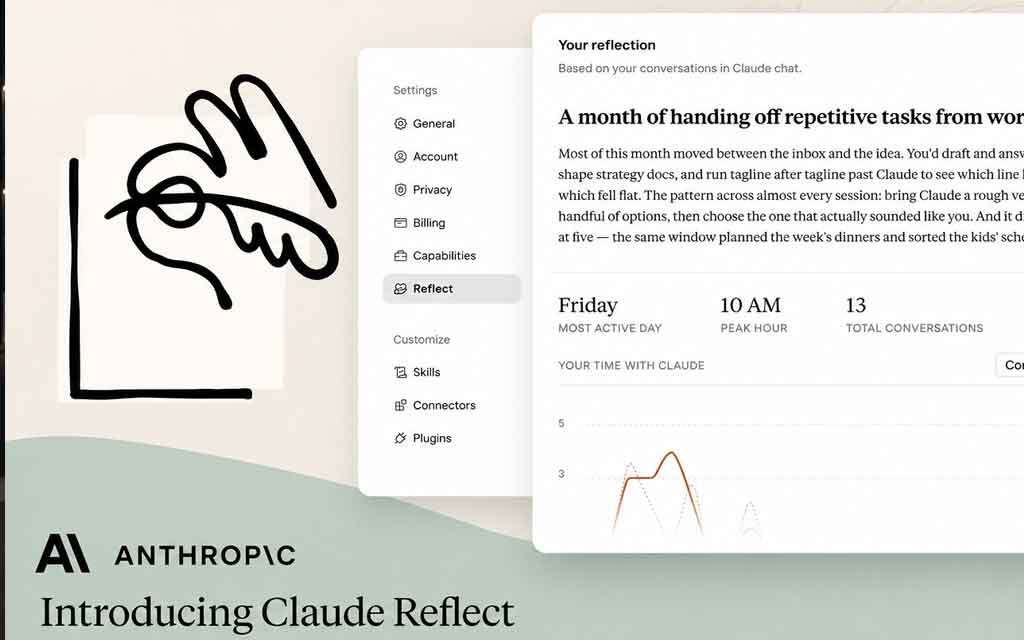
Anthropic has introduced a thoughtful new feature that helps users better understand and manage their relationship with Claude. On July 9, 2026, the company rolled out Reflect — a beta monthly recap dashboard that shows when users rely on Claude the most, what they work on, and patterns in their AI usage.
Available in Settings > Reflect on Free, Pro, and Max plans (web and Claude Desktop), the feature aims to promote more intentional and mindful AI use rather than unchecked dependency.
What Is Claude’s Reflect Feature?
Reflect generates personalized monthly summaries of your Claude activity. It provides:
- Key topics you spent time working on with Claude
- Your most active day and peak hour of usage
- Observations and insights about how you typically collaborate with Claude
- Breakdowns of usage patterns over selectable periods: 1 month, 3 months, 6 months, or 12 months
The goal is simple but powerful: give users clear visibility into when and how they are using AI so they can decide whether that usage aligns with their goals.
Anthropic states that the feature was designed to help answer questions like “Am I using Claude productively?” and “Where might I want to keep certain work human-led?”
How It Works and Requirements
- Access: Settings > Reflect
- Availability: Beta on Free, Pro, and Max plans for web and Claude Desktop
- Requirement: Memory must be turned on (the feature uses conversation history for analysis)
- Privacy notes: Excludes incognito chats and health integrations
- Coming soon: A total time spent view
Alongside Reflect, Anthropic added Time and focus settings that let users set optional break reminders and quiet hours. These tools encourage healthier digital habits and prevent over-reliance on AI during personal time.
The feature was developed with input from the MIT Media Lab’s AHA program, the Digital Wellness Lab at Boston Children’s Hospital, and the Family Online Safety Institute — signaling Anthropic’s interest in responsible AI use and user well-being.
Why This Matters for Claude Users
As generative AI becomes more deeply integrated into daily work, many professionals struggle to track exactly how much they depend on tools like Claude. Reflect addresses this by turning raw usage data into actionable insights.
Practical benefits include:
- Identifying peak productive hours with Claude
- Understanding which types of tasks (coding, writing, research, analysis, etc.) dominate your AI time
- Spotting potential overuse or underuse patterns
- Making more deliberate choices about when to keep work fully human-driven
- Supporting better work-life balance through break reminders and quiet hours
For power users and teams, these recaps can also serve as a lightweight form of productivity analytics without requiring third-party tracking tools.
Context in Anthropic’s Product Evolution
This launch fits Anthropic’s broader 2026 strategy of making Claude more useful for real work while emphasizing safety and human agency. Recent months have seen the company expand Claude Code, introduce Cowork (desktop agent capabilities), increase usage limits, and improve memory and personalization features.
By adding Reflect, Anthropic is differentiating itself not just on model intelligence but on thoughtful product design that helps users stay in control. In an era where many AI companies focus purely on capability and engagement, this focus on reflection and boundaries stands out.
Potential Impact and User Reception
Early reactions highlight the feature as a welcome step toward more transparent and human-centered AI tools. Users appreciate the ability to see concrete data about their collaboration with Claude rather than relying on vague impressions.
Critics of AI dependency may view Reflect as a positive self-regulation tool, while productivity-focused users see it as a smart way to optimize workflows. The inclusion of wellness partners also helps position Anthropic as attentive to the broader societal conversation around AI’s effects on attention and work.
As more people use AI daily, features that surface usage patterns and encourage intentionality are likely to become standard across major platforms.
How to Get Started
- Make sure Memory is enabled in your Claude settings.
- Go to Settings > Reflect.
- Generate your first monthly recap (or longer time ranges).
- Explore the companion Time and focus settings for break reminders and quiet hours.
- Use the insights to refine how you collaborate with Claude going forward.
The feature is currently in beta, so expect refinements and additional metrics (such as total time spent) in future updates.
Broader Implications for AI Productivity Tools
Anthropic’s Reflect feature signals a maturing phase of generative AI products. Early waves focused on raw capability and access. The next wave increasingly includes tools for measurement, reflection, and sustainable use.
Similar dashboards and usage insights could soon appear in other major AI assistants. Companies that help users understand and optimize their AI collaboration — rather than simply maximizing engagement — may build stronger long-term trust and retention.
For knowledge workers, freelancers, developers, and researchers, having clear visibility into AI reliance is becoming as important as the AI capabilities themselves.
Frequently Asked Questions
What does Claude’s monthly recap show? It shows the topics you spent time on, your most active day and peak hour, and observations about how you work with Claude. You can view data for 1, 3, 6, or 12 months.
Who can access the Reflect feature? It is currently in beta for Free, Pro, and Max plan users on the web and Claude Desktop. Memory must be enabled.
Does Reflect track total time spent? A total time spent view is coming soon. Current recaps focus on topics, activity patterns, and peak usage times.
Is my data private? The feature uses your conversation history (with Memory on) but excludes incognito chats and health integrations. Anthropic emphasizes privacy-preserving approaches in its products.
What are the new Time and focus settings? These optional tools let you set break reminders and quiet hours to support healthier AI usage habits.
Why did Anthropic build this? To help users reflect on and refine how they use Claude, promote intentional collaboration, and support digital wellness.
Bottom Line Anthropic’s new Reflect feature and monthly recaps give Claude users clear visibility into when they rely on AI most, what they work on, and how their usage patterns look over time. Combined with break reminders and quiet hours, it represents a thoughtful step toward more mindful and sustainable AI use.
In a landscape full of powerful models racing for engagement, Anthropic is betting that helping users stay intentional will create a better long-term experience. For anyone who works regularly with Claude, these insights could become a valuable tool for productivity and balance.
Try the Reflect dashboard in your Claude settings and see what your own AI usage patterns reveal.
For more on Anthropic updates, Claude features, and the evolving AI productivity landscape, stay tuned to vfuturemedia.com.




Leave a Comment