

LangGraph Architecture Explained: State, Nodes, Edges, Checkpoints
How LangGraph works: shared state and reducers, nodes, normal and conditional edges, super-steps, checkpointers, threads, interrupts and long-term stores.
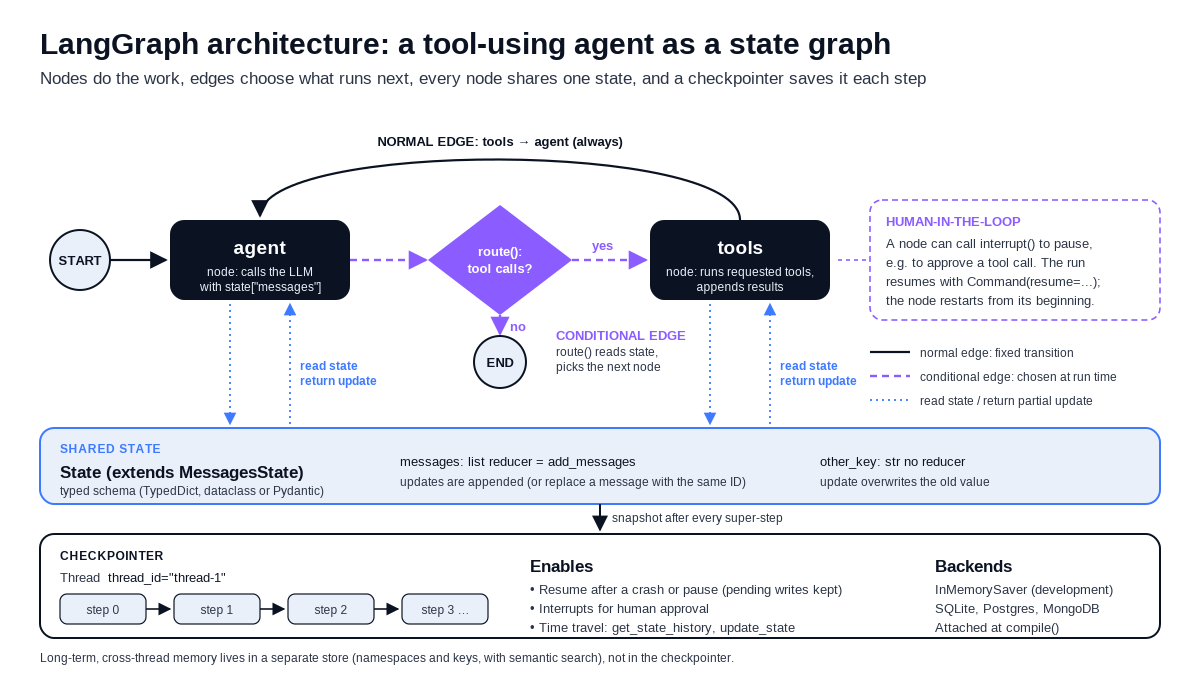
LangGraph is an open-source (MIT-licensed) framework built by LangChain Inc. [9] that models an AI agent or workflow as a graph. Each node is a function that does one step of work, edges decide which node runs next, and every node reads from and writes to a single shared state. A checkpointer saves a snapshot of that state after each step, which is what lets a LangGraph agent pause for human approval, resume after a crash, and replay earlier steps. Its own documentation calls it "a low-level orchestration framework and runtime for long-running, stateful agents" [1].
This explainer covers LangGraph's architecture. For the broader idea of agents, see our agentic AI guide; for how LangGraph compares with alternatives, see CrewAI vs LangGraph and AI agent orchestration frameworks.
What LangGraph is (and isn't)
LangGraph doesn't prescribe prompts or a particular agent design [1]. It gives you a runtime in which you can mix deterministic code with LLM-driven steps in one graph [1]. LangChain positions its higher-level agent APIs for people who want a ready-made loop, and LangGraph for when "you need explicit control over state and control flow" [1]. LangGraph doesn't require LangChain [1]. Its repository says it is "inspired by Pregel and Apache Beam," with a public interface that draws on NetworkX [9].
That low-level stance matches advice from model vendors. Anthropic suggests developers start with LLM APIs directly and, if they use a framework, make sure they understand the code underneath [8]. LangGraph's explicit graph is one way to keep that visibility.
The three core pieces
The documentation sums it up in one line: "The Graph API defines agent workflows as a graph of state, nodes, and edges" [2].
State: one shared object
State is a typed schema, defined as a Python TypedDict, a dataclass, or a Pydantic model when you need validation; the docs recommend TypedDict or dataclasses for performance [2]. Every node sees the current state and returns only the keys it wants to change.
How those changes merge is controlled by reducers, one per key. "With no reducer, updates overwrite the previous value" [2]. A reducer such as operator.add appends to a list instead. For conversations, LangGraph provides add_messages, and a prebuilt MessagesState with a single messages key that uses it [2]. The docs note that plain operator.add "only appends, so it cannot update an existing message in place," which matters when a human edits a message [2].
Nodes: steps of work
"Nodes are sync or async functions that implement a step of the graph" [2]. A node might call an LLM, run a tool, query a database, or apply plain business logic. It receives the state (plus optional config and runtime context) and returns a partial update [2].
Edges: what runs next
- Normal edges always go from one node to the next, added with
add_edge[2]. - Conditional edges call a routing function on the current state; by default it returns the name of the next node, or a list of names [2]. This is where an agent "decides."
- START and END are virtual nodes. START delivers user input into the graph; END marks where a path stops [2].
Before you can run a graph, you must compile() it. Compilation checks the structure (for example, for orphaned nodes) and is "where you attach runtime options such as checkpointers and breakpoints" [2].
A tool-using agent as a graph
The classic agent loop, reason, call a tool, observe, repeat, comes from the ReAct pattern [7]. In LangGraph it becomes two nodes and one conditional edge, as in the diagram above:
- START goes to an agent node that calls the LLM with the message history.
- A conditional edge inspects the reply. If it contains tool calls, route to the tools node; if not, route to END.
- The tools node runs the requested tools, appends results to
messages, and a normal edge sends control back to the agent.
An illustrative sketch (the two node functions are placeholders):
from langgraph.graph import StateGraph, MessagesState, START, END
from langgraph.checkpoint.memory import InMemorySaver
def call_model(state: MessagesState):
reply = ... # call your LLM with state["messages"]
return {"messages": [reply]}
def run_tools(state: MessagesState):
results = ... # execute tool calls from the last message
return {"messages": results}
def route(state: MessagesState):
return "tools" if state["messages"][-1].tool_calls else END
builder = StateGraph(MessagesState)
builder.add_node("agent", call_model)
builder.add_node("tools", run_tools)
builder.add_edge(START, "agent")
builder.add_conditional_edges("agent", route)
builder.add_edge("tools", "agent")
graph = builder.compile(checkpointer=InMemorySaver())
graph.invoke({"messages": [{"role": "user", "content": "Hi"}]},
{"configurable": {"thread_id": "thread-1"}})
Because the loop is explicit, you can add a node anywhere: a guardrail check before tools, a summarizer when history gets long, or a human approval step.
How execution works: super-steps
LangGraph's runtime follows message passing in the style of Google's Pregel system [2]. Execution proceeds in super-steps: nodes that can run in parallel share a super-step, while sequential nodes run in separate ones. "The run ends when every node is inactive and no messages remain in transit" [2].
Two tools extend the basic model:
Sendruns the same node once per item when the number of items is only known at run time (a map-reduce pattern). Reducers merge the parallel results [2].Commandlets a node both update state and choose the next node in one return value, and can also navigate to a parent graph or carry a resume value after an interrupt [2].
Graphs can nest. A subgraph is a compiled graph used as a node in a larger one, with its own checkpoints; the docs suggest one when a unit has its own routing or state schema, or is reused by several parent graphs [2].
To stop runaway loops, LangGraph enforces a recursion limit on super-steps. The docs state that starting in version 1.1.4 the default is 10,007 super-steps, and exceeding it raises GraphRecursionError [2]. Most applications will want a far lower, task-specific limit.
Persistence: checkpointers and threads
Persistence is LangGraph's distinguishing feature. There are two systems [3]:
- Checkpointers "persist a thread's graph state as checkpoints," giving short-term, thread-scoped memory.
- Stores persist application data across threads, for long-term memory.
Checkpoints
"A checkpointer saves a snapshot of graph state at each super-step, organized into threads" [4]. You pick a thread by passing a thread_id in the run config [3]. Each snapshot records the state values, which nodes run next, metadata, a timestamp, the parent checkpoint and any pending tasks [4].
If one node fails during a super-step, LangGraph keeps the pending writes of the nodes that succeeded in that step, so they aren't re-run on resume [4]. You can choose a durability mode: exit (persist only when the run ends; fastest, least safe), async (write in the background while the next step runs) or sync (persist before the next step starts; most durable) [4].
Backends, as of November 2026, include an in-memory saver bundled with LangGraph, plus separately installed SQLite, Postgres and MongoDB checkpointers and an Azure Cosmos DB option [4]. The docs describe the in-memory saver's data as lost on restart and SQLite as suited to local development [3][4].
Time travel
Because every step is saved, you can list a thread's history with get_state_history, re-run from an earlier checkpoint, or fork with update_state, which creates a new checkpoint rather than changing the old one [4]. Execution can only resume from a super-step boundary [4].
Interrupts: human-in-the-loop
The interrupt() function "pauses graph execution and returns a value to the caller" [5]. It needs a checkpointer and a thread ID [5]. To continue, you invoke the graph again with Command(resume=...), and that value becomes the return value of the paused interrupt() call [5].
One subtlety trips people up: on resume, "the runtime restarts the entire node from the beginning," so code before the interrupt runs again [5]. Side effects placed before an interrupt should be idempotent. Static breakpoints (interrupt_before, interrupt_after) exist mainly for debugging and are "not recommended for human-in-the-loop workflows" [5]. See our explainer on human-in-the-loop AI for the design patterns.
Long-term memory
The store saves memories under custom namespaces (like folders) and keys, readable from any thread, with semantic search and content filtering [6]. Our explainer on agent memory and context management covers how stores fit with the context window.
Architecture at a glance
Concept | What it is | Why it matters |
|---|---|---|
State + reducers [2] | Shared typed object; per-key merge rules | Parallel nodes can update safely |
Node [2] | Function returning a partial update | Mix LLM calls and plain code |
Normal edge [2] | Fixed transition | Deterministic steps |
Conditional edge [2] | Routing function on state | Where the agent decides |
Send / Command [2] | Dynamic fan-out; update plus goto | Map-reduce, handoffs |
Super-step [2] | Unit of parallel execution | Checkpoint boundary |
Checkpointer + thread [3][4] | Snapshot per step, per thread | Resume, recovery, time travel |
Interrupt [5] | Pause and resume with a value | Human approval |
Store [6] | Cross-thread key-value + search | Long-term memory |
Strengths and limitations
Strengths
- Explicit control flow you can read, test and visualize [1][2].
- Durable state, crash recovery and human-in-the-loop built into the runtime [3][4][5].
- Model- and prompt-agnostic: nodes are just functions [1].
Limitations
- More code than role-based frameworks for simple tasks; you design the graph yourself.
- The re-execution behavior of interrupts requires care with side effects [5].
- Checkpoints grow over long conversations; the docs suggest pruning or retention policies [3].
- Durability has a cost:
syncmode adds overhead to every step [4].
When to use LangGraph
Use it when you need fine control over loops and branches, when tasks run long enough that resume and recovery matter, or when humans must approve steps mid-run. If your problem is a fixed pipeline, plain code may be enough; if you want a quick team of role-playing agents, a higher-level framework may get you there faster. Compare the options in our orchestration frameworks guide.
Frequently asked questions
Is LangGraph the same as LangChain?
No. LangChain provides agent abstractions and integrations; LangGraph is the lower-level orchestration runtime, and it doesn't require LangChain [1].
What is a conditional edge in LangGraph?
An edge that calls a routing function on the current state and goes to whichever node that function names [2]. In a tool-using agent, it typically checks whether the model asked for a tool and routes to a tools node or to END.
What does a LangGraph checkpointer do?
It saves a snapshot of the graph state at each super-step, grouped by thread ID [4]. That snapshot lets a run resume after an interruption or failure, supports human approval steps, and enables replaying or forking from earlier points [3][4].
Does LangGraph support multi-agent systems?
Yes. Each agent can be a node or a subgraph, and Command lets one node update state and hand control to another, including in a parent graph [2]. See multi-agent systems for when that design is worth it.
Why does my node run twice after an interrupt?
Because LangGraph restarts the whole node from the beginning on resume, not from the line where it paused [5]. Move side effects after the interrupt or make them idempotent.
Sources
- LangGraph documentation, "LangGraph overview." https://docs.langchain.com/oss/python/langgraph/overview
- LangGraph documentation, "Graph API overview." https://docs.langchain.com/oss/python/langgraph/graph-api
- LangGraph documentation, "Persistence." https://docs.langchain.com/oss/python/langgraph/persistence
- LangGraph documentation, "Checkpointers." https://docs.langchain.com/oss/python/langgraph/checkpointers
- LangGraph documentation, "Interrupts." https://docs.langchain.com/oss/python/langgraph/interrupts
- LangGraph documentation, "Memory overview." https://docs.langchain.com/oss/python/langgraph/memory
- Yao et al., "ReAct: Synergizing Reasoning and Acting in Language Models," arXiv. https://arxiv.org/abs/2210.03629
- Anthropic, "Building effective agents." https://www.anthropic.com/engineering/building-effective-agents
- LangChain Inc., "langchain-ai/langgraph" repository (README and license), GitHub. https://github.com/langchain-ai/langgraph