

Public Cloud vs Private Cloud vs Hybrid Cloud
Public, private and hybrid cloud differ in who the infrastructure serves, who runs it and how workloads move. NIST definitions, trade-offs and how to pick.
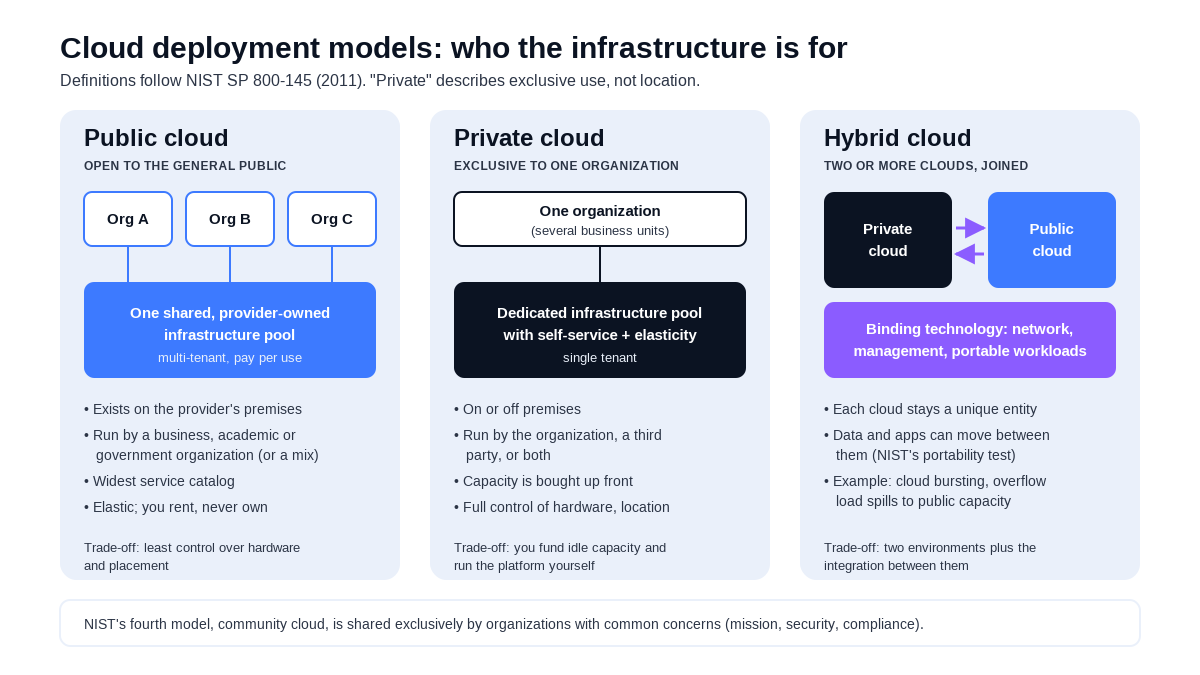
A public cloud is infrastructure open to the general public and run on a provider's premises. A private cloud is provisioned for the exclusive use of one organization, wherever it physically sits. A hybrid cloud joins two or more of those distinct clouds with technology that lets data and applications move between them [1]. The choice between them is really a choice about tenancy, control and portability, not about whose building the servers are in.
This article focuses on the comparison and the decision. For the broader basics of service models (IaaS, PaaS, SaaS) and the five essential characteristics of cloud, see our complete guide to cloud computing.
The definitions that everyone borrows
Most vendor and government material traces back to NIST Special Publication 800-145, published in September 2011 [1]. It names four deployment models. The wording matters, so here are the key phrases:
- Public cloud: "provisioned for open use by the general public." It may be owned and operated by a business, an academic institution, a government organization or a combination, and "it exists on the premises of the cloud provider" [1].
- Private cloud: "provisioned for exclusive use by a single organization comprising multiple consumers (e.g., business units)." It may be owned and operated by that organization, a third party or both, and "it may exist on or off premises" [1].
- Hybrid cloud: "a composition of two or more distinct cloud infrastructures (private, community, or public) that remain unique entities, but are bound together by standardized or proprietary technology that enables data and application portability" [1].
- Community cloud: the fourth, less common model, shared exclusively by organizations with common concerns such as mission, security requirements or compliance [1].
Two consequences follow, and both trip people up.
First, "private" is about tenancy, not location. A dedicated environment in a third party's data center can be a private cloud. A rack of servers in your own basement is not automatically one.
Second, a private cloud is still a cloud. NIST's deployment models sit on top of its five essential characteristics, including on-demand self-service and rapid elasticity [1]. A traditional virtualized data center where teams file a ticket and wait weeks for a server is on-premises infrastructure, but it does not meet NIST's bar for a private cloud.
How each model works in practice
Public cloud
The provider owns a very large pool of hardware and slices it among many unrelated customers through virtualization and software-defined networking. You rent capacity through an API, pay for what you consume and never touch the hardware. The provider's scale lets it offer a catalog of managed services, from databases to analytics, that most single companies could not build on their own.
The trade-off is that you work inside the provider's design choices: its regions, its service limits, its pricing model and its shared responsibility split for security.
Private cloud
A private cloud gives one organization a self-service, elastic pool that nobody else shares. It can be built and run in-house, hosted by a third party, or delivered as provider-managed hardware on your premises.
That last category blurs the lines in a useful way. AWS Outposts, for example, is "a fully managed service that extends AWS infrastructure, services, APIs, and tools to customer premises." The racks and servers are "owned and managed by AWS," and AWS operates the capacity "as part of an AWS Region" [7]. Microsoft's Azure Local plays a similar role on validated hardware that the customer provides and, per Microsoft's documentation, can run in connected or disconnected modes [6]. Whether you call these private cloud or an extension of public cloud depends on which NIST criterion you emphasize: the hardware is dedicated and on your site, but the control plane and service catalog belong to the provider.
Hybrid cloud
Hybrid is not "we have some things on-premises and some things in AWS." Under NIST's definition, the environments must be bound together so data and applications can move between them [1]. Google Cloud's architecture guidance uses a similar test, describing hybrid as workloads "deployed across multiple computing environments, one based in the public cloud, and at least one being private," such as an on-premises data center or a colocation facility [3].
The binding usually happens at three layers:
- Network: private connectivity such as Azure ExpressRoute or an encrypted VPN between sites and cloud networks [6].
- Management: one control plane across environments. Microsoft's Azure Arc, for example, uses Azure Resource Manager to "manage and govern supported resources outside Azure," including servers and Kubernetes clusters in data centers, at the edge and in other clouds [6].
- Workload portability: containers, consistent images and infrastructure as code, so the same application definition can run in either place. Our Infrastructure as Code explainer covers that layer.
Google Cloud documents common hybrid patterns, including tiered hybrid, edge hybrid, environment hybrid, business continuity and cloud bursting [4]. Cloud bursting, where overflow load spills from a private environment into public capacity, is the example NIST itself gives [1].
Public vs private vs hybrid at a glance
Public cloud | Private cloud | Hybrid cloud | |
|---|---|---|---|
Who it serves (NIST) | The general public | One organization | Two or more distinct clouds, bound together |
Where it runs | Provider's premises | On or off premises | Both, by definition |
Who operates it | The provider | The organization, a third party or both | Split across operators |
Cost shape | Pay-per-use operating expense | Mostly upfront capacity you must fill | A mix, plus integration and networking costs |
Elasticity | Very high, bounded by provider quotas | Bounded by the capacity you bought | High, if bursting is engineered in |
Control over hardware and location | Low | High | High for the private side |
Breadth of managed services | Widest | Narrowest, unless provider-managed | Depends on the connecting platform |
Operational complexity | Lowest for your team | High | Highest: two environments plus the glue |
Typical fit | Variable demand, new applications, global reach | Steady load, strict control, data that must stay put | Gradual migration, regulated data plus cloud services, edge sites |
Treat the cost row as a shape, not a verdict. Which model is cheaper depends on utilization, staffing and contract terms, and we have not seen a neutral, primary-source benchmark that settles it in general.
Real-world uses that drive each choice
The provider frameworks list concrete drivers rather than abstract preferences:
- Data sovereignty. Google Cloud names "heeding laws and regulations about data sovereignty" as a common driver for hybrid and multicloud setups [5]. If a regulation requires certain data to stay in a specific facility or country, the private side holds it and the public side handles the rest.
- Low latency and local processing. AWS positions Outposts for workloads that need "lower latency and local data processing" close to on-premises systems [7]. Factories and hospitals with on-site equipment are the classic case.
- Disconnected or edge sites. Microsoft documents a disconnected mode for Azure Local, with a local control plane for environments that cannot connect to Azure [6].
- Incremental modernization. Google Cloud notes that a hybrid strategy lets organizations "modernize applications and processes incrementally as resources permit" while preserving existing investments [3]. Many hybrid estates are temporary by design, a stage in a cloud migration.
- Capacity without capital spending. The same guide frames public cloud as a way to "extend the capacity and capabilities of your computing platforms without up-front capital investment costs" [3].
Benefits of each model
Public cloud offers the fastest start, the broadest service catalog and the ability to scale down as easily as up. You turn infrastructure into a consumption bill and hand hardware lifecycle management to the provider.
Private cloud offers dedicated tenancy, full control over hardware and placement, and predictable capacity. For steady, well-understood loads, owned capacity can be easier to forecast.
Hybrid cloud lets you place each workload where its requirements point: regulated or latency-sensitive data on the private side, elastic or experimental work on the public side.
Limitations and risks
Public cloud: costs can climb without governance, because every engineer can provision resources. You inherit the provider's service limits and outage exposure, and data transfer between environments is often billed. Security is shared: the provider secures the underlying infrastructure, but configuration, identity and data protection stay with you. See our guide to cloud cost optimization for the spending side.
Private cloud: you buy capacity before you need it, and idle hardware still costs money. Building real self-service and elasticity takes engineering effort, and you own patching, hardware failures and capacity planning.
Hybrid cloud: you run two environments and the integration between them. Google Cloud's guidance flags management complexity, consistent security, integration of software environments and skills as recurring challenges for multi-environment strategies [5]. Network links become critical dependencies. A hybrid design that cannot actually move workloads gives you the costs of both models and the portability of neither.
NIST's companion publication, SP 800-146 (May 2012), was written precisely to set the benefits of cloud alongside its open issues, and it remains a useful neutral checklist for this trade-off [2].
How to decide
Work through these questions per workload, not once for the whole company:
- Is there a hard constraint on location or connectivity? Regulation, data residency, latency to on-site equipment or no reliable connection all push toward private or provider-managed on-premises capacity.
- How variable is demand? Spiky, seasonal or unpredictable load rewards public cloud elasticity. Flat, high utilization narrows the gap.
- Do you need managed services you cannot build? If the value lies in managed databases, analytics or AI services, public cloud is hard to replicate privately.
- Can your team operate it? A private cloud is a product your team must run. Be honest about staffing.
- Will the workloads really move? If you are choosing hybrid for flexibility, confirm the network, identity, management and deployment tooling will let workloads move. Otherwise you have two separate estates.
- Is hybrid a destination or a stage? Google Cloud notes that organizations adopt hybrid "either as a permanent solution" or "as a temporary state," for example during migration [5]. Decide which, and set an end date if it is temporary.
If more than one public provider enters the picture, you are also making a multicloud decision, which is a different axis. Our explainer on multi-cloud vs hybrid cloud separates the two.
Outlook
The clean three-way split is getting blurrier. Provider-managed hardware on customer premises (AWS Outposts, Azure Local) and cross-environment control planes (Azure Arc) let public cloud APIs reach into private facilities [6][7]. Expect the decision to shift from "which model" toward "which control plane, and where does each workload run," although that is our expectation, not a published forecast.
Frequently asked questions
Is a private cloud the same as on-premises?
No. NIST says a private cloud "may exist on or off premises" [1]. What makes it private is exclusive use by one organization. What makes it a cloud is self-service, elasticity and the other essential characteristics. A traditional data center without those traits is on-premises infrastructure, not a private cloud.
Is hybrid cloud the same as multi-cloud?
No. Hybrid combines distinct cloud types, typically at least one private and one public. Multicloud, in Google Cloud's usage, combines at least two public cloud providers [3]. An organization can be both at once.
Which is most secure: public, private or hybrid?
None is secure by default. Private cloud gives you more control, which helps only if you staff it well. Public cloud providers secure the underlying infrastructure, but customers still own configuration, identity and data protection. Hybrid adds network links and a larger attack surface to manage.
What is cloud bursting?
Cloud bursting means running a workload in one environment, usually private, and spilling extra load into another, usually public, when demand exceeds capacity. NIST cites it as the example of hybrid portability [1], and Google Cloud documents it as a standard hybrid pattern [4]. It only works if the application and its data can run in both places.
What is a community cloud?
A community cloud is shared exclusively by organizations with common concerns, such as mission, security or compliance requirements [1]. It is the least discussed of NIST's four models, but the idea survives in sector-specific offerings.
Sources
- NIST, "The NIST Definition of Cloud Computing (SP 800-145)," September 2011. https://nvlpubs.nist.gov/nistpubs/Legacy/SP/nistspecialpublication800-145.pdf
- NIST, "Cloud Computing Synopsis and Recommendations (SP 800-146)," May 2012. https://csrc.nist.gov/pubs/sp/800/146/final
- Google Cloud, "Build hybrid and multicloud architectures using Google Cloud." https://cloud.google.com/architecture/hybrid-multicloud-patterns
- Google Cloud, "Hybrid and multicloud architecture patterns." https://cloud.google.com/architecture/hybrid-multicloud-patterns-and-practices
- Google Cloud, "Drivers, considerations, strategy, and approaches." https://cloud.google.com/architecture/hybrid-multicloud-patterns/drivers
- Microsoft Learn, "Get started with Azure hybrid and adaptive cloud architecture," Azure Architecture Center. https://learn.microsoft.com/en-us/azure/architecture/hybrid/hybrid-start-here
- Amazon Web Services, "What is AWS Outposts?" https://docs.aws.amazon.com/outposts/latest/userguide/what-is-outposts.html