

AI Model Quantization Explained
How quantization shrinks AI models from FP32 to FP16, INT8 and INT4, what it does to memory, speed and accuracy, and how GPTQ, AWQ and LLM.int8() differ.
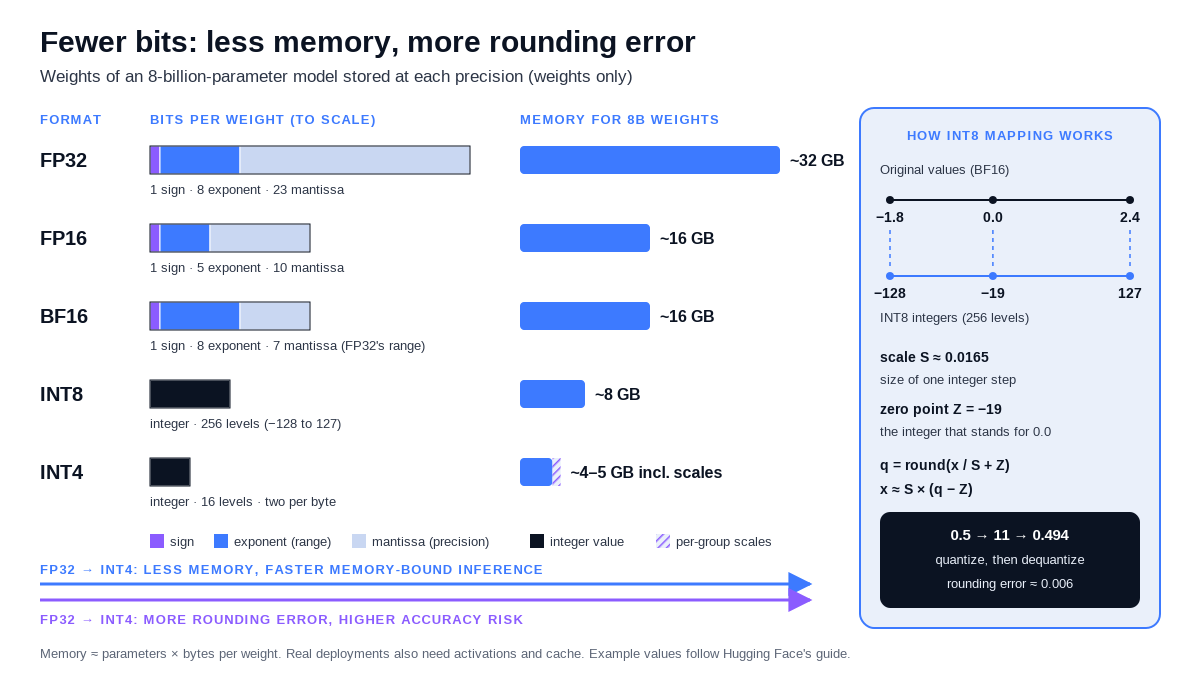
Quantization is the technique of storing an AI model's numbers, mainly its weights and sometimes its activations, in fewer bits so it needs less memory and can run on smaller or cheaper hardware. Hugging Face's documentation gives a concrete example: an 8-billion-parameter model needs about 16 GB for its weights in 16-bit format, about 8 GB at 8 bits, and about 4–5 GB at 4 bits [1]. The price is rounding error. Fewer bits mean less precision, and each quantization method makes its own trade-off between memory, speed and accuracy [1].
Quantization is why large open-weight models can run on a single GPU, a laptop or a phone. It's also one of the main levers for cutting the cost of serving AI at scale.
Why models are so big in the first place
A neural network is mostly a huge collection of numbers. Each weight is typically stored as a floating-point value. The memory needed for the weights is roughly:
parameters × bytes per parameter
So an 8-billion-parameter model takes about 32 GB in 32-bit floating point (4 bytes each), 16 GB in 16-bit (2 bytes) and 8 GB in 8-bit (1 byte). That's before counting activations and the cache a language model builds during generation. For why memory, not just compute, limits AI hardware, see AI Chips vs CPUs vs GPUs vs TPUs.
The number formats
Format | Bits | Layout | Memory for 8B parameters (weights only) | Notes |
|---|---|---|---|---|
FP32 | 32 | 1 sign, 8 exponent, 23 mantissa bits (IEEE 754) [4][14] | ~32 GB | Full single precision; the baseline |
FP16 | 16 | 1 sign, 5 exponent, 10 mantissa bits [4] | ~16 GB | Half the memory of FP32; narrower range |
BF16 | 16 | 1 sign, 8 exponent, 7 mantissa bits [4] | ~16 GB [1] | Same dynamic range as FP32 at half the memory [5]; Hugging Face notes models usually load in BF16 [1] |
FP8 | 8 | E4M3 or E5M2 [2] | ~8 GB | Needs recent hardware support [2] |
INT8 | 8 | 256 evenly spaced integers, −128 to 127 [2] | ~8 GB [1] | Mature; widely supported |
INT4 | 4 | 16 integers; two packed per byte [2] | ~4–5 GB with scales [1] | Bigger accuracy risk; usually needs grouping or calibration [2] |
Floating-point formats spend bits on an exponent so they can represent both tiny and huge values. Integer formats spend every bit on evenly spaced steps over a fixed range, which is why they need a scale factor to map real values onto them.
How quantization works
Hugging Face's concept guide explains the most common method, affine quantization, with a worked example [2].
Take a tensor whose values run from −1.8 to 2.4 and map that range onto INT8's 256 integers:
- The scale (S) is the size of one integer step in the original units. Here it's about 0.0165.
- The zero point (Z) is the integer that represents 0.0. Here it's −19.
- To quantize a value x: q = round(x / S + Z). The value 0.5 becomes 11.
- To dequantize: x ≈ S × (q − Z). The integer 11 comes back as about 0.494.
That gap, about 0.006, is the rounding error [2]. Multiply it across billions of weights and the question becomes whether the errors cancel out or pile up into worse answers.
Three design choices shape the result:
- Symmetric or asymmetric. Symmetric quantization fixes the zero point at 0, which is cheaper to compute but can waste part of the integer range if values lean to one side [2].
- Granularity. One scale per whole tensor is cheap, but a single outlier stretches the range for everything. Per-channel or per-group scales (for example, one per 128 weights) keep error lower at the cost of storing more scales. Most low-bit methods quantize per group, and GPTQ defaults to groups of 128 [2].
- What gets quantized. Weight-only methods store weights in low precision and convert them back before each matrix multiply. Weight-and-activation methods, written as W8A8 for 8-bit weights and activations, run the math itself in low precision, which needs hardware support [2].
Does quantization make models faster?
Usually, but not always, and the reason is worth understanding. When a language model generates text one token at a time, the GPU spends most of each step reading weights from memory, not computing. Hugging Face notes that reading 4-bit weights moves a quarter of the data that 16-bit weights do, and that saving can outweigh the extra work of converting them back [2]. That's why weight-only quantization speeds up chat-style generation.
When the workload is compute-bound, such as processing a long prompt or large batches, speedups come from running the math in low precision, which requires weight-and-activation quantization and matching hardware [2]. Integer math has long been the target: a 2017 Google paper designed a scheme for "integer-arithmetic-only" inference, aimed at mobile devices, that runs more efficiently than floating point on commonly available integer-only hardware [6].
For how inference differs from training, see AI Model Training vs Inference.
When quantization happens
Post-training quantization (PTQ) converts an already trained model. Some PTQ methods need no data and are fast enough to run as the model loads. Others run a small calibration dataset through the model to decide how to quantize each layer, which usually improves accuracy at 4 bits and below but takes minutes to hours [2].
Quantization-aware training (QAT) simulates rounding during training, so the model learns to tolerate it. It usually gives the best accuracy at very low bit widths, but requires training [2].
Key methods for large language models
Method | Year | Bits | How it works | Reported result (from the paper) |
|---|---|---|---|---|
LLM.int8() | 2022 | 8 | Vector-wise INT8, with rare outlier features kept in 16-bit | Inference "without any performance degradation" up to 175B parameters; halves inference memory [8] |
GPTQ | 2022 | 3–4 (down to 2) | One-shot, layer-by-layer using approximate second-order information; adjusts remaining weights to compensate for each rounding error [9][2] | 175B model quantized in about four GPU hours "with negligible accuracy degradation" [9] |
AWQ | 2023 | 4 | Protects the ~1% most important weight channels, found from activation statistics, by scaling them before rounding [10] | No backpropagation needed; generalizes across domains and modalities [10] |
QLoRA (NF4) | 2023 | 4 | Fine-tunes adapters on top of a frozen 4-bit model using a 4-bit NormalFloat data type [11] | Fine-tuned a 65B model on a single 48 GB GPU while preserving 16-bit fine-tuning performance [11] |
A few details stand out:
- Outliers are the enemy. The LLM.int8() authors found that at around 6.7 billion parameters, transformer models develop large-magnitude "outlier features" that wreck naive 8-bit precision. Their fix isolates those dimensions in 16-bit while "more than 99.9% of values are multiplied in 8-bit" [8].
- Not all weights matter equally. AWQ's key observation is that protecting about 1% of salient weights "can greatly reduce quantization error," and that you find them by looking at activations, not the weights themselves [10].
- 8-bit is a well-trodden path. NVIDIA researchers reported an 8-bit workflow that kept accuracy within 1% of the floating-point baseline on every network they studied, including harder cases such as MobileNets and BERT-large [7].
QLoRA connects quantization to fine-tuning. See What Is LoRA and QLoRA?
Tools and formats (as of November 2026)
- Hugging Face Transformers integrates more than 20 quantization methods through a single loading call [1]. Its guide recommends bitsandbytes for the least setup, GPTQ for the best 4-bit accuracy, and torchao for speed with
torch.compile[3]. - Pre-quantized checkpoints. Some methods, including AWQ and GGUF, can only be loaded from checkpoints that were quantized ahead of time with their own tools [1]. Hugging Face notes that most GGUF models are dequantized to full precision when loaded in Transformers, so they use as much memory as an unquantized model there [1].
- PyTorch is moving its quantization work to the torchao library. Its older
torch.ao.quantizationdocumentation now tells users to migrate [12][13]. - Hardware-specific formats. FP8 needs NVIDIA GPUs with compute capability 8.9 or higher (Ada, Hopper, Blackwell), AMD Instinct MI300 or Intel XPU, according to Hugging Face [2]. Its comparison table lists NVIDIA's 4-bit NVFP4 format as running on Blackwell GPUs [3].
When you read about new open-weight models in our monthly release roundups, such as March 2026, April 2026 and July 2026, check which quantization method and bit width a downloadable version uses before comparing it with published scores.
Benefits
- Fit bigger models on smaller hardware. GPTQ's authors ran a 175-billion-parameter model on a single GPU for the first time [9].
- Faster generation when inference is memory-bound [2].
- Lower cost and energy per request, since less data moves through memory.
- On-device AI. AWQ's authors frame local deployment as a way to "reduce the cloud computing cost and protect users' privacy" [10]. See Small Language Models vs Large Language Models.
Limitations and risks
- Accuracy loss. Every method introduces rounding error [2]. Losses that look small on average can be larger on specific tasks, so test on your own workload.
- Not always faster. Weight-only methods add dequantization work and may not speed up compute-bound workloads [2].
- Hardware and software lock-in. Some formats need particular GPUs or kernels [2][3].
- Harder comparisons. A model's published benchmark scores usually refer to full precision. A 4-bit community version may behave differently.
- Fine-tuning limits. Not every quantization method supports further training or saving [3].
How to choose
- Start at 8-bit if accuracy is critical. INT8 is mature and well studied [7][8].
- Go to 4-bit when memory is the constraint. Prefer calibrated methods such as GPTQ or AWQ, which typically hold accuracy better at 4 bits [2][3].
- Use what your hardware accelerates. FP8 or FP4 formats only pay off on GPUs that support them [2].
- Use QAT for extreme compression when you can afford training [2].
- Evaluate before and after. Run your own task set on both the original and the quantized model.
Outlook
The trend is toward lower precision built into hardware and formats, such as block-scaled FP4 [2], and toward training models with quantization in mind from the start, as BitNet does with 1.58-bit weights [2]. Expect 4-bit to remain the practical default for running large models locally, with 8-bit and FP8 dominating production serving where accuracy margins are tight.
Frequently asked questions
What is quantization in AI, in simple terms?
It's like saving a high-resolution photo as a smaller file. The model's numbers are stored with fewer bits, so it takes less memory and often runs faster, at the cost of a small loss in precision [1].
Does quantization reduce accuracy?
Yes, some. Every method introduces rounding error [2]. With good methods the loss can be negligible: GPTQ's authors report "negligible accuracy degradation" at 3–4 bits on very large models [9]. Results vary by model and task, so test your own use case.
What is the difference between INT8 and INT4?
INT8 uses 8 bits per value and can represent 256 levels. INT4 uses 4 bits and only 16 levels [2]. INT4 halves memory again compared with INT8 but loses more precision, so it usually needs per-group scales or calibration [2].
What is the difference between FP16 and BF16?
Both use 16 bits. FP16 has 5 exponent and 10 mantissa bits; BF16 has 8 exponent and 7 mantissa bits [4]. BF16 has the same dynamic range as FP32 [5], which makes it less prone to overflow, while FP16 is more precise within its narrower range.
Can I fine-tune a quantized model?
Often, yes. QLoRA fine-tunes small adapters on top of a frozen 4-bit model [11]. Hugging Face's comparison table shows which quantization methods support fine-tuning [3].
Sources
- Hugging Face. "Quantization overview." Transformers documentation. https://huggingface.co/docs/transformers/main/en/quantization/overview
- Hugging Face. "Quantization concepts." Transformers documentation. https://huggingface.co/docs/transformers/main/en/quantization/concept_guide
- Hugging Face. "Choose a quantization method." Transformers documentation. https://huggingface.co/docs/transformers/main/en/quantization/selecting
- PyTorch. "Tensor Attributes: torch.dtype." PyTorch 2.15 documentation. https://docs.pytorch.org/docs/2.15/tensor_attributes.html
- Google Cloud. "Improve your model's performance with bfloat16." Cloud TPU documentation. https://docs.cloud.google.com/tpu/docs/bfloat16
- Jacob, B., et al. "Quantization and Training of Neural Networks for Efficient Integer-Arithmetic-Only Inference." arXiv 1712.05877. https://arxiv.org/abs/1712.05877
- Wu, H., et al. "Integer Quantization for Deep Learning Inference: Principles and Empirical Evaluation." arXiv 2004.09602. https://arxiv.org/abs/2004.09602
- Dettmers, T., et al. "LLM.int8(): 8-bit Matrix Multiplication for Transformers at Scale." arXiv 2208.07339. https://arxiv.org/abs/2208.07339
- Frantar, E., et al. "GPTQ: Accurate Post-Training Quantization for Generative Pre-trained Transformers." arXiv 2210.17323. https://arxiv.org/abs/2210.17323
- Lin, J., et al. "AWQ: Activation-aware Weight Quantization for LLM Compression and Acceleration." arXiv 2306.00978. https://arxiv.org/abs/2306.00978
- Dettmers, T., et al. "QLoRA: Efficient Finetuning of Quantized LLMs." arXiv 2305.14314. https://arxiv.org/abs/2305.14314
- PyTorch. "Quantization." PyTorch 2.15 documentation. https://docs.pytorch.org/docs/2.15/quantization.html
- PyTorch. "torchao documentation." https://docs.pytorch.org/ao/stable/index.html
- oneDNN. "Bfloat16 Training." oneDNN Developer Guide. https://uxlfoundation.github.io/oneDNN/dev_guide_training_bf16.html