

Graph RAG vs Traditional RAG
GraphRAG builds a knowledge graph and community summaries so an LLM can answer corpus-wide questions. How it works, what tests showed, when to use it.
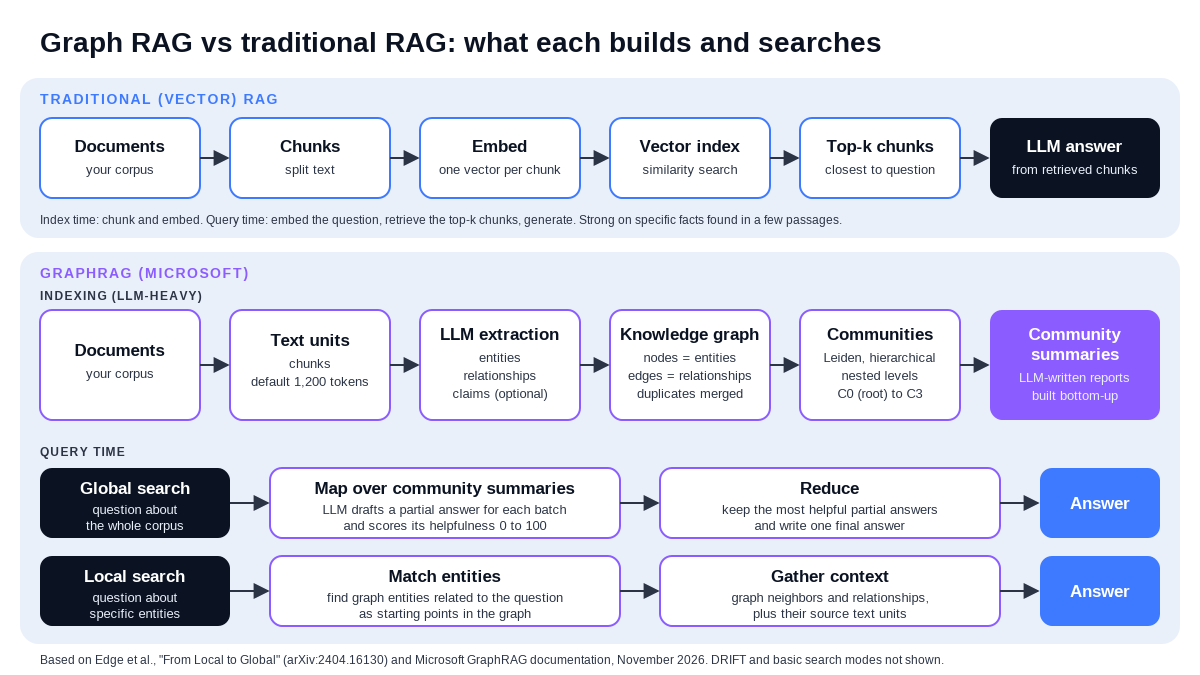
Traditional RAG embeds chunks of your documents and, for each question, retrieves the few chunks most similar to it. Graph RAG first uses a language model to turn the documents into a knowledge graph of entities and relationships, and, in Microsoft's GraphRAG, writes summaries of clusters ("communities") in that graph. That extra structure lets it answer questions about a whole corpus, such as "What are the main themes?", which similarity search handles poorly. The price is a much more expensive indexing step, and in Microsoft's tests vector RAG still gave the most direct answers to pointed questions.
The problem GraphRAG was built for
Retrieval-augmented generation, introduced in a 2020 paper from Facebook AI Research and collaborators, pairs a language model with a searchable index so it can draw on documents it wasn't trained on [9]. In the common form, which Microsoft's researchers call vector RAG, the system returns the records "closest to the query in vector space" [1]. Our RAG explainer covers that pipeline.
Vector RAG works when the answer lives in a handful of passages. It struggles when the answer is spread across the entire corpus. The GraphRAG paper puts it bluntly: RAG "fails on global questions directed at an entire text corpus, such as 'What are the main themes in the dataset?'," because that's a summarization task, not a retrieval task [1]. No single chunk is "most similar" to "main themes," so top-k retrieval returns a few arbitrary pieces.
Summarizing the whole corpus with the model doesn't scale either: the text doesn't fit in a context window, and doing it fresh for every question is slow and costly. GraphRAG's answer is to do much of the summarizing once, at indexing time, and organize it so it can be reused.
How traditional (vector) RAG works
- Split documents into chunks (see chunking strategies).
- Embed each chunk with an embedding model and store the vectors in a vector index.
- At query time, embed the question, retrieve the top-k most similar chunks, optionally merge with keyword results (hybrid search) and rerank.
- Put the chunks in the prompt and let the model answer.
Indexing costs one embedding call per chunk. Updates are simple: re-embed the changed chunks.
How GraphRAG works
Microsoft's paper and documentation describe the pipeline in stages [1][3].
Indexing
1. Text units. Documents are split into chunks, which GraphRAG calls TextUnits; the default size in the current docs is 1,200 tokens [3]. The paper notes the trade-off: longer chunks mean fewer LLM calls but worse recall of information early in each chunk [1].
2. Entity and relationship extraction. An LLM reads each chunk and extracts important entities (people, places, organizations, concepts) and the relationships between them, each with a short description [1]. It can optionally extract claims, factual statements about entities such as dates and events; the docs say claim extraction is "turned off by default" [3]. The paper's example: from a paragraph about a chip company's IPO, the model extracts the entities NeoChip and Quantum Systems and a relationship stating that Quantum Systems owned NeoChip from 2016 until it went public [1].
3. The knowledge graph. The same entity is usually extracted many times across chunks. Duplicates are merged into single nodes and edges, their descriptions summarized, and the number of duplicate relationships becomes the edge weight [1]. The paper used exact string matching to merge entity names, noting softer matching is possible [1].
4. Communities. The graph is partitioned with the Leiden community detection algorithm, applied hierarchically: communities are split into sub-communities until they can't be split further [1]. Each level covers every node exactly once, giving a set of nested "chapters" for the corpus.
5. Community summaries. An LLM writes a report-like summary of each community, bottom up: leaf communities from their entities, relationships and claims; higher levels from their sub-communities' summaries when the details won't fit in the context window [1]. These summaries are useful on their own as a browsable overview [1].
6. Embeddings. The current pipeline also embeds text units, entity descriptions and community reports into a vector store, so the graph can be entered by similarity search [3].
Querying
The paper's core query method is global search, a map-reduce over community summaries [1]:
- Map: shuffle the summaries at a chosen level of the hierarchy into context-sized batches; the LLM writes a partial answer for each batch and scores how helpful it is from 0 to 100. Zero-score answers are dropped.
- Reduce: sort partial answers by score, pack as many as fit into a context window, and generate the final answer.
The documentation adds other modes [2][5]:
Mode | How it works | Suited to |
|---|---|---|
Global search | Map-reduce over community reports [5] | Questions about the dataset as a whole [5] |
Local search | Starts from entities matching the question and combines graph data with source text chunks [5] | Questions about specific entities [5] |
DRIFT search | Local search widened with community information, generating follow-up questions [5] | Broader local questions |
Basic search | Standard top-k vector RAG over text units [5] | Baseline comparison; pointed lookups |
What Microsoft's experiments showed
The paper compared GraphRAG at four community levels (C0, the root, to C3, the most detailed) against vector RAG ("semantic search," SS) and against map-reduce summarization of the raw text without a graph (TS) [1]. Two corpora were used, each around 1 to 1.7 million tokens: transcripts of Microsoft's Behind the Tech podcast and a news-article benchmark [1]. An LLM generated 125 sensemaking questions per corpus, and an LLM judge compared pairs of answers head to head, with each comparison repeated five times [1].
Results, as reported by the authors [1]:
- Comprehensiveness: global approaches beat vector RAG with win rates of 72–83% on podcasts and 72–80% on news.
- Diversity: win rates of 75–82% on podcasts and 62–71% on news.
- Directness: vector RAG produced the most direct answers in every comparison. The authors included directness as a control, expecting it to trade off against the other two.
- Empowerment (helping the user reach an informed judgment): mixed. The authors suggest the graph index loses some specific examples, quotes and citations, and that tuning extraction prompts may help.
- Token efficiency: root-level summaries (C0) needed over 97% fewer context tokens per query than summarizing the source text, while still beating vector RAG on comprehensiveness (72% win rate) and diversity (62%).
A second experiment counted extracted factual claims instead of relying on the LLM judge. All global conditions produced significantly more claims per answer than vector RAG on both datasets; diversity results were significant across the board for podcasts but only partly for news [1].
Reading these results carefully:
- They cover "global sensemaking" questions, the class GraphRAG was designed for, not fact lookups.
- Most judgments came from an LLM comparing answers without a ground-truth answer.
- Only two corpora of about a million tokens were tested. The authors say more work is needed on other domains, and that comparing fabrication rates "would also strengthen the current analysis" [1].
Cost: the main trade-off
GraphRAG's indexing makes many LLM calls: extraction for every chunk, summarization for every entity and relationship, and a report for every community [3]. In the paper, indexing the podcast corpus took 281 minutes using GPT-4-Turbo [1]. Microsoft's docs estimate graph extraction at "roughly 75% of indexing cost" [4], and the project README warns that "GraphRAG indexing can be an expensive operation" and advises starting small [6].
Microsoft has published two cheaper variants:
- FastGraphRAG, an indexing option in the library, replaces LLM entity extraction with noun-phrase extraction using NLP libraries such as NLTK or spaCy, and derives relationships from co-occurrence. The LLM still writes community reports. The docs call it much cheaper but noisier, and best suited to summary questions via global search [4].
- LazyGraphRAG, announced by Microsoft Research in November 2024, skips upfront LLM summarization entirely, building a concept graph with noun-phrase extraction and deferring LLM work to query time. Microsoft claimed its indexing cost is "identical to vector RAG and 0.1% of the costs of full GraphRAG" [8]. Those figures are Microsoft's own. A June 2025 editor's note says the technology was added to Microsoft Discovery, an agentic research platform on Azure, and to a public preview of Azure Local services [8].
Graph RAG vs traditional RAG at a glance
Traditional (vector) RAG | GraphRAG | |
|---|---|---|
Index | Chunk embeddings | Entities, relationships, optional claims, hierarchical communities, community reports, plus embeddings [3] |
Indexing cost | One embedding call per chunk | Many LLM calls per chunk and per community [3][4] |
Best question type | Specific facts in a few passages | Corpus-wide themes, trends, "what's going on across all of this" [1] |
Answer style | Most direct [1] | More comprehensive and diverse on global questions, in Microsoft's tests [1] |
Updates | Re-embed changed chunks | Extraction and summaries must be refreshed as content changes |
Explainability | Cites retrieved chunks | Can trace answers to communities, entities and source text units [2] |
Failure modes | Misses spread-out answers; arbitrary top-k for broad questions | Extraction errors, merged or split entities, lost detail in summaries |
Real-world uses
The paper's evaluation corpora give a sense of the target: podcast transcripts and a decade of news articles, analyzed with questions a journalist or educator might ask [1]. The authors list other versions of the approach in LangChain, LlamaIndex, NebulaGraph and Neo4j [1]. We haven't found independently documented production results to report, so we don't cite any.
Limitations and risks
- Extraction quality drives everything. Entities the LLM misses or mislabels are missing from the graph. The paper recommends domain-specific few-shot examples for fields like science, medicine and law [1]; the docs strongly recommend prompt tuning before relying on results [2].
- Summaries are model-written. Errors or omissions in community reports flow into every global answer. Treat them as a derived artifact, not a source of truth.
- Freshness. A changing corpus means re-running extraction and summarization.
- Project status. As of November 2026, the GitHub README says the project "is largely in maintenance mode" and won't accept new features, and that it "is not an officially supported Microsoft offering" [6]. The PyPI package was still receiving releases, with version 3.3.0 published in October 2026 [7]. Factor that into build-versus-buy decisions.
How to choose
- Look at your questions. If most are "What does policy X say about Y?" or "What's the error code for Z?", vector RAG with hybrid search and reranking is the right baseline. If many are "What are the recurring complaints across these 5,000 tickets?" or "Summarize the main risks in this year of filings," consider GraphRAG.
- Start with basic search as a control. GraphRAG's own basic search mode is vector RAG [5]; compare against it on the same questions.
- Pilot on a slice. Index a small, representative subset first, as the README advises [6], and estimate the full cost from it.
- Consider the cheaper variants (FastGraphRAG, or deferred-summarization approaches like LazyGraphRAG) if most of your graph questions are summaries [4][8].
- Route by question type. Many systems do well with a router that sends lookups to vector RAG and corpus-wide questions to global search; see agentic RAG for routing patterns.
- Evaluate both. Use retrieval metrics such as Recall@K for lookups, and answer-level evaluation such as RAGAS or head-to-head judging for global questions. The GraphRAG authors note that RAG metrics like faithfulness and context relevance don't fit global sensemaking well [1].
For other ways to give retrieval more structure, such as RAPTOR summary trees, see advanced document retrieval techniques.
Outlook
GraphRAG's authors point to hybrid schemes as future work: embedding-based matching combined with on-the-fly community reports, and "drill down" exploration through the summary hierarchy [1]. Microsoft's own LazyGraphRAG moves in that direction by shifting cost from indexing to query time [8]. Expect graph-based retrieval to become an option within RAG systems, used for specific question types, rather than a replacement for vector search.
Frequently asked questions
Is GraphRAG better than normal RAG?
For corpus-wide, big-picture questions, Microsoft's tests found GraphRAG's answers more comprehensive and diverse [1]. For specific factual questions, vector RAG gave more direct answers [1] and is far cheaper to index. "Better" depends on your questions.
Do I need a graph database for GraphRAG?
Not with Microsoft's library, which writes its outputs (entities, relationships, communities, reports) as tables and embeddings to a vector store [3]. Graph databases such as Neo4j offer their own versions of the approach [1].
What is a community in GraphRAG?
A group of entities more densely connected to each other than to the rest of the graph, found with the Leiden algorithm. GraphRAG builds a hierarchy of them and writes a summary for each [1].
Why is GraphRAG indexing so expensive?
Because an LLM reads every chunk to extract entities and relationships, summarizes every entity and relationship, and writes a report for every community [3]. Microsoft estimates extraction alone is about 75% of indexing cost [4].
Is GraphRAG the same as a knowledge graph?
No. A knowledge graph is the data structure. GraphRAG is a full pipeline that builds a graph with an LLM, summarizes its communities and uses those summaries to answer questions [1].
Sources
- Edge, D. et al. "From Local to Global: A GraphRAG Approach to Query-Focused Summarization." arXiv:2404.16130, v2, February 2025. https://arxiv.org/abs/2404.16130
- Microsoft. "Welcome to GraphRAG." Accessed November 2026. https://microsoft.github.io/graphrag/
- Microsoft. "Indexing Dataflow." GraphRAG documentation. Accessed November 2026. https://microsoft.github.io/graphrag/index/default_dataflow/
- Microsoft. "Indexing Methods." GraphRAG documentation. Accessed November 2026. https://microsoft.github.io/graphrag/index/methods/
- Microsoft. "Query Engine overview." GraphRAG documentation. Accessed November 2026. https://microsoft.github.io/graphrag/query/overview/
- Microsoft. "microsoft/graphrag" (README). GitHub. Accessed November 2026. https://github.com/microsoft/graphrag
- Python Package Index. "graphrag." Accessed November 2026. https://pypi.org/project/graphrag/
- Edge, D., Trinh, H. and Larson, J. "LazyGraphRAG: Setting a new standard for quality and cost." Microsoft Research Blog, November 25, 2024. https://www.microsoft.com/en-us/research/blog/lazygraphrag-setting-a-new-standard-for-quality-and-cost/
- Lewis, P. et al. "Retrieval-Augmented Generation for Knowledge-Intensive NLP Tasks." arXiv:2005.11401. https://arxiv.org/abs/2005.11401