AI Agent Tools and Function Calling Explained
How LLM function calling works: tool schemas, the call-execute-return loop, OpenAI, Anthropic and Gemini differences, MCP, and how to keep tool use safe.
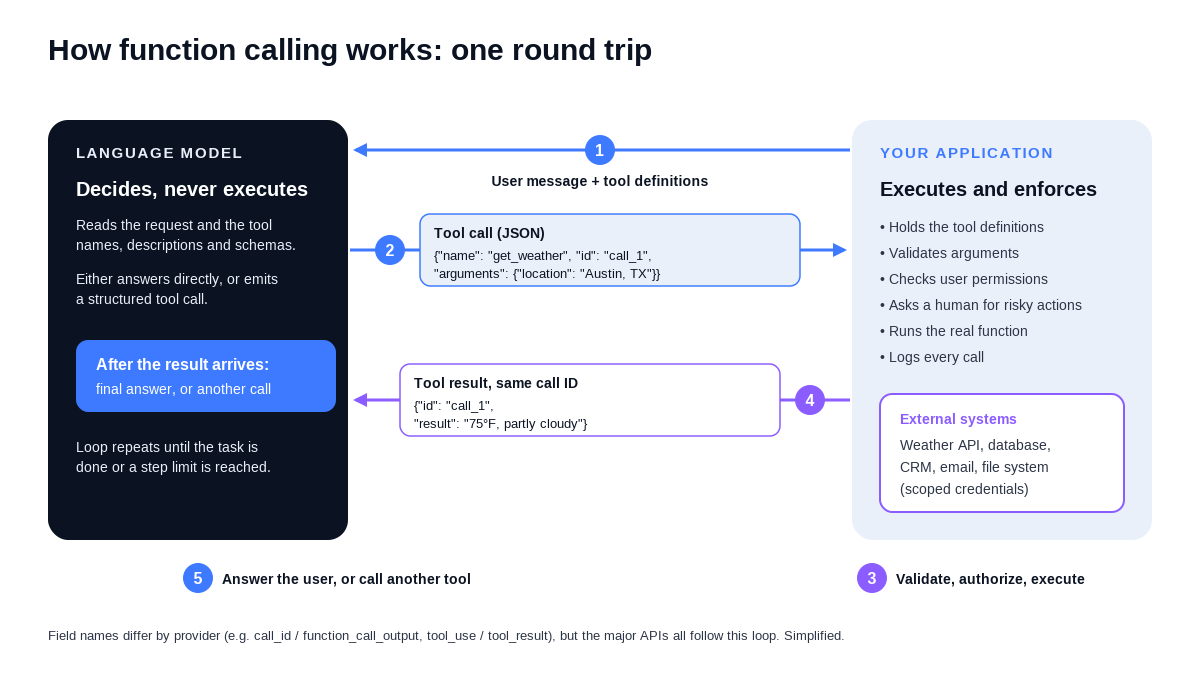
Function calling (also called tool calling or tool use) is how a language model gets things done outside its own text output. You describe a set of functions to the model, each with a name, a plain-language description and a JSON Schema for its arguments. When a request needs one, the model returns a structured "call this function with these arguments" message instead of a normal reply. Your application, not the model, runs the function, then sends the result back so the model can finish its answer or call another tool.
That loop is the engine inside every AI agent. Once you understand it, agents stop looking like magic and start looking like software you can design, test and secure.
Why models need tools
A large language model predicts text. On its own it can't check today's weather, look up an order, run a calculation exactly or change anything in the world. Its knowledge also stops at its training cutoff.
Researchers worked on this well before the major APIs shipped the feature. The 2023 Toolformer paper showed that a model could teach itself, from only a handful of demonstrations per API, when to call tools such as a calculator, search engines and a calendar, improving zero-shot results on many tasks [5]. The ReAct paper (first posted October 2022) showed that interleaving reasoning steps with actions, such as querying a Wikipedia API, reduced hallucination compared with reasoning alone on question-answering and fact-checking benchmarks [6].
Today OpenAI, Anthropic and Google all build tool calling directly into their APIs [1][2][3].
How the tool-calling round trip works
All three major providers describe the same basic loop [1][2][3]:
- Define tools and send the request. Your app sends the user's message plus a list of tool definitions.
- The model decides. If a tool would help, the model replies with a tool call: the tool's name, arguments as JSON, and an ID for that call.
- Your app executes. Your code validates the arguments, runs the real function (an API request, a database query, a calculation) and captures the output.
- Return the result. You send the output back to the model, tagged with the same call ID.
- The model continues. It either answers the user or asks for another tool call. OpenAI's documentation notes that this loop can repeat as many times as a task needs [1].
Google's documentation puts the key point plainly: "The model doesn't execute the function itself" [3].
What a tool definition looks like
A tool definition is a contract. Here is a simplified, provider-neutral example:
{
"name": "get_weather",
"description": "Get the current weather for a city. Use when the user asks about current conditions, not forecasts.",
"parameters": {
"type": "object",
"properties": {
"location": { "type": "string", "description": "City and state, e.g. Austin, TX" },
"unit": { "type": "string", "enum": ["celsius", "fahrenheit"] }
},
"required": ["location", "unit"],
"additionalProperties": false
}
}
The model never sees your function's code. It decides whether and how to call it based only on the name, description and schema. That makes the description the most important line you write. Anthropic's documentation says Claude chooses tools "based on the user's request and the tool's description" [2].
What the model sends back
When the model wants the tool, it returns something like a request for get_weather with {"location": "Austin, TX", "unit": "fahrenheit"} and a call ID. In Anthropic's API, for example, the response carries stop_reason: "tool_use" and a tool_use block with an id; you reply with a tool_result block that references it through tool_use_id [2]. OpenAI's Responses API uses a call_id, and you return a function_call_output item with the matching ID; the result is typically a string, and the format (JSON or plain text) is up to you [1].
How the major APIs compare
The concepts match; the field names and controls differ. As of November 2026 (OpenAI's Responses API, Anthropic's Messages API and Google's Gemini Interactions API):
Feature | OpenAI | Anthropic (Claude) | Google (Gemini API) |
|---|---|---|---|
Schema field |
|
|
|
Call identifier |
|
|
|
Result format |
|
|
|
Let model decide |
|
|
|
Force a tool call |
|
|
|
Disable tools |
|
|
|
Restrict to a subset |
| Pass fewer tools |
|
Schema enforcement |
|
|
|
Parallel calls | Allowed by default; | Supported; | Parallel and compositional calls supported [3] |
Anthropic also distinguishes client tools, which run in your application, from server tools such as web search and code execution, which run on Anthropic's infrastructure and return results without your code handling execution [2].
Strict mode and schema validation
By default, models follow your schema on a best-effort basis. Strict modes tighten that. OpenAI's strict mode requires additionalProperties: false on every object and every field listed as required, with optional fields modelled by allowing null [1]. Anthropic says strict: true ensures Claude's tool calls "always match your schema exactly" [2]. Gemini's validated mode has the model ensure schema adherence [3].
Schema conformance is not the same as correctness. A call can be perfectly formatted and still target the wrong customer ID. Your code still has to check.
Where MCP fits
Function calling defines how a model asks for a tool. The Model Context Protocol (MCP) standardizes how applications discover and connect to tools that live in separate servers.
In MCP (current specification revision: 2026-07-28), a client lists available tools with tools/list and invokes one with tools/call [4]. Each tool has a name, an inputSchema in JSON Schema, and optional fields such as title, description, outputSchema and annotations [4]. A typical host takes the MCP tool list, hands it to the model as ordinary tool definitions, and translates the model's tool calls into tools/call requests.
MCP also separates two kinds of failure [4]:
- Protocol errors (unknown tool, malformed request) come back as JSON-RPC errors.
- Tool execution errors (an API failure, a date in the wrong format) come back as a normal result with
isError: true, so the model can read the message and retry with corrected arguments.
That second pattern is worth copying even if you don't use MCP: return errors the model can act on, not stack traces.
Designing tools agents can use well
Tool design is interface design for a non-human user. Anthropic calls this the agent-computer interface and recommends giving it as much care as a human interface, treating tool documentation like a docstring for a junior developer [7]. Practical rules from the provider docs:
- Write descriptions that say when to use the tool, not only what it does [1].
- Use enums and structured objects so invalid inputs are hard to express [1]. Anthropic calls this "poka-yoke": change the arguments so mistakes are harder to make [7].
- Don't ask the model for values your code already knows, such as the logged-in user's ID [1].
- Keep the toolset small. OpenAI suggests aiming for fewer than 20 functions at the start of a turn [1]; Google suggests considering tool retrieval past roughly 20 to 30 tools [3]. Every definition also costs input tokens on every request [1][3].
- Prefer specific tools over general ones. A
refund_order(order_id, amount)tool is easier to secure than arun_sql(query)tool. - Set stopping conditions. Anthropic notes it's common to cap the number of loop iterations to keep control [7].
Security: the model proposes, your code decides
Every tool call is untrusted input generated by a probabilistic system. Treat it that way.
The OWASP Top 10 for LLM Applications names this risk Excessive Agency, and the 2026 edition moved it up to third place, from sixth in 2025 [8][9]. The 2025 guidance traces it to three root causes: tools with more functionality than needed, tools with more permissions than needed, and too much autonomy for high-impact actions [8]. Its recommended mitigations map directly onto tool design [8]:
- Offer only the tools the task needs, and avoid open-ended ones like arbitrary shell commands.
- Give each tool least-privilege credentials, such as a read-only database identity.
- Run tools in the context of the specific user, with minimal scopes.
- Require human approval for high-impact actions; see our guide to human-in-the-loop AI.
- Enforce authorization in the downstream system, not by trusting the model's judgment.
The MCP specification adds that clients should show tool inputs to the user before calling a server, validate results before passing them to the model, set timeouts and log tool use for audit [4]. It also says there "SHOULD always be a human in the loop with the ability to deny tool invocations" [4].
Tool outputs are a second risk. A web page, email or document returned by a tool can contain text that tries to steer the model. That's indirect prompt injection, covered in our guide to RAG security and guardrails and the broader AI agent security and governance explainer.
Real-world uses
Tool calling now sits underneath most assistant features that touch live data or take actions: web search with citations, code execution, file editing, calendar and email actions, and database lookups. Anthropic, for instance, documents server tools for web search, web fetch and code execution, and client tools for bash, text editing and computer use [2]. Consumer assistants are moving the same way, as our coverage of Apple and Google's Gemini-powered Siri agent tools shows.
Benefits and limitations
Benefits:
- Fresh, exact data instead of guesses from training memory.
- Real actions in real systems, the basis of agents versus assistants.
- Structured outputs your code can parse reliably.
- A clear security boundary: nothing happens unless your code runs it.
Limitations:
- Models can pick the wrong tool, skip a needed call or invent argument values. Anthropic's documentation notes that some models may guess a missing required parameter instead of asking [2].
- Each round trip adds latency and tokens.
- Large toolsets degrade selection accuracy and raise cost [1][3].
- Tool outputs widen the attack surface for prompt injection.
How to get started
- Start with one or two read-only tools and a narrow task.
- Write the descriptions first, then the schemas; turn on strict mode.
- Validate every argument server-side and return actionable error messages.
- Log every call, argument and result.
- Add write actions only with scoped credentials and an approval step.
- Build an evaluation set of real requests and check tool selection, not just final answers.
- When you outgrow a handful of tools, consider MCP servers and tool retrieval, or split work across multiple agents.
Frequently asked questions
Does the AI model run the function itself?
No. The model only produces a structured request naming the function and its arguments. Your application decides whether to run it, executes it and returns the result [1][3]. Hosted "server tools" are the exception: the provider runs those on its own infrastructure [2].
What's the difference between function calling and tool calling?
They describe the same mechanism. OpenAI's documentation uses "function calling," while Anthropic uses "tool use" and notes it is also called function calling [1][2]. "Tools" is the broader term because it also covers provider-hosted tools like web search.
Is function calling the same as MCP?
No. Function calling is the model-level mechanism for requesting a tool. MCP is an open protocol that standardizes how applications discover and invoke tools hosted in separate servers, using tools/list and tools/call [4]. Many apps use both: MCP to connect tools, function calling to let the model choose them.
Can a model call several tools at once?
Yes. OpenAI, Anthropic and Google all support multiple tool calls in a single turn [1][2][3]. OpenAI and Anthropic each document a setting that limits a turn to a single call [1][2]. Parallel calls cut latency when the calls are independent.
How many tools should I give an agent?
As few as the task needs. OpenAI recommends fewer than 20 functions at the start of a turn, and Google suggests tool retrieval beyond roughly 20 to 30 [1][3]. Fewer tools improve selection accuracy, lower token costs and shrink the attack surface.
Sources
- OpenAI. "Function calling." OpenAI API documentation. https://developers.openai.com/api/docs/guides/function-calling
- Anthropic. "Tool use with Claude." Claude Developer Platform documentation. https://platform.claude.com/docs/en/agents-and-tools/tool-use/overview
- Google. "Function calling with the Gemini API." https://aistudio.google.com/docs/function-calling
- Model Context Protocol. "Tools." Specification revision 2026-07-28. https://modelcontextprotocol.io/specification/2026-07-28/server/tools
- Schick, T. et al. "Toolformer: Language Models Can Teach Themselves to Use Tools." arXiv:2302.04761, February 2023. https://arxiv.org/abs/2302.04761
- Yao, S. et al. "ReAct: Synergizing Reasoning and Acting in Language Models." arXiv:2210.03629, October 2022. https://arxiv.org/abs/2210.03629
- Anthropic. "Building effective agents." December 19, 2024. https://www.anthropic.com/engineering/building-effective-agents
- OWASP GenAI Security Project. "LLM06:2025 Excessive Agency." https://genai.owasp.org/llmrisk/llm062025-excessive-agency/
- OWASP GenAI Security Project. "OWASP Top 10 for LLM Applications 2026." Published August 4, 2026. https://raw.githubusercontent.com/GenAI-Security-Project/GenAI-LLM-Top10/main/README.md