Cloud Disaster Recovery Strategies: From Backups to Active/Active
The four cloud disaster recovery strategies (backup and restore, pilot light, warm standby, active/active), how RTO and RPO drive the choice, and how to test.
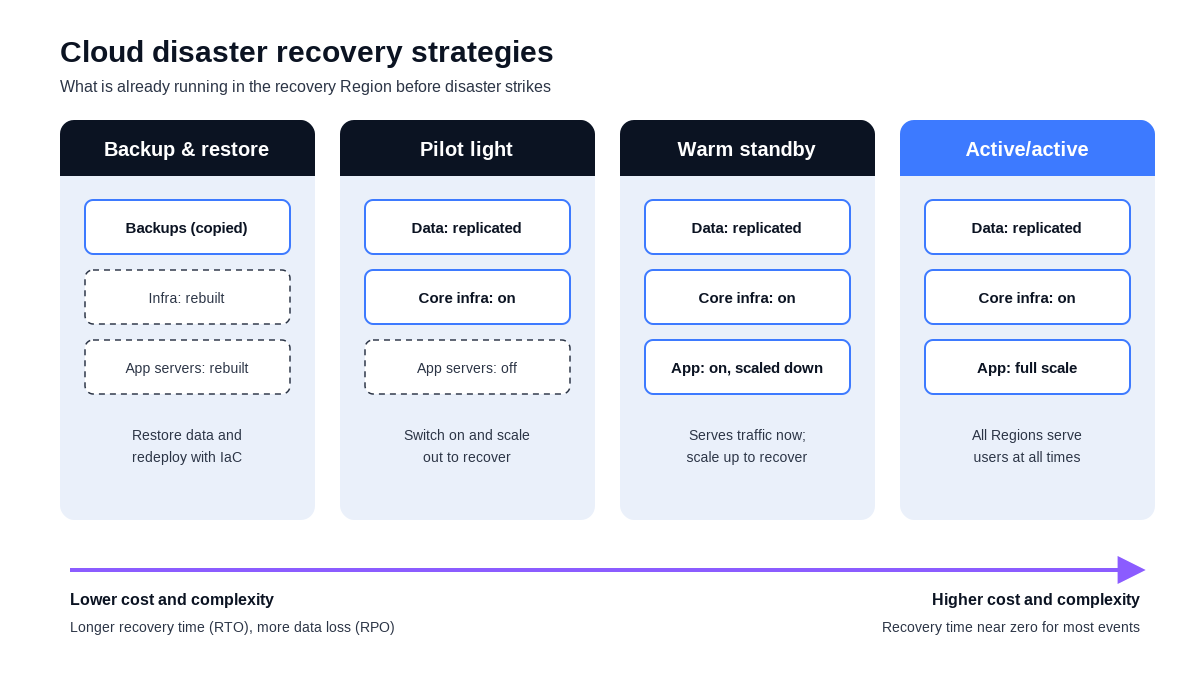
Cloud disaster recovery (DR) is how you get a workload running again after something big goes wrong: a Region outage, a bad deployment, deleted data or a ransomware attack. There are four standard strategies: backup and restore, pilot light, warm standby, and multi-site active/active. They trade cost and complexity against how quickly you recover and how much data you can lose, and your recovery targets, RTO and RPO, decide which one each workload needs.
This guide covers the recovery strategies themselves. For protecting the data underneath, including backup rules and ransomware-resistant copies, see our companion guide to cloud backup and business continuity.
Start with RTO and RPO
Every DR decision flows from two numbers, set per workload by the business, not by the IT team alone.
- Recovery time objective (RTO): the maximum acceptable delay between the interruption of service and its restoration [2]. How long can this be down?
- Recovery point objective (RPO): the maximum acceptable amount of time since the last data recovery point, which sets how much data loss is acceptable [2]. How many minutes or hours of changes can you afford to lose?
Google's DR planning guide places both inside a broader business impact analysis and makes the cost link explicit: the smaller your RTO and RPO, the more the application costs to run [3]. Its example contrasts frequently modified user data, which might need an RPO of a few minutes, with infrequently changed, less critical data that could tolerate several hours [3].
A useful habit is to tier workloads. Your checkout service, your internal wiki and your analytics warehouse rarely need the same targets, and paying active/active prices for all three is waste.
The four strategies
AWS's disaster recovery whitepaper groups cloud DR into four approaches, ranging "from the low cost and low complexity of making backups to more complex strategies using multiple active Regions" [1]. The same patterns apply on Azure and Google Cloud under different product names.
1. Backup and restore
You take regular backups and, after a disaster, rebuild the environment and restore data into it. AWS calls this suitable for mitigating data loss or corruption, and it can cover a regional disaster if backups are copied to another Region [1].
The catch is that data alone isn't enough. You must also redeploy infrastructure, configuration and application code in the recovery Region. AWS recommends always deploying through infrastructure as code for exactly this reason: without it, restoring a workload in another Region "may be complex" and recovery could exceed your RTO [1]. Your RPO is set by how often backups run [1].
Best for: workloads that can tolerate hours of downtime, and as the baseline under every other strategy.
2. Pilot light
Your data is continuously replicated to the recovery Region, and the core infrastructure is in place, but application servers are "switched off" until needed [1]. AWS's recommended best practice for "switched off" is not to deploy those resources at all, but to keep the configuration ready to deploy them when you invoke recovery [1].
Recovery means switching on and scaling out the application tier. You pay for always-on data replication and storage, but little compute.
Best for: important systems where some recovery time is acceptable but rebuilding everything from backups would be too slow.
3. Warm standby
A scaled-down but fully functional copy of production runs in another Region all the time [1]. The difference from pilot light is subtle but important. Pilot light can't serve requests until you take action first, while warm standby can handle traffic immediately at reduced capacity; you only need to scale it up [1]. Because it's always running, warm standby also makes continuous testing easier [1].
Best for: business-critical services where recovery needs to be fast and you want confidence the second Region actually works.
4. Multi-site active/active (and hot standby)
The workload runs fully in two or more Regions. In active/active, every Region serves users; in hot standby, a full second environment exists but takes no traffic until failover [1]. AWS calls active/active "the most complex and costly approach" but notes it can bring recovery time to near zero for most disasters, with the right design [1]. AWS also observes that most customers who stand up a full second environment decide to use it active/active [1].
Even here, one caveat stands out: data corruption replicates as fast as good data, so recovering from it may still depend on backups, which means a recovery point greater than zero [1].
Best for: systems where any outage is unacceptable and the organization can fund and operate multi-Region data consistency.
Comparing the strategies
Strategy | What runs in the recovery Region | Relative recovery speed | Relative cost and complexity |
|---|---|---|---|
Backup and restore | Backups only; rebuild everything on demand [1] | Slowest | Lowest |
Pilot light | Replicated data and core infrastructure; app tier off [1] | Faster | Low to moderate |
Warm standby | Scaled-down full copy, serving-capable [1] | Fast | Moderate to high |
Active/active | Full production, serving traffic [1] | Near zero for most events [1] | Highest |
AWS's guidance on scope is worth repeating: if your definition of a disaster is losing one physical data center, a well-architected, highly available workload may only need backup and restore. If you must survive the loss of a whole Region, or regulations require it, look at pilot light, warm standby or active/active [1].
Replication is not backup
Continuous replication gives the shortest possible backup window, close to zero, but AWS warns it may not protect against data corruption or malicious deletion as well as point-in-time backups do [1]. If an attacker or a buggy job deletes records, replication faithfully deletes them in the DR Region too.
Two AWS details illustrate the defenses:
- Versioning. S3 object versioning keeps the original version of an object before it is deleted or overwritten, which helps with human error [1].
- Delete markers stay local. With S3 replication, by default a deletion in the source bucket adds a delete marker only in the source, protecting the DR copy from malicious deletions in the primary Region [1].
The general lesson applies on every cloud: keep point-in-time backups alongside replication, and protect them from the same credentials that run production. Ransomware is the usual reason; see how ransomware attacks work.
Managed DR services on each cloud
You don't have to build replication yourself. Major providers offer managed options (as of November 2026):
- AWS Elastic Disaster Recovery replicates on-premises or cloud servers into a low-cost staging area in an AWS Region using "affordable storage and minimal compute," and supports non-disruptive drills and point-in-time recovery [5]. AWS Backup centralizes backup policies across many AWS services and can copy backups to a DR Region [1].
- Azure Site Recovery provides continuous replication, failover and recovery for virtual machines, protecting against disruptions "ranging from zonal failures to regional outages" while meeting RPO and RTO targets [4].
- Google Cloud publishes a DR planning guide and pattern library that maps its products to these scenarios [3].
Managed tools handle replication mechanics. They don't decide your RTO and RPO, write your runbook or test it for you.
Failover decisions
Two practical choices determine whether a DR plan works on a bad day.
- Automatic or manual failover. AWS says automatic failover based on health checks or alarms "should be used with caution," because a false alarm costs availability and data for no reason [1]. Many teams automate the mechanics but keep a human decision to declare a disaster.
- Use the data plane, not the control plane. AWS advises using only data plane operations during failover, because data planes typically have higher availability design goals than the control planes used to configure services [1]. In practice, pre-provision what you can instead of relying on creating resources mid-incident.
DNS and traffic routing are usually how failover happens. Our upcoming cloud networking guide explains the pieces involved.
Test, or it doesn't exist
AWS's Well-Architected guidance is blunt: regularly test failover to the recovery site to verify it works and that RTO and RPO are met. It lists never exercising failovers in production as a common anti-pattern and rates the risk of skipping this practice as high [6]. The trap is a recovery path that is rarely exercised; when you finally need it, your assumptions about it turn out to be wrong [6].
A realistic testing ladder:
- Restore tests. Regularly restore backups into an isolated account and check the data.
- Tabletop exercises. Walk through the runbook with the people who'd be paged.
- Partial failovers. Fail one service over and back.
- Full Region drills. Planned, announced, and measured against your RTO and RPO.
Record how long each step took. The measured recovery time, not the designed one, is your real RTO.
How to choose your strategy
- List workloads and assign tiers with business owners, each with an RTO and RPO [2][3].
- Match each tier to a strategy. As a rough guide, the more downtime a tier can tolerate, the further left on the spectrum it can sit: generous targets suit backup and restore, tighter ones pilot light or warm standby, and near-zero targets active/active [1].
- Check dependencies. A warm-standby app is only as fast as its slowest dependency, whether that's an identity provider, a payment gateway or a shared database.
- Codify the environment so rebuilding is a pipeline run, not a scramble [1].
- Keep backups under every strategy, isolated from production credentials [1].
- Test on a schedule and update the plan after every test and every real incident [6].
Frequently asked questions
What is the difference between pilot light and warm standby?
Both keep copies of your data and core infrastructure in a recovery Region. Pilot light can't process requests until you switch on and scale out servers, while warm standby is already running at reduced capacity and can take traffic immediately, then scale up [1].
What are RTO and RPO?
RTO is the maximum acceptable delay between a service interruption and its restoration. RPO is the maximum acceptable time since the last recovery point, which defines how much data loss you can tolerate [2]. Smaller values cost more to achieve [3].
Is multi-AZ deployment enough for disaster recovery?
It protects against the loss of a data center or Availability Zone, and AWS says that for such events a well-architected, highly available workload may only need backup and restore as its DR strategy. To survive a Region-wide disaster, you need a multi-Region strategy such as pilot light, warm standby or active/active [1].
Is replication the same as backup?
No. Replication copies changes almost instantly, including deletions and corruption. Point-in-time backups let you go back to before the damage, which is why AWS recommends them alongside replication [1].
How often should we test disaster recovery?
Regularly enough that the team knows the procedure and the results reflect your current architecture. AWS treats untested failover as a high-risk gap [6]. Many organizations test restores frequently and run larger failover drills on a fixed schedule and after major architecture changes.
Sources
- Amazon Web Services, "Disaster recovery options in the cloud" (Disaster Recovery of Workloads on AWS whitepaper)
- Amazon Web Services, "Business continuity plan (BCP)" (Disaster Recovery of Workloads on AWS whitepaper)
- Google Cloud, "Disaster recovery planning guide"
- Microsoft Learn, "About Site Recovery"
- Amazon Web Services, "What is Elastic Disaster Recovery?"
- Amazon Web Services, "REL13-BP03 Test disaster recovery implementation to validate the implementation"