Cloud Computing Architecture Explained: Layers, Styles and Pillars
How cloud computing architecture works: regions and zones, the layers of a cloud application, common styles like n-tier and microservices, and design pillars.
Cloud computing architecture is the way an application's components (compute, storage, networking, databases and managed services) are arranged on a cloud platform, and how they interact. A typical cloud architecture spreads an application across isolated zones within a region. It separates presentation, logic and data into layers, and puts cross-cutting services such as identity, monitoring and automation around everything. Architects then choose an architecture style, such as n-tier, microservices or event-driven, and check the design against a framework of pillars: reliability, security, cost, performance and operations.
This guide is about how cloud applications are built. For what the cloud is, including service and deployment models, see our complete guide to cloud computing.
The physical foundation: regions and zones
Everything starts with where resources run. AWS describes its locations this way: Regions are separate geographic areas, and Availability Zones are "multiple, isolated locations within each Region" [1]. AWS also offers Local Zones closer to end users, Wavelength Zones for ultra-low-latency 5G applications, and Outposts on customer premises [1]. Azure and Google Cloud use similar region-and-zone models.
Two design rules follow:
- Spread across zones for high availability. If one zone fails, instances in another keep serving.
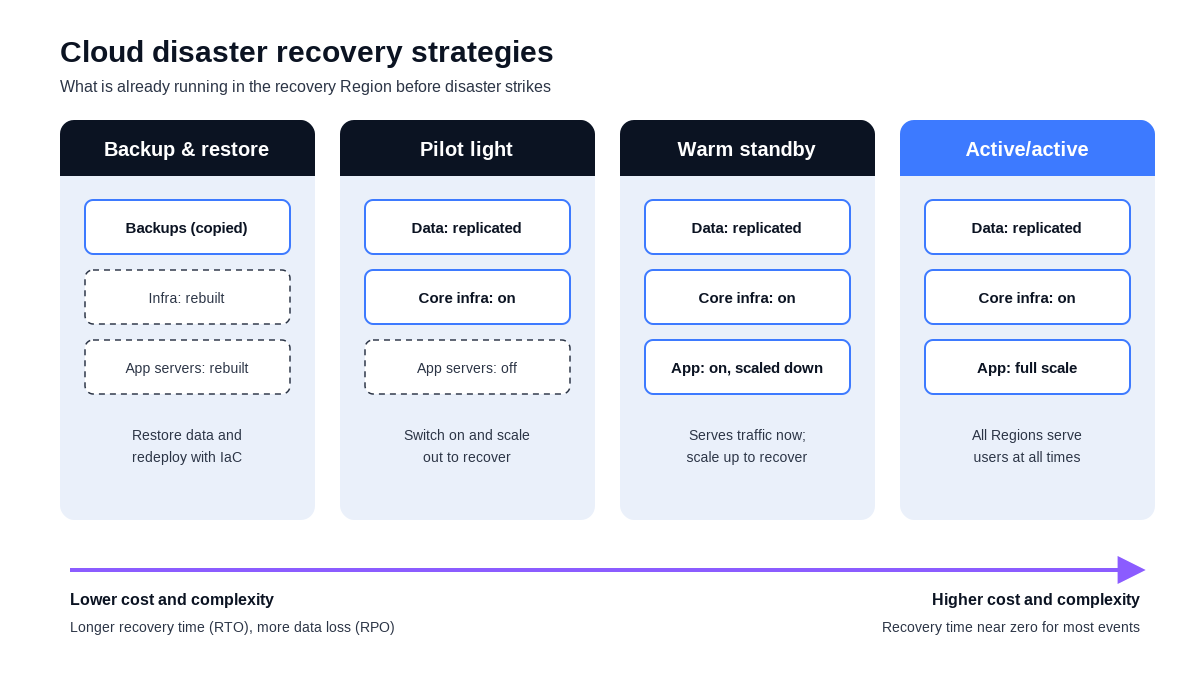
- Use multiple regions only when you need to. Multi-region designs protect against regional outages and serve distant users faster, but they add data consistency challenges and cost. Our guide to cloud disaster recovery strategies explains when that's worth it.
The layers of a cloud application
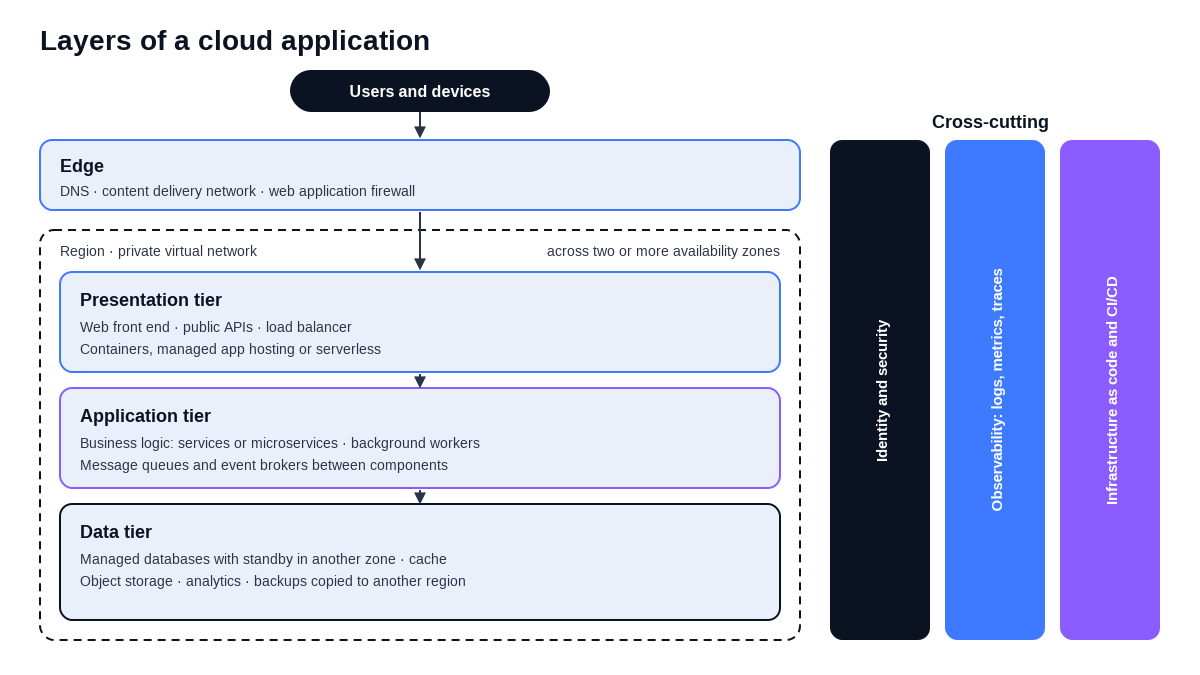
Most cloud applications, from a startup's web app to a bank's customer portal, can be read as a stack of layers.
Edge layer
DNS, a content delivery network and a web application firewall sit closest to users. A CDN like Amazon CloudFront delivers content through a worldwide network of edge locations and routes each request to the lowest-latency location [7]. The edge absorbs traffic spikes and filters attacks before they reach your servers.
Presentation tier
The part users interact with: web front ends, mobile back ends and APIs. In the cloud this often runs behind a load balancer, on containers, serverless functions or static hosting.
Application tier
The business logic. This is where the architecture style matters most (see below). It might be one application on a group of virtual machines, dozens of microservices on Kubernetes, or serverless functions triggered by events.
Data tier
Databases, caches, object storage, queues and analytics. Cloud architecture leans heavily on managed data services, because running databases yourself is where much operational risk lives. Analytics platforms also separate storage from compute; Google's BigQuery, for example, runs its compute and storage layers independently, so each can allocate resources without affecting the other [8].
Network layer
A private virtual network ties the tiers together. AWS describes a VPC as a logically isolated virtual network resembling a traditional data center network [6]. Public subnets hold internet-facing components; private subnets hold application servers and databases. Our cloud networking explainer covers the details.
Cross-cutting layers
Some concerns wrap every tier:
- Identity and security: who and what can access each component.
- Observability: logs, metrics and traces across all layers. See observability vs monitoring.
- Automation: infrastructure as code and CI/CD pipelines that build and change the whole stack repeatably. AWS's DR guidance stresses deploying through IaC so an environment can be recreated quickly in another Region [9].
Common architecture styles
Microsoft's Azure Architecture Center defines an architecture style as "a family of architectures that share specific characteristics," and catalogues the styles most common in cloud applications [2]. They apply on any cloud.
Style | How it works | Good fit | Main trade-off |
|---|---|---|---|
N-tier | Logical layers (presentation, business logic, data access), each calling only the layers below [2] | Migrating existing layered apps with minimal change [2] | Horizontal layers make frequent, independent changes harder [2] |
Web-queue-worker | Web front end hands heavy work to a back-end worker through an asynchronous message queue [2] | Simple domains with some resource-intensive processing [2] | Both parts can grow into monoliths without care [2] |
Microservices | Small, autonomous services, each owning one business capability and its own data, communicating via APIs [2] | Complex domains needing frequent, independent releases [2] | Significant complexity in service discovery, data consistency and operations [2] |
Event-driven | Producers publish events; decoupled consumers react in near real time through brokers [2] | IoT, trading and high-volume streaming [2] | Guaranteed delivery, ordering and eventual consistency are hard [2] |
Big data | Ingest, batch and stream processing into analytical stores [2] | Data too large or complex for traditional databases [2] | Many moving parts to orchestrate |
Big compute | Work split across hundreds or thousands of cores [2] | Simulation, rendering, scientific computing [2] | Scheduling and cost control |
These aren't mutually exclusive. A real system might be n-tier at its core, push heavy jobs to workers through a queue, and emit events for analytics. Microsoft also notes some technologies fit certain styles better, for example containers for microservices [2]. Our containers vs virtual machines explainer covers that choice.
Don't start with microservices by default
Microsoft says microservices succeed only with mature development and DevOps practices [2]. For a small team or a new product, a well-structured n-tier or web-queue-worker design on managed services is usually faster to build and cheaper to run. Split services out when a clear reason appears, such as a component that needs to scale or release independently.
Designing against the pillars
All three major providers publish a "Well-Architected" framework for reviewing designs. Their pillars largely agree (as of November 2026):
Concern | AWS Well-Architected [3] | Azure Well-Architected [4] | Google Cloud Well-Architected [5] |
|---|---|---|---|
Keep running and recover | Reliability | Reliability | Reliability |
Protect data and systems | Security | Security | Security, Privacy, and Compliance |
Spend wisely | Cost Optimization | Cost Optimization | Cost Optimization |
Run and improve operations | Operational Excellence | Operational Excellence | Operational Excellence |
Use resources efficiently | Performance Efficiency | Performance Efficiency | Performance Optimization |
Environmental impact | Sustainability | (not a separate pillar) | Sustainability |
AWS describes the reliability pillar as being about workloads performing their intended functions and recovering quickly from failure, and the cost pillar as avoiding unnecessary costs [3]. Microsoft frames reliability around resiliency, availability and recovery, and security around protecting confidentiality, integrity and availability [4]. Google adds cross-pillar "perspectives" for specific technologies and industries, such as AI and ML or financial services [5].
The pillars pull against each other. More redundancy improves reliability and raises cost; aggressive caching improves performance but complicates data consistency. Good architecture makes those trade-offs explicitly, per workload, instead of maximizing everything.
Walking through a reference design
A sensible starting architecture for a typical customer-facing web application:
- Edge: managed DNS and a CDN with a web application firewall [7].
- Network: one virtual network with public and private subnets in at least two availability zones [1][6].
- Presentation and application: containers or managed app hosting behind a load balancer, auto-scaling across zones.
- Background work: a queue and worker service for slow tasks, the web-queue-worker style [2].
- Data: a managed relational database with a standby in another zone, a cache, and object storage for files.
- Cross-cutting: single sign-on and least-privilege roles, centralized logs and traces, everything defined in IaC and deployed by pipeline [9].
- Recovery: backups copied to another region, with a tested plan matched to the business's recovery targets [9].
It's deliberately boring. Boring, managed and well-understood components are a feature in production.
Common mistakes
- Single-zone deployments for systems that need to stay up.
- Lift-and-shift without rethinking, carrying data center assumptions such as fixed IP addresses and manual changes into the cloud.
- Premature microservices that multiply operational work [2].
- Ignoring cost as a design input until the first large bill.
- Hand-built environments that no one can reproduce [9].
- No observability plan, leaving distributed systems impossible to debug.
Frequently asked questions
What are the main components of cloud computing architecture?
A typical design has an edge layer (DNS, CDN, firewall), presentation, application and data tiers, a private network connecting them, and cross-cutting identity, observability and automation, all deployed across a provider's regions and availability zones [1][6][7].
What is the difference between n-tier and microservices architecture?
N-tier divides an application into horizontal layers such as presentation, logic and data, and suits existing layered applications. Microservices split it into small, independently deployable services that each own one capability and its data, which suits complex, fast-changing domains but adds operational complexity [2].
What is a well-architected framework?
It's a provider's set of design principles and best practices for reviewing cloud workloads, organized into pillars such as reliability, security, cost, operations, performance and sustainability. AWS, Microsoft and Google each publish one [3][4][5].
Do I need multiple regions?
Not always. Spreading across availability zones handles most hardware and data center failures. Multiple regions make sense when you must survive a full regional outage, serve users far apart, or meet regulatory requirements [1][9].
Is serverless a type of cloud architecture?
Serverless is a way to run code and use services without managing servers. It shows up within architecture styles, for example functions reacting to events in an event-driven design or workers in a web-queue-worker design [2]. See our serverless explainer.
Sources
- Amazon Web Services, "Regions and Zones" (Amazon EC2 User Guide)
- Microsoft Azure Architecture Center, "Architecture styles"
- Amazon Web Services, "AWS Well-Architected"
- Microsoft Learn, "Microsoft Azure Well-Architected Framework pillars"
- Google Cloud, "Google Cloud Well-Architected Framework"
- Amazon Web Services, "What is Amazon VPC?"
- Amazon Web Services, "What is Amazon CloudFront?"
- Google Cloud, "BigQuery overview"
- Amazon Web Services, "Disaster recovery options in the cloud" (Disaster Recovery of Workloads on AWS whitepaper)