Kubernetes Architecture Explained
How a Kubernetes cluster works: the API server, etcd, scheduler and controller manager, plus kubelet, kube-proxy, container runtime and pods on each node.
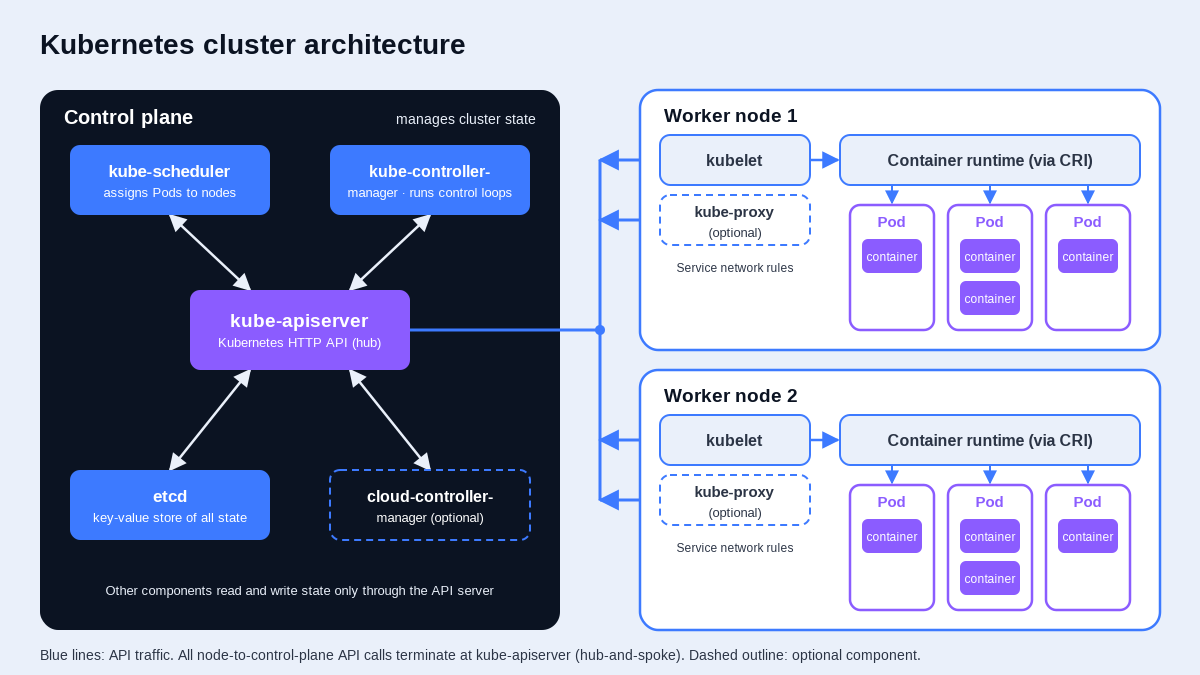
A Kubernetes cluster has two halves: a control plane that stores the desired state of everything and makes decisions, and a set of worker nodes that actually run your containers [2]. The control plane's core pieces are the API server, etcd, the scheduler and the controller manager; every node runs a kubelet, a container runtime and usually kube-proxy [1]. Everything talks through the API server, and small control loops keep nudging the real cluster toward what you declared.
The core idea: declare a state, let loops converge on it
Kubernetes describes itself as "a portable, extensible, open source platform for managing containerized workloads and services" that supports both declarative configuration and automation [3]. Google open-sourced it in 2014 [3].
The key word is declarative. You don't tell Kubernetes "start three containers on server 7." You submit an object that says "I want three replicas of this app," and the system works out how to get there and keep it there.
The official docs explain this with a thermostat analogy [4]. You set a temperature (the desired state); the thermostat compares it with the room (the current state) and switches heating on or off to close the gap. A Kubernetes controller is the same thing: "a control loop that watches the shared state of the cluster through the apiserver and makes changes attempting to move the current state towards the desired state" [1].
The docs are explicit that Kubernetes is "not a mere orchestration system." It is "a set of independent, composable control processes that continuously drive the current state towards the provided desired state" [3]. Once that clicks, the architecture makes sense: one component stores state, and many small loops act on it.
The control plane: where decisions are made
The control plane components "manage the overall state of the cluster" [1]. They can run on any machine, but setup scripts often put them together on machines that don't run user workloads, and production clusters usually spread the control plane across several machines for fault tolerance and high availability [2].
kube-apiserver
The API server is "the core component server that exposes the Kubernetes HTTP API" [1]. It is the front door for everything: kubectl, the other control plane components, every node's kubelet and any custom tooling all read and write cluster state through it.
Two design details matter:
- It scales horizontally. You can run several API server instances and balance traffic between them [2].
- It is the hub of a hub-and-spoke design. All API usage from nodes and their Pods terminates at the API server, and the docs state that no other control plane component is designed to expose remote services [5].
That second point is a security simplification. There is one well-defined place to authenticate and authorize requests, rather than many.
etcd
etcd is a "consistent and highly-available key value store for all API server data" [1]. Every object you create, from a Pod to a Secret to a Node record, ends up here. Other components don't work on etcd themselves: controllers and kubelets read and change cluster state through the API server [4][5].
Because etcd is the cluster's source of truth, the docs advise having a backup plan for its data [2]. Lose etcd without a backup and you lose the cluster's record of what should exist.
kube-scheduler
The scheduler "looks for Pods not yet bound to a node, and assigns each Pod to a suitable node" [1]. It weighs resource requests, constraints, affinity and anti-affinity rules, data locality and other factors [2].
The docs describe selection as a two-step operation, followed by binding [7]:
- Filtering. Drop every node that can't run the Pod, for example because it lacks enough free resources for the Pod's requests. If no node passes, the Pod stays pending until one does.
- Scoring. Rank the remaining feasible nodes and pick the highest score. Ties are broken at random.
- Binding. The scheduler then notifies the API server of its decision, a process called binding.
Note what the scheduler doesn't do: it doesn't start containers. It writes a decision to the API server, and the kubelet on the chosen node acts on it.
kube-controller-manager
This component "runs controllers to implement Kubernetes API behavior" [1]. Many separate controllers, such as the Node, Job, EndpointSlice and ServiceAccount controllers, are compiled into a single binary and run as one process [2].
The Job controller shows the pattern well [4]. When you create a Job, the controller notices and asks the API server to create the Pods the Job needs. It doesn't run containers itself; other components schedule and run those Pods. As the work completes, the controller updates the Job's status. Kubernetes deliberately uses many simple controllers, each managing one aspect of state, instead of one monolithic loop [4].
cloud-controller-manager (optional)
This optional component "integrates with underlying cloud provider(s)" [1]. It holds cloud-specific logic, such as the Node, Route and Service controllers that talk to a provider's APIs, and it isn't present on on-premises or local clusters [2]. Splitting it out keeps provider-specific code out of the core.
Worker nodes: where containers run
Node components "run on every node, maintaining running pods and providing the Kubernetes runtime environment" [1]. Every cluster needs at least one worker node to run Pods [2].
kubelet
The kubelet "ensures that Pods are running, including their containers" [1]. It is the node's agent. It learns from the API server which Pods are assigned to its node, asks the container runtime to start them, and reports status back.
By default the kubelet also registers its node with the API server, which the docs call the preferred pattern [6]. With the Node authorization mode and NodeRestriction admission plugin enabled, a kubelet can only create or modify its own Node object [6], which limits the damage if one node is compromised.
Container runtime
The container runtime is the "software responsible for running containers" [1]. The kubelet doesn't run containers itself. It talks to the runtime through the Container Runtime Interface (CRI), a gRPC protocol in which the kubelet is the client and the runtime serves the runtime and image services [8]. This plugin model lets a cluster use different CRI-compatible runtimes without recompiling Kubernetes. The CRI API has been stable since v1.23, and since v1.26 the kubelet requires runtimes to support the v1 CRI API [8].
kube-proxy (optional)
kube-proxy "maintains network rules on nodes to implement Services" [1]. The official component list marks it optional because some network plugins provide their own proxying, in which case kube-proxy isn't needed [2].
To see why it exists, consider a Service. Pods are ephemeral and their IP addresses change, so a Service gives a group of Pods one stable endpoint, selected by labels [10]. A controller continuously scans for Pods that match the Service's selector and keeps its EndpointSlices up to date [10], and kube-proxy (or its replacement) programs each node so traffic sent to the Service reaches one of them.
Pods
A Pod is "the smallest deployable unit" you can create and manage in Kubernetes: one or more containers that share storage and network resources and are always scheduled together [9]. Most Pods hold a single container. Multi-container Pods are an advanced pattern reserved for tightly coupled helpers [9].
Pods are rarely created by hand. Workload resources create them for you [9]:
Workload resource | What it manages | Typical use |
|---|---|---|
Deployment | A replicated set of interchangeable Pods | Stateless web apps and APIs |
StatefulSet | Pods with stable identity and durable storage | Databases, queues |
DaemonSet | One Pod on each (or selected) node | Log shippers, node agents |
Job | Pods that run a task to completion | Batch jobs, migrations |
Following one request: from YAML to running Pod
Here is how the components cooperate when you create a Deployment, using only the behavior documented above:
- You submit a Deployment to kube-apiserver, which authenticates and authorizes the request, then stores the object in etcd [1][5].
- Controllers in kube-controller-manager see a Deployment whose actual replica count doesn't match the desired count and, through the API server, ultimately create the missing Pod objects [4].
- kube-scheduler sees Pods with no node assigned, filters and scores nodes, and writes a binding back to the API server [7].
- The kubelet on each chosen node sees a Pod assigned to it and asks the container runtime, via CRI, to pull images and start containers [8].
- The kubelet reports status back to the API server, and the Service's controller updates its EndpointSlices to include the new Pods that match its selector [10].
- kube-proxy (or the network plugin) updates node rules so Service traffic reaches the new Pods [1].
If a node later fails, nothing in this chain needs a human. Controllers notice the gap between desired and actual replicas and the cycle repeats. That is the self-healing behavior Kubernetes advertises: restarting failed containers, replacing them and withholding traffic until they're ready [3].
Component reference table
Component | Runs on | Job in one line | Talks to |
|---|---|---|---|
kube-apiserver | Control plane | Exposes the Kubernetes API; front door for all state | etcd, every other component |
etcd | Control plane | Stores all cluster data | API server only |
kube-scheduler | Control plane | Assigns unscheduled Pods to nodes | API server |
kube-controller-manager | Control plane | Runs built-in control loops | API server |
cloud-controller-manager | Control plane (optional) | Integrates with a cloud provider | API server, provider APIs |
kubelet | Every node | Keeps assigned Pods running | API server, container runtime |
Container runtime | Every node | Runs containers | kubelet (via CRI) |
kube-proxy | Every node (optional) | Implements Service networking rules | API server, node networking |
Security notes architects should know
Kubernetes' architecture gives security teams some clear control points, plus a few defaults worth checking:
- One front door. Because all API traffic terminates at the API server [5], authentication, authorization and admission control there protect the whole cluster. The docs describe the API server listening on a secure HTTPS port with one or more forms of client authentication enabled, and say one or more forms of authorization should be enabled [5].
- API server to kubelet connections. The API server connects to kubelets to fetch Pod logs, attach to running Pods and provide port-forwarding. By default it does not verify the kubelet's serving certificate, which the docs call unsafe over untrusted networks; they recommend setting
--kubelet-certificate-authorityand enabling kubelet authentication and authorization [5]. - etcd is the crown jewel. It holds every object, including Secrets. Restrict access to it and back it up [2].
- Node isolation. Node authorization and NodeRestriction limit each kubelet to its own Node object [6].
These map neatly onto Zero Trust thinking: authenticate every caller, authorize every request and don't trust traffic because of where it comes from. Our explainer on Zero Trust security architecture covers those principles in depth.
Benefits of this design
- Resilience by default. Independent control loops mean one failed component doesn't freeze the whole system, and production control planes are usually replicated across machines [2][4].
- Extensibility. Because everything goes through one API, you can add custom controllers that run as Pods in the cluster or outside it [4].
- Portability. Pluggable runtimes (CRI), optional cloud integration and optional kube-proxy let the same core run on laptops, data centers and public clouds [1][8].
Limitations and trade-offs
- It isn't a full platform. The docs state Kubernetes "is not a traditional, all-inclusive PaaS." It doesn't build your code, provide databases or dictate logging and monitoring [3]. Teams assemble those pieces themselves.
- Operational complexity. Running etcd, upgrading control plane components and managing certificates is real work. That's why many teams use a managed service, where the provider runs the control plane. Our guide to cloud computing explains how that fits the IaaS/PaaS split.
- Version churn. As of November 2026, the project maintains the three most recent minor releases (1.37, 1.36 and 1.35), each with roughly one year of patch support [11]. Clusters need a regular upgrade cadence to stay supported.
- Secure defaults need checking. As noted above, some control plane to node paths aren't verified by default [5].
How to approach it
- Learning? Run a local single-node cluster and watch the flow above happen with
kubectl get events. Seeing the scheduler and kubelet act in sequence is the fastest way to internalize the architecture. - Running production? Decide early whether you'll operate the control plane yourself or use a managed offering. If you run it yourself, plan for a highly available control plane and etcd backups from day one [2].
- Securing it? Start at the API server (authentication, authorization, admission), then the kubelet API, then etcd [5].
Outlook
Kubernetes keeps evolving through its regular release cycle, with 1.38 listed as the next minor release as of November 2026 [11]. The core architecture described here, an API server backed by etcd plus independent control loops, has stayed stable, which is why understanding it pays off across versions and providers.
Frequently asked questions
What are the main components of Kubernetes architecture?
The control plane runs kube-apiserver, etcd, kube-scheduler, kube-controller-manager and, optionally, cloud-controller-manager. Each worker node runs a kubelet, a container runtime and usually kube-proxy [1].
What is the difference between the control plane and a node?
The control plane stores cluster state and makes decisions, such as where a Pod should run. Nodes do the work: their kubelets start and supervise the containers the control plane assigns to them [1][2].
Why is etcd so important?
etcd stores all API server data, so it is the cluster's single source of truth [1]. The official docs recommend having a backup plan for it [2].
Is kube-proxy required?
No. The official docs mark it optional, because some network plugins implement Service networking themselves [1][2].
Does Kubernetes still use Docker?
Kubernetes doesn't talk to any runtime directly. The kubelet uses the Container Runtime Interface, and since v1.26 it requires a runtime that supports the v1 CRI API [8]. The official docs include guidance for moving nodes from Docker Engine to a CRI runtime such as containerd.
What is a Pod versus a container?
A container is a single packaged process. A Pod wraps one or more containers that share network and storage and are scheduled together; it's the smallest unit Kubernetes deploys [9].
Sources
- The Kubernetes Authors, "Kubernetes Components." https://kubernetes.io/docs/concepts/overview/components/
- The Kubernetes Authors, "Cluster Architecture." https://kubernetes.io/docs/concepts/architecture/
- The Kubernetes Authors, "Overview." https://kubernetes.io/docs/concepts/overview/
- The Kubernetes Authors, "Controllers." https://kubernetes.io/docs/concepts/architecture/controller/
- The Kubernetes Authors, "Communication between Nodes and the Control Plane." https://kubernetes.io/docs/concepts/architecture/control-plane-node-communication/
- The Kubernetes Authors, "Nodes." https://kubernetes.io/docs/concepts/architecture/nodes/
- The Kubernetes Authors, "Kubernetes Scheduler." https://kubernetes.io/docs/concepts/scheduling-eviction/kube-scheduler/
- The Kubernetes Authors, "Container Runtime Interface (CRI)." https://kubernetes.io/docs/concepts/architecture/cri/
- The Kubernetes Authors, "Pods." https://kubernetes.io/docs/concepts/workloads/pods/
- The Kubernetes Authors, "Service." https://kubernetes.io/docs/concepts/services-networking/service/
- The Kubernetes Authors, "Releases." https://kubernetes.io/releases/