Containers vs Virtual Machines
Containers share the host kernel; VMs each run a full guest OS on a hypervisor. How they differ in isolation, speed and security, and when to use each.
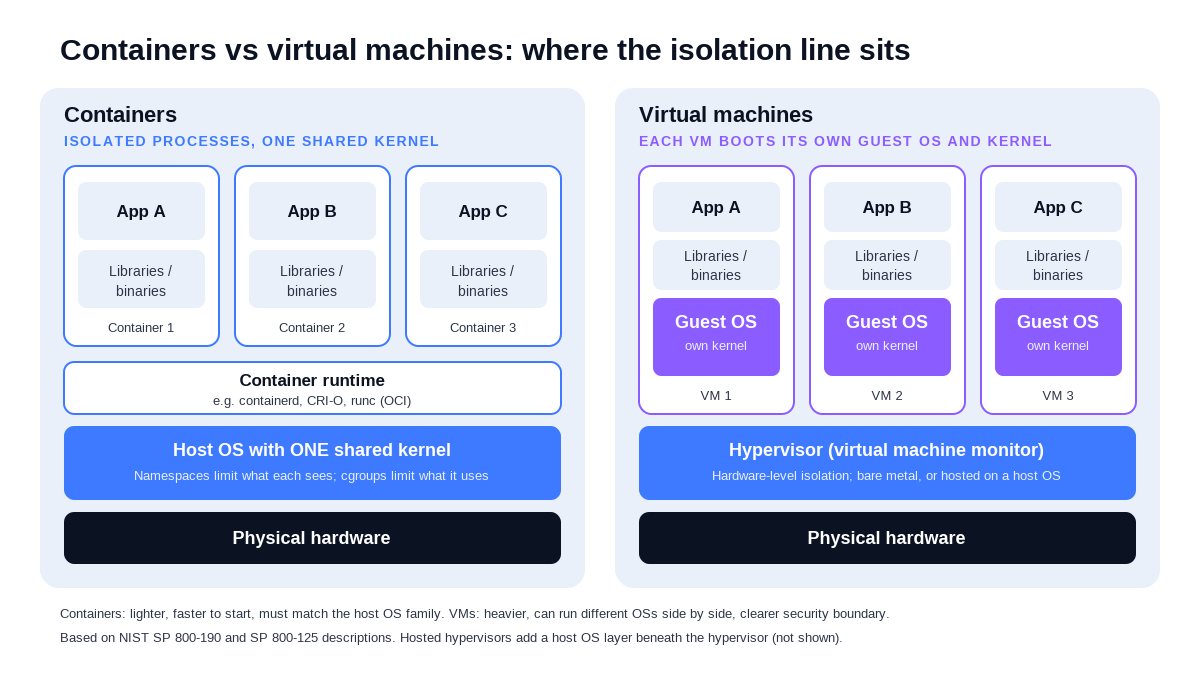
Containers and virtual machines (VMs) both let many applications share one physical server, but they isolate those applications at different layers. A VM runs a complete guest operating system, including its own kernel, on virtual hardware provided by a hypervisor. A container is an isolated process that shares the host's operating system kernel with every other container on that machine. That makes containers lighter and faster to start, while VMs offer a stronger, more clearly defined security boundary.
The one-sentence difference
Docker's own documentation puts it simply. A VM isolates software by simulating a whole computer: "Every VM boots its own complete operating system, including its own kernel." A container doesn't boot an OS at all: "It's still a process, so every container on a machine shares that machine's kernel" [3].
NIST's Application Container Security Guide (SP 800-190) describes the same split in more formal terms. VMs "use a hypervisor that provides hardware-level isolation of resources across VMs," and each VM "includes a complete guest OS." With containers, "multiple apps share the same OS kernel instance but are segregated from each other" [1].
Everything else (speed, density, security posture, portability) follows from where that line is drawn.
How virtual machines work
A hypervisor (also called a virtual machine monitor) sits between physical hardware and the VMs. It presents each VM with virtual CPUs, memory, disks and network cards. Each VM installs and boots its own operating system on that virtual hardware.
NIST SP 800-125 distinguishes two forms of full virtualization [2]:
- Bare metal (native) virtualization. The hypervisor runs directly on the hardware, with no host OS. NIST notes that servers are most often virtualized this way.
- Hosted virtualization. The hypervisor runs on top of a regular host OS such as Windows, Linux or macOS. Desktops are most often virtualized this way.
Because each VM has its own kernel, VMs can run different operating systems side by side on the same machine. NIST notes that "VMs allow different OSs, such as Linux and Windows, to share the same physical hardware" [1].
How containers work
A container isn't a mini-computer. It's a normal process (or group of processes) that the kernel fences off. On Linux, two kernel features do most of the work:
- Namespaces control what a process can see. The Linux manual describes a namespace as wrapping "a global system resource in an abstraction that makes it appear to the processes within the namespace" that they have their own isolated instance [7]. Separate namespaces exist for process IDs, network stacks, mount points, hostnames, users, inter-process communication, cgroups and clocks [7].
- Control groups (cgroups) control what a process can use. They "allow processes to be organized into hierarchical groups whose usage of various types of resources can then be limited and monitored" [8].
Docker summarizes the result: a container gets its own filesystem, its own view of processes and networking, and optional limits on memory and CPU [3].
The other half of a container is its image: a packaged filesystem with the application and everything it needs. Kubernetes defines an image as "a ready-to-run software package containing everything needed to run an application: the code and any runtime it requires, application and system libraries, and default values for any essential settings" [5].
Standards: OCI
Container formats are standardized by the Open Container Initiative (OCI), launched in June 2015 under the Linux Foundation by Docker, CoreOS and others. Docker donated its runtime, runC, as the cornerstone [4]. The OCI maintains three specifications: the runtime spec (how to run an unpacked container), the image spec (how images are structured) and the distribution spec (the API for pushing and pulling images) [4]. These standards are why an image built with one tool can run under another, and why Kubernetes can work with runtimes such as containerd and CRI-O [5].
Containers are OS-family specific
Because containers share the host kernel, they must match it. NIST notes that "a Linux host can only run containers built for Linux, and a Windows host can only run Windows containers" [1]. That is why Docker Desktop on macOS and Windows runs Linux containers inside a managed Linux VM [3]. It's a good reminder that containers and VMs are often used together, not as rivals.
Side-by-side comparison
Virtual machines | Containers | |
|---|---|---|
What's isolated | A whole virtual computer | A process or group of processes |
Kernel | Each VM has its own guest kernel | All containers share the host kernel [1][3] |
Isolation mechanism | Hypervisor, hardware-level [1] | Namespaces and cgroups, software-level [7][8] |
Guest OS choice | Any OS the hypervisor supports [1] | Must match the host OS family [1] |
Startup | Boots a full OS | Starts a process, no OS boot [3] |
Size | Includes a full OS | App plus its libraries only |
Density per host | Lower | Higher |
Security boundary | Stronger, clearer [1] | Weaker by default; depends on configuration [1] |
Typical unit of management | VM image, patched like a server | Immutable image, rebuilt and redeployed [5] |
Docker's docs say containers are smaller and start faster precisely because there's no guest OS to boot, and that VMs offer stronger isolation because they're separated by a hardware boundary rather than a shared kernel [3].
Security: where the real difference lies
This is the most important part of the comparison, and NIST is unusually direct about it.
"While containers provide a strong degree of isolation, they do not offer as clear and concrete of a security boundary as a VM," NIST SP 800-190 says. "Because containers share the same kernel and can be run with varying capabilities and privileges on a host, the degree of segmentation between them is far less than that provided to VMs by a hypervisor" [1]. It adds that carelessly configured environments can let containers interact with each other and the host "far more easily and directly than multiple VMs on the same host" [1].
Even with a minimal, container-specific host OS, NIST notes, "the use of a shared kernel invariably results in a larger inter-object attack surface than seen with hypervisors" [1].
What NIST recommends
SP 800-190, published in September 2017 and still the current version as of November 2026 [1], includes these recommendations among others:
- Use container-specific host operating systems. These minimalist OSs run only containers, with other services disabled and read-only file systems, which shrinks the attack surface [1].
- Group containers by sensitivity. "Only group containers with the same purpose, sensitivity, and threat posture on a single host OS kernel to allow for additional defense in depth" [1].
- Use container-aware vulnerability management. Traditional scanners often assume long-lived servers and can miss vulnerabilities inside images. NIST recommends tools built for the immutable, declarative nature of images and blocking non-compliant images from running [1].
These fit naturally into a zero trust architecture, where no workload is trusted simply because it shares a network or host.
The middle ground: sandboxed containers and microVMs
The old choice, VM security or container speed, has pushed engineers to build hybrids.
MicroVMs (Firecracker). AWS built Firecracker, an open source virtual machine monitor that uses Linux's KVM to create lightweight "microVMs" [10]. Its NSDI 2020 paper states the problem directly: the traditional view is a choice "between virtualization with strong security and high overhead, and container technologies with weaker security and minimal overhead," a trade-off "unacceptable to public infrastructure providers" [9]. Firecracker strips out unnecessary devices to reduce memory footprint and attack surface [10]. It powers AWS Lambda and AWS Fargate [9], and AWS lists Firecracker's "VM-level isolation between workloads" as part of Lambda's foundation [13]. Our serverless explainer covers how that's used.
Kata Containers. Kata builds "lightweight virtual machines that seamlessly plug into the containers ecosystem," using hardware virtualization "as a second layer of defense" while supporting OCI images and the Kubernetes CRI [12].
gVisor. Instead of a VM, gVisor provides "an application kernel" written in Go that runs in user space and intercepts application system calls [11]. Its runsc runtime plugs into Docker and Kubernetes. The project is candid about the cost: "reduced application compatibility and higher per-system call overhead" [11].
Choosing per workload in Kubernetes. Kubernetes' RuntimeClass feature, stable since v1.20, lets you pick a runtime per Pod. The docs give the exact use case: workloads needing "a high level of information security assurance" can run "in a container runtime that uses hardware virtualization," at "the expense of some additional overhead" [6]. See our Kubernetes architecture explainer for how runtimes fit into a cluster.
Approach | Isolation boundary | Trade-off |
|---|---|---|
Standard container (runc) | Shared kernel, namespaces, cgroups | Lightest; weakest default boundary [1] |
gVisor | User-space application kernel | Compatibility and syscall overhead [11] |
Kata Containers | Lightweight VM per container or Pod | Extra VM layer [12] |
Firecracker microVM | Minimal KVM-based VM | Built for serverless scale; minimal device model [9][10] |
Full VM | Hypervisor with full guest OS | Strongest familiar boundary; heaviest [1] |
Real-world patterns
- Containers on VMs. A common pattern is to run container hosts, such as Kubernetes worker nodes, on VMs. The VM gives a hard boundary between customers or environments; containers give density and fast deployment inside it. Docker Desktop's Linux VM on macOS and Windows is a small-scale example [3].
- VMs for legacy and mixed OS needs. Applications that expect a full OS, need a specific kernel, or need Windows and Linux side by side fit VMs [1].
- Containers for microservices and CI/CD. Immutable images that are rebuilt rather than patched in place match modern delivery pipelines [5].
- MicroVMs for multi-tenant code. Running untrusted or customer code at scale is the reason Firecracker exists [9].
- Desktop developers. If you're choosing an OS for running VMs or containers locally, our look at Linux distributions for desktops, VMs and the cloud covers the options.
How to decide
Choose containers when:
- You're building or modernizing services that can share one OS family.
- You want fast startup, high density and immutable, repeatable deployments [5].
- Workloads on the same host share a similar trust level [1].
Choose VMs when:
- You need a different OS or kernel per workload [1].
- You're isolating tenants, environments or workloads of different sensitivity [1].
- The application assumes a full, traditional server.
Choose a sandboxed runtime or microVM when:
- You need container workflows but VM-grade isolation, such as running untrusted code [6][9][12].
Whatever you choose, define it in code with infrastructure as code so environments are reproducible.
Outlook
The trend in official documentation is convergence rather than replacement. Kubernetes treats stronger-isolation runtimes as a per-Pod choice [6], Kata and gVisor plug into standard container tooling [11][12], and AWS runs its serverless compute types on Firecracker microVMs [13]. Expect "container or VM?" to increasingly become "which isolation level for this workload?"
Frequently asked questions
Are containers more secure than virtual machines?
Not by default. NIST says containers "do not offer as clear and concrete of a security boundary as a VM" because they share the host kernel [1]. Containers can be run securely with hardened hosts, sensible grouping and image scanning, and sandboxed runtimes narrow the gap.
Can a container run a different operating system than its host?
Not a different OS family. Containers share the host kernel, so Linux containers need a Linux kernel and Windows containers need Windows [1]. Docker Desktop on macOS and Windows gets around this by running a Linux VM in the background [3].
Is Docker a virtual machine?
No. Docker runs containers, which are isolated processes on the host kernel, not virtual computers with their own OS [3]. On macOS and Windows, Docker Desktop does use a lightweight Linux VM to provide that kernel [3].
Do containers replace VMs?
Rarely. Container hosts are often VMs themselves, and VMs remain the better fit for mixed operating systems and strong tenant isolation. The two are usually layered, not competing.
What is a microVM?
A microVM is a stripped-down virtual machine designed to start quickly and use little memory while keeping hardware-virtualization isolation. Firecracker, which AWS uses for Lambda and Fargate, is the best-known example [9][10].
Sources
- Souppaya, M., Morello, J. and Scarfone, K. "Application Container Security Guide." NIST SP 800-190, September 2017. https://csrc.nist.gov/pubs/sp/800/190/final
- NIST. "Guide to Security for Full Virtualization Technologies." NIST SP 800-125, January 2011. https://csrc.nist.gov/pubs/sp/800/125/final
- Docker. "What is a container?" https://docs.docker.com/get-started/docker-concepts/the-basics/what-is-a-container/
- Open Container Initiative. "About the OCI." https://opencontainers.org/about/overview/
- Kubernetes. "Containers." https://kubernetes.io/docs/concepts/containers/
- Kubernetes. "Runtime Class." https://kubernetes.io/docs/concepts/containers/runtime-class/
- Linux man-pages. "namespaces(7)." https://man7.org/linux/man-pages/man7/namespaces.7.html
- Linux man-pages. "cgroups(7)." https://man7.org/linux/man-pages/man7/cgroups.7.html
- Agache, A. et al. "Firecracker: Lightweight Virtualization for Serverless Applications." NSDI 2020. https://www.usenix.org/conference/nsdi20/presentation/agache
- Firecracker project. README. https://github.com/firecracker-microvm/firecracker
- gVisor. "gVisor documentation." https://gvisor.dev/docs/
- Kata Containers. https://katacontainers.io/
- Amazon Web Services. "What is AWS Lambda?" https://docs.aws.amazon.com/lambda/latest/dg/welcome.html