Multi-Factor Authentication vs Passwordless: What's the Difference?
MFA adds factors; passwordless removes the password. How passkeys and WebAuthn work, which methods resist phishing per NIST and CISA, and how to choose.
Multi-factor authentication (MFA) requires two or more different kinds of proof to log in, such as a password plus a code from your phone. Passwordless authentication removes the password entirely, usually replacing it with a passkey unlocked by your fingerprint, face or device PIN. The two overlap: a passkey that checks your biometric or PIN is itself a form of MFA, and it's one of the few methods U.S. agencies classify as phishing-resistant [1][2]. The more useful question isn't "MFA or passwordless?" but "can this login be phished?"
What MFA actually means
CISA defines MFA as a control that requires a user to present "a combination of two or more different authenticators (something you know, something you have, or something you are)" [1]. If one factor is stolen, the attacker still needs the other.
That logic holds up against bulk password attacks such as password spraying [1]. It breaks down when an attacker can trick the user into handing over both factors at once. CISA's fact sheet lists the main ways MFA gets defeated [1]:
- Phishing: a fake login page collects the password and the six-digit code, then replays both to the real site in real time.
- Push bombing (push fatigue): the attacker floods the user with approval prompts until they tap "Accept."
- SS7 exploitation: weaknesses in telecom signaling let attackers intercept codes sent by SMS or voice.
- SIM swap: the attacker persuades a carrier to move the victim's number to a SIM they control.
All of these share a root cause. The thing being verified is a secret, or a human decision, that can be relayed to the wrong website.
What passwordless means
Passwordless simply means no password is involved. That covers very different methods:
- Passkeys (FIDO/WebAuthn): public-key cryptography, phishing-resistant by design [5].
- Smart cards (PKI): certificate-based, such as the U.S. government's PIV and CAC cards [1].
- Magic links and one-time codes by email or SMS: no password, but the link or code can still be stolen or relayed.
So "passwordless" isn't automatically stronger. A login that relies only on an SMS code is passwordless and still exposed to SIM swaps and phishing [1]. What makes passkeys different is how they're built, not the absence of a password.
How passkeys work
A passkey is the FIDO Alliance's name for a FIDO credential stored on a phone, computer or hardware security key, unlocked with a biometric, PIN or pattern [5]. In the W3C's WebAuthn specification, which became a W3C Recommendation at Level 3 on August 25, 2026, the matching technical term is a discoverable credential, which the spec notes is also called a passkey [4].
There are three parties: the relying party (the website or app, defined by the W3C as the entity whose web application uses the Web Authentication API to register and authenticate users), the client (usually your browser or OS), and the authenticator (the hardware or software that holds the keys) [4].
Registration
When you create a passkey, the authenticator generates a new public/private key pair scoped to that site's relying party ID, or RP ID (its domain) [4]. The private key stays with the authenticator. The public key is sent to the server and stored with your account. The server never receives anything secret.
Signing in: the challenge-response flow
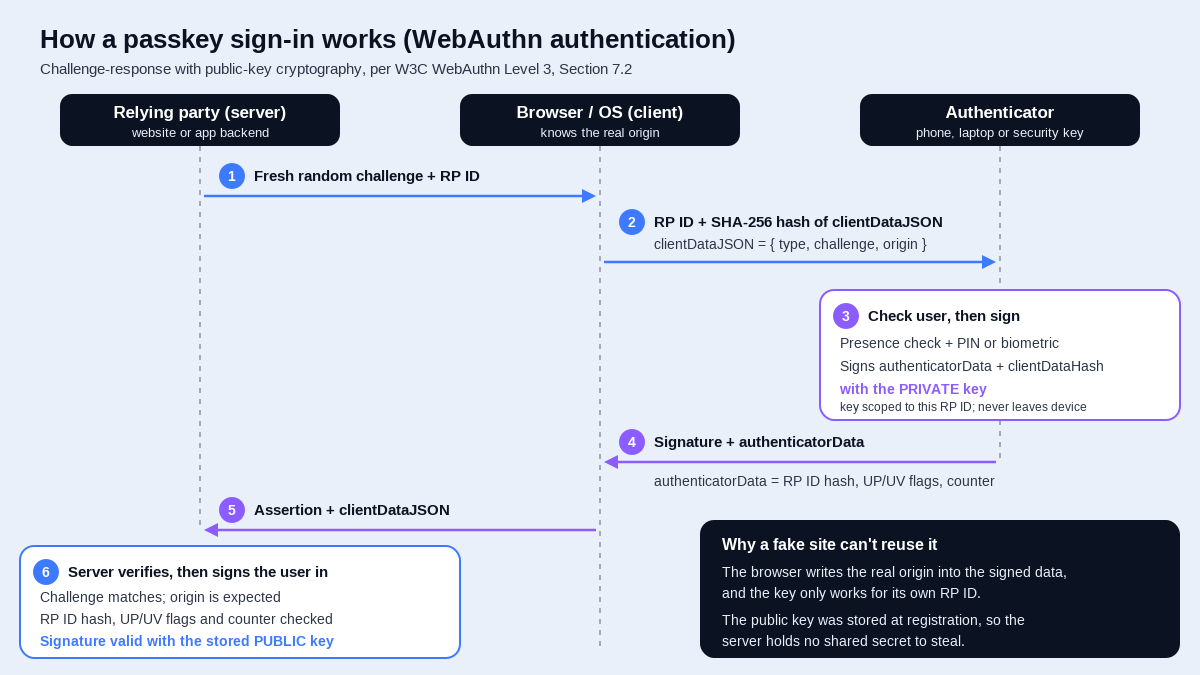
The diagram for this article shows the steps. Paraphrasing the verification procedure in Section 7.2 of WebAuthn Level 3 [4]:
- Challenge. The server generates a fresh random challenge and sends it with its RP ID.
- Client data. The browser builds a small JSON object,
clientDataJSON, containing the request type, the challenge and the origin, meaning the actual website address the user is on. It passes a SHA-256 hash of that object to the authenticator. - User check and signature. The authenticator confirms you're present and, if the site requires it, verifies you with a PIN or biometric. It then signs the authenticator data (which includes a hash of the RP ID and flags recording whether user presence and user verification happened) together with the client data hash, using the private key.
- Return. The browser sends the signature, the authenticator data and the client data back to the server.
- Verification. The server checks that the challenge matches the one it issued, that the origin is one it expects, that the RP ID hash matches its own, and that the user-presence flag (and user-verification flag, if required) is set. Then, using the public key stored at registration, it verifies that the signature is valid "over the binary concatenation of authData and hash" [4].
The spec also defines a signature counter. If the counter doesn't increase as expected, that's "a signal, but not proof, that the authenticator may be cloned," which a site can feed into its risk scoring [4].
Why this resists phishing
Two details do the work. First, the browser, not the user, writes the real origin into the signed client data, and the server rejects origins it doesn't expect [4]. A lookalike domain can't produce a valid signature for the real site. Second, the credential is scoped to one relying party, so the authenticator won't use your bank's passkey on a different domain [4]. There's also no shared secret on the server to steal; the FIDO Alliance points out that passkeys use key pairs rather than shared secrets, so there are no sensitive secrets on the server [5].
NIST's definition of phishing resistance captures this. SP 800-63B-4 accepts two mechanisms, channel binding and verifier name binding, where the authenticator's output is cryptographically tied to the verifier's identity, such as its authenticated hostname [2]. It adds that "phishing resistance requires single- or multi-factor cryptographic authentication" and that any code a user types in by hand "SHALL NOT be considered phishing-resistant" [2].
MFA methods compared by phishing resistance
This table combines CISA's strongest-to-weakest ranking with NIST's 2025 rules [1][2].
Method | Passwordless? | Phishing-resistant? | Main weaknesses |
|---|---|---|---|
SMS or voice code | Sometimes | No | Phishing, SS7 interception, SIM swap; NIST classifies phone-network delivery as "restricted" [1][2] |
Authenticator app code (TOTP) or hardware OTP token | No | No | Codes can be phished and replayed; NIST says OTP "is not phishing-resistant" [1][2] |
Push notification without number matching | Sometimes | No | Push bombing and user error [1] |
Push with number matching | Sometimes | No | Resists push bombing but still vulnerable to phishing [1] |
Synced passkey | Yes | Yes | Security depends on the cloud account that syncs it; not allowed at NIST AAL3 [2][5] |
Device-bound passkey or FIDO security key | Yes | Yes | Lost devices need a backup method; FIDO calls this the highest assurance [5] |
PKI smart card (PIV/CAC) | Yes (with PIN) | Yes | Needs mature identity management and reader support [1] |
CISA's conclusion is blunt: "The only widely available phishing-resistant authentication is FIDO/WebAuthn authentication," with PKI-based MFA as a less widely available alternative [1].
What NIST's 2025 guidelines say
NIST finalized SP 800-63-4 in July 2025, with SP 800-63B-4 covering authentication [3]. Several rules matter for this comparison [2]:
- AAL2 must offer a phishing-resistant option. "Verifiers SHALL offer at least one phishing-resistant authentication option at AAL2."
- AAL3 requires phishing resistance and a non-exportable private key. That's why NIST says "syncable authenticators SHALL NOT be used at AAL3," while allowing them at AAL2 and below.
- Phone-network delivery is restricted. Use of the public telephone network for out-of-band verification is restricted, and verifiers must offer alternatives.
- Passwords get longer, not more complex. At least 15 characters when used alone, no composition rules and no scheduled forced changes.
For a wider view of how authentication fits into access control, see our explainer on identity and access management.
Synced vs device-bound passkeys
The FIDO Alliance describes two types [5]:
- Synced passkeys are copied between a user's devices through a cloud service. Lose your phone, and your passkeys are still on your laptop. The trade-off is that the cloud account becomes part of your security.
- Device-bound passkeys "never leave a single device," including those on FIDO security keys. FIDO says those on modern hardware security keys offer the highest security assurance [5].
The FIDO Alliance stresses that phishing resistance applies either way [5]. The difference is about key exportability and recovery, which is exactly where NIST draws the AAL2/AAL3 line [2].
Real-world uses
- Administrators and high-value staff. CISA recommends starting phishing-resistant MFA rollouts with help desk and IT administrators, then expanding [1]. That makes sense given how often stolen admin credentials feature in attacks like those in our ransomware explainer.
- Federal agencies. CISA notes that the Office of Management and Budget requires agencies to adopt phishing-resistant MFA [1], part of the federal Zero Trust push covered in our Zero Trust architecture guide.
- Consumer accounts. In a 2024 survey the FIDO Alliance commissioned, 53% of respondents said they had enabled passkeys on at least one account [5]. Treat that as an industry-group figure rather than an independent census.
Benefits of going passwordless with passkeys
- Phishing resistance without relying on users to spot fake sites [1][4].
- Nothing reusable to steal from the server, since passkeys rely on key pairs rather than shared secrets [5].
- Faster sign-in: a fingerprint or PIN replaces typing a password and a code.
- Fewer help-desk password resets once passwords are actually removed, not just supplemented.
Limitations and risks
- Account recovery is the new weak point. If a lost passkey can be replaced by an emailed link or SMS code, attackers will target that path instead.
- Fallbacks undo the gains. Leaving a password or SMS option enabled "just in case" leaves those weaknesses in place.
- Legacy systems. Some applications don't support FIDO at all. CISA suggests starting with services that do, such as most hosted email and SSO platforms, and routing others through SSO [1].
- Synced passkeys inherit cloud-account risk and aren't permitted at NIST's highest assurance level [2].
- Shared and kiosk devices need careful design so one person's passkey isn't available to the next user.
How to choose
- Any MFA beats none. CISA says any form of MFA "is better than no MFA," but phishing-resistant MFA is the gold standard [1].
- Prioritize by risk. Move system administrators, help desk staff, other high-value accounts such as HR and legal staff with broad data access, and anyone who can manage identity servers like Active Directory to passkeys or security keys first [1].
- If you can't go phishing-resistant yet, CISA names app- or token-based OTP or push with number matching as the best interim options for small and medium businesses [1].
- Use device-bound keys where NIST AAL3 or equivalent assurance is required [2].
- Fix recovery before launch. Require a second registered passkey or a verified in-person or high-assurance process rather than SMS.
- Retire passwords once passkey adoption is high, rather than running both indefinitely.
Outlook
With WebAuthn Level 3 now a W3C Recommendation [4] and NIST requiring a phishing-resistant option at AAL2 [2], the standards groundwork for a passkey-first web is in place. We expect the remaining friction to be operational: recovery, legacy apps and moving users off fallback methods. That's our assessment rather than a forecast by NIST, CISA or the FIDO Alliance.
Frequently asked questions
Is a passkey considered MFA?
A passkey on a device that requires a PIN or biometric combines something you have (the device holding the private key) with something you know or are. WebAuthn records whether that user verification happened in a flag the server checks [4]. CISA lists FIDO/WebAuthn as phishing-resistant MFA [1].
Is passwordless more secure than MFA?
It depends on the method. Passkeys and smart cards are more secure than password-plus-code MFA because they resist phishing [1][2]. Passwordless methods based on emailed links or SMS codes are not, because those can be intercepted or relayed [1].
Why isn't an authenticator app code phishing-resistant?
Because the user reads the code and types it into whatever page is in front of them. A fake site can collect it and replay it to the real site within seconds. NIST states that OTP authentication is not phishing-resistant and that manually entered outputs can't count as phishing-resistant [2].
What happens if I lose the device with my passkey?
With synced passkeys, the credential is usually still on your other devices through your cloud account [5]. With device-bound passkeys or security keys, you need a second registered key or the site's recovery process, which is why registering a backup is important.
Does NIST still allow SMS codes?
Yes, but NIST classifies authentication over the public telephone network as "restricted," requiring extra safeguards and an alternative option for users [2]. CISA describes SMS and voice MFA as a last-resort or temporary option [1].
What is WebAuthn's relationship to FIDO2?
CISA explains that the FIDO Alliance originally developed WebAuthn as part of the FIDO2 standards and that the W3C now publishes it, with support in major browsers, operating systems and smartphones [1]. WebAuthn is the browser API; FIDO's companion protocols handle communication with external authenticators such as security keys [1].
Sources
- CISA, "Implementing Phishing-Resistant MFA," fact sheet, October 2022. https://www.cisa.gov/sites/default/files/publications/fact-sheet-implementing-phishing-resistant-mfa-508c.pdf
- NIST, "SP 800-63B-4, Digital Identity Guidelines: Authentication and Authenticator Management," July 2025. https://pages.nist.gov/800-63-4/sp800-63b.html
- NIST, "SP 800-63-4, Digital Identity Guidelines," July 2025. https://csrc.nist.gov/pubs/sp/800/63/4/final
- W3C, "Web Authentication: An API for accessing Public Key Credentials, Level 3," W3C Recommendation, 25 August 2026. https://www.w3.org/TR/webauthn-3/
- FIDO Alliance, "Passkeys." https://fidoalliance.org/passkeys/