What Is GPU Computing for AI?
Why AI runs on GPUs: parallel cores, Tensor Cores, high-bandwidth memory, multi-GPU links and CUDA, plus how to estimate the GPU memory a model needs.
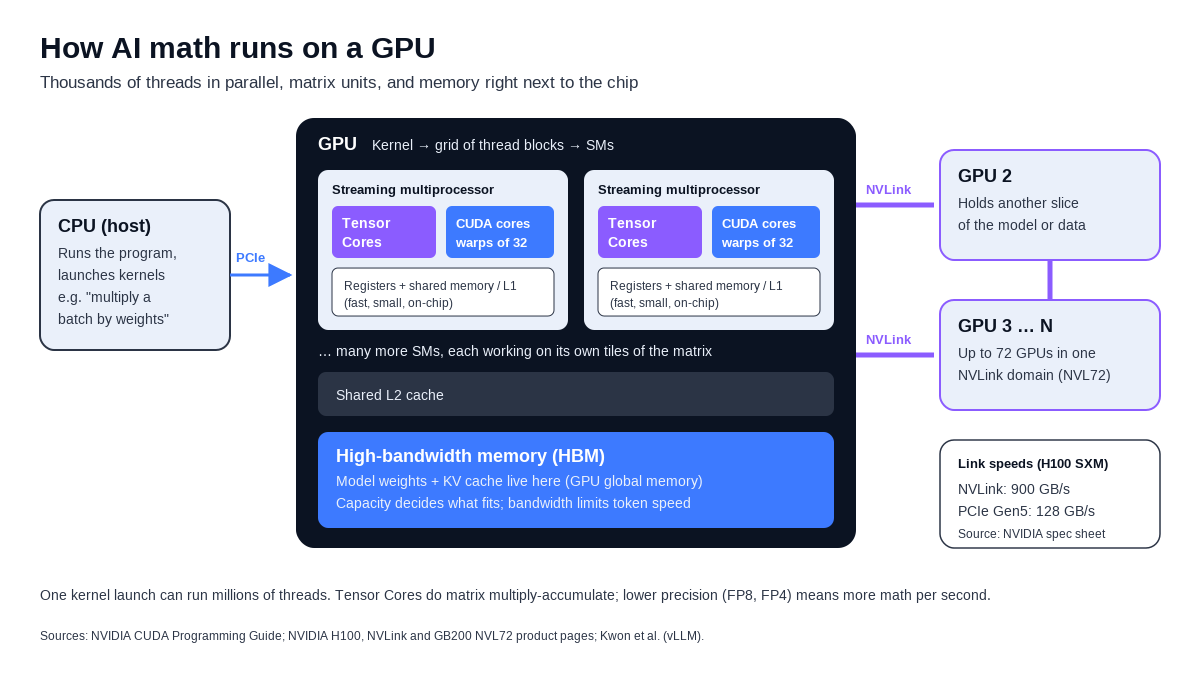
GPU computing for AI means running the math of neural networks on graphics processing units instead of general-purpose CPUs. Training and running AI models comes down to enormous numbers of matrix multiplications, and a GPU is designed to execute "thousands of threads in parallel," trading single-thread speed for much greater total throughput [1]. Add specialized matrix units, very fast memory and high-speed links between chips, and you get the hardware that today's AI is built on.
This guide explains how that works and what limits performance in practice. If you are comparing processor types, read our companion piece, AI Chips vs CPUs vs GPUs vs TPUs.
Why AI and GPUs fit together
A neural network layer takes a batch of inputs, multiplies it by a matrix of learned weights, adds a bias and applies a simple function. A large language model repeats this across dozens of layers for every token it reads or writes. Each multiply-and-add is independent of most others, so they can run at the same time.
CPUs are built the other way. NVIDIA's CUDA guide explains that a CPU is designed to run "a serial sequence of operations... as fast as possible" and can run "a few tens of these threads in parallel," while GPUs "devote more transistors to data processing units" and fewer to caching and flow control [1]. The result, NVIDIA says, is "much higher instruction throughput and memory bandwidth than a CPU within a similar price and power envelope" [1].
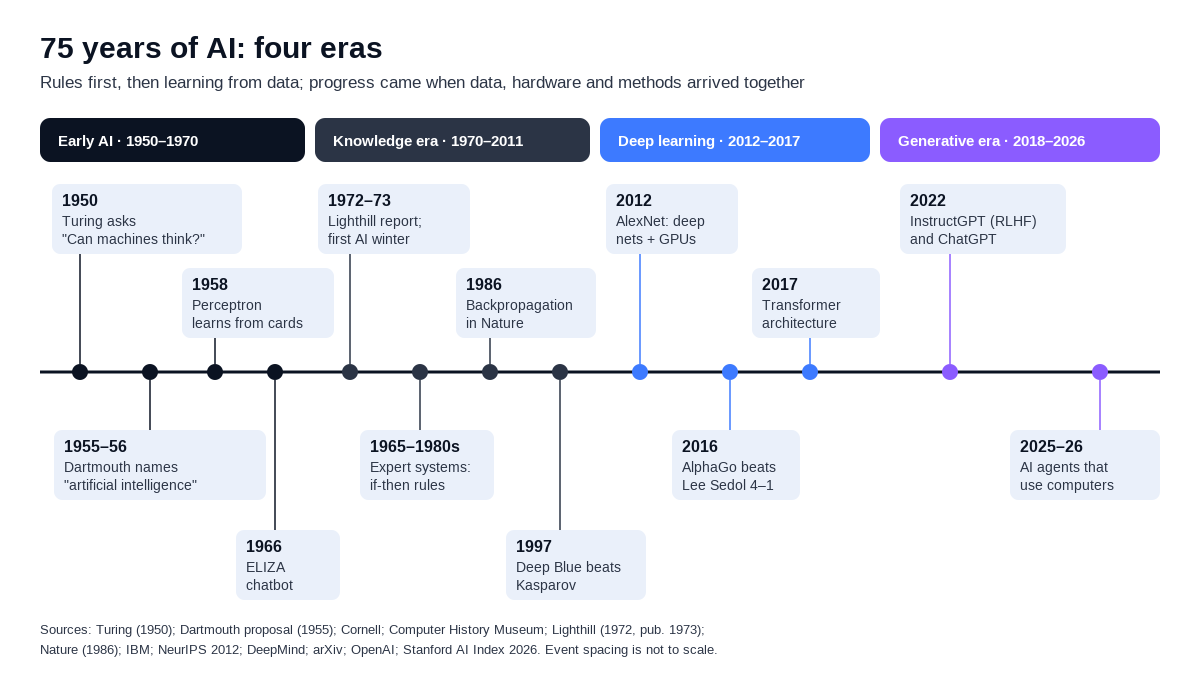
GPUs started as graphics chips. NVIDIA introduced CUDA in 2006 to let "any computational workload" use GPU throughput "independent of graphics APIs" [1]. In 2012 the AlexNet team used "a very efficient GPU implementation" to train a 60-million-parameter image network whose ImageNet error rates were "considerably better than the previous state-of-the-art," an early demonstration of what GPU-trained deep networks could do [9].
How a GPU executes AI work
Kernels, threads and blocks
Programs hand the GPU small functions called kernels. When an application launches a kernel, NVIDIA explains, "it does so with many threads, often millions of threads," organized into thread blocks, which form a grid [2]. For a matrix multiplication, each block typically computes one tile of the output.
Streaming multiprocessors and warps
Physically, the GPU is a collection of streaming multiprocessors (SMs). Each SM has its own register file, a data cache that doubles as fast shared memory, and many functional units [2]. Within a block, threads are grouped into "warps" of 32 that execute the same instructions in a "Single-Instruction Multiple-Threads (SIMT)" fashion [2]. Thousands of these threads in flight keep the chip busy while others wait for data.
Tensor Cores: hardware for matrix math
Modern data center GPUs add Tensor Cores, units that perform matrix multiply-accumulate operations directly. In the Hopper generation (H100), NVIDIA says fourth-generation Tensor Cores deliver twice the matrix multiply-accumulate rate per SM of the prior A100 on equivalent data types, and introduced FP8 precision along with a "Transformer Engine" for language models [3]. Most of a modern GPU's headline AI performance comes from Tensor Cores, not its general-purpose cores.
Lower precision, more speed
AI rarely needs the 64-bit precision used in scientific computing. Using 16-bit (FP16 or BF16), 8-bit (FP8, INT8) or even 4-bit formats lets a GPU do more operations per second and fit more parameters in memory. NVIDIA's H100 spec sheet lists 3,958 teraFLOPS for FP8 Tensor Core math on the SXM version, about double its BF16 figure, with the caveat that these peak numbers assume sparsity [4]. AMD says its MI355X adds expanded support for the MXFP6 and MXFP4 formats [5]. Our guide to AI model quantization explains the accuracy trade-offs.
Memory: often the real bottleneck
Capacity: does the model fit?
A model's weights must sit in the GPU's high-bandwidth memory (HBM) to run efficiently. As of November 2026, NVIDIA and AMD list these capacities on their spec pages:
GPU | Memory | Memory bandwidth |
|---|---|---|
NVIDIA H100 SXM | 80 GB [4] | 3.35 TB/s [4] |
NVIDIA H100 NVL | 94 GB [4] | 3.9 TB/s [4] |
AMD Instinct MI355X | 288 GB HBM3E [5] | 8 TB/s [5] |
A quick sizing rule: weights need roughly parameters × bytes per parameter. A 70-billion-parameter model stored in 16-bit format (2 bytes each) needs about 140 GB for weights alone, more than one 80 GB H100 holds. At 8 bits it needs about 70 GB. These are back-of-envelope figures; real deployments need headroom for activations and caches.
The KV cache
When a language model generates text, it stores intermediate attention data for every token in the conversation, called the key-value (KV) cache. The vLLM researchers describe it as "huge" and note that it "grows and shrinks dynamically" per request, so poor management wastes memory and limits how many requests can be batched together [8]. In the paper's example of a 13-billion-parameter model on a 40 GB NVIDIA A100, the weights take about 65% of GPU memory and the KV cache close to 30%; a single long request to that model can need up to 1.6 GB of KV cache [8].
Bandwidth: how fast data moves
Generating each new token requires reading the model's weights from memory. Because tokens are generated one after another, the vLLM authors describe this phase as "memory-bound, underutilizing the computation power of GPUs" [8], which is why memory bandwidth figures matter as much as FLOPS. Batching many requests together reuses each read across users and raises utilization; this is a core idea behind serving systems such as vLLM [8]. For more on why serving differs from training, see AI Model Training vs Inference.
Scaling beyond one GPU
Frontier models are far too big to train, and often to serve, on a single GPU. Work is split across many GPUs, and the links between them become critical.
- PCIe connects GPUs to the CPU. NVIDIA lists PCIe Gen5 at 128 GB/s for the H100 [4].
- NVLink connects GPUs directly. NVIDIA lists 900 GB/s of NVLink bandwidth for the H100 SXM (fourth-generation NVLink) [4]. NVIDIA says its sixth-generation NVLink for the Vera Rubin platform reaches 3 TB/s per GPU, 12 times PCIe Gen6 [6].
- Rack-scale systems wire a whole rack together. NVIDIA says the GB200 NVL72 connects 36 Grace CPUs and 72 Blackwell GPUs in a liquid-cooled rack whose 72-GPU NVLink domain "acts as a single, massive GPU" [7].
- Networking (InfiniBand or Ethernet) links racks into clusters for the largest training runs; NVIDIA pairs its rack systems with both [7].
How the model is split matters. Data parallelism copies the model to each GPU and splits the data; tensor and pipeline parallelism split the model itself across GPUs, which demands the fastest links.
The software layer
Hardware is only useful with software. NVIDIA says CUDA, its platform since 2006, has been used to accelerate "nearly every type" of computational workload [1]. AMD lists its ROCm open software among the tools for its GPU accelerators [5]. Most practitioners never write GPU code directly; frameworks such as PyTorch and JAX, and serving engines such as vLLM [8], call optimized libraries underneath. When choosing a vendor, software support can matter as much as raw specifications.
Training vs inference on GPUs
Training | Inference | |
|---|---|---|
Goal | Learn weights from data | Use fixed weights to answer requests |
Scale | Large clusters for frontier models | One GPU to many, depending on model and traffic |
Bottleneck | Compute and GPU-to-GPU communication | Memory capacity and bandwidth, latency |
Precision | Often BF16 or FP8 mixed precision [3] | Often 8-bit; newer GPUs add 4-bit formats [5] |
Duration | Weeks to months, then done | Continuous, for as long as the product runs |
Costs, supply and energy
GPU computing is expensive and concentrated. Stanford's 2026 AI Index notes that a single company, TSMC, fabricates almost every leading AI chip [10]. Power is the other constraint. The U.S. Department of Energy reported that data centers used about 4.4% of U.S. electricity in 2023 and could use roughly 6.7% to 12% by 2028 [11]. NVIDIA rates a single H100 SXM at up to 700 W [4].
How to decide what GPU capacity you need
- Start with the model size and precision. Estimate weight memory (parameters × bytes), then add headroom for the KV cache and activations [8].
- Estimate concurrency. More simultaneous users and longer contexts mean more KV cache memory.
- Decide between API, cloud GPUs and owned hardware. APIs avoid hardware entirely; cloud GPUs suit variable demand; owned hardware can pay off at sustained high utilization. Our guides to cloud computing for AI workloads and GPU cloud providers cover the options.
- Check the software stack for your framework and serving engine before committing to a vendor.
- Consider smaller or quantized models. They can cut hardware needs dramatically; see Small Language Models vs Large Language Models.
Frequently asked questions
Why are GPUs better than CPUs for AI?
AI workloads are dominated by parallel matrix math. GPUs run thousands of threads at once and devote more of the chip to computation, which NVIDIA says gives them much higher throughput and memory bandwidth than CPUs at similar cost and power [1].
Can I run AI models on a gaming GPU?
Yes, for smaller models. The constraint is usually memory: the model's weights, at your chosen precision, plus the KV cache must fit in the card's memory [8].
What is a Tensor Core?
A specialized unit inside NVIDIA GPUs that performs matrix multiply-accumulate operations directly, which is the core operation in neural networks [3].
How much GPU memory does a large language model need?
Roughly the parameter count times bytes per parameter for the weights, plus extra for the KV cache. A 70-billion-parameter model needs about 140 GB at 16-bit and about 70 GB at 8-bit, before the cache.
Are GPUs the only option for AI?
No. Google's TPUs and other custom accelerators also run AI workloads, and CPUs handle small models. Our chip comparison explains the trade-offs.
Sources
- NVIDIA, "CUDA Programming Guide: Introduction." https://docs.nvidia.com/cuda/cuda-programming-guide/01-introduction/introduction.html
- NVIDIA, "CUDA Programming Guide: Programming Model." https://docs.nvidia.com/cuda/cuda-programming-guide/01-introduction/programming-model.html
- NVIDIA Technical Blog, "NVIDIA Hopper Architecture In-Depth." https://developer.nvidia.com/blog/nvidia-hopper-architecture-in-depth/
- NVIDIA, "H100 Tensor Core GPU" (specifications). https://www.nvidia.com/en-us/data-center/h100/
- AMD, "AMD Instinct MI355X GPUs." https://www.amd.com/en/products/accelerators/instinct/mi350/mi355x.html
- NVIDIA, "NVLink and NVLink Switch." https://www.nvidia.com/en-us/data-center/nvlink/
- NVIDIA, "GB200 NVL72." https://www.nvidia.com/en-us/data-center/gb200-nvl72/
- Kwon et al., "Efficient Memory Management for Large Language Model Serving with PagedAttention," arXiv:2309.06180. https://arxiv.org/abs/2309.06180
- Krizhevsky, Sutskever and Hinton, "ImageNet Classification with Deep Convolutional Neural Networks," NeurIPS 2012. https://papers.nips.cc/paper_files/paper/2012/hash/c399862d3b9d6b76c8436e924a68c45b-Abstract.html
- Stanford HAI, "The 2026 AI Index Report." https://hai.stanford.edu/ai-index/2026-ai-index-report
- U.S. Department of Energy, "DOE Releases New Report Evaluating Increase in Electricity Demand from Data Centers" (December 20, 2024). https://www.energy.gov/articles/doe-releases-new-report-evaluating-increase-electricity-demand-data-centers