GPU Cloud Providers Explained: Hyperscalers vs Specialist AI Clouds
GPU cloud providers compared by type: hyperscalers, specialist AI clouds and others. What you rent, how capacity is sold, and a checklist for choosing one.
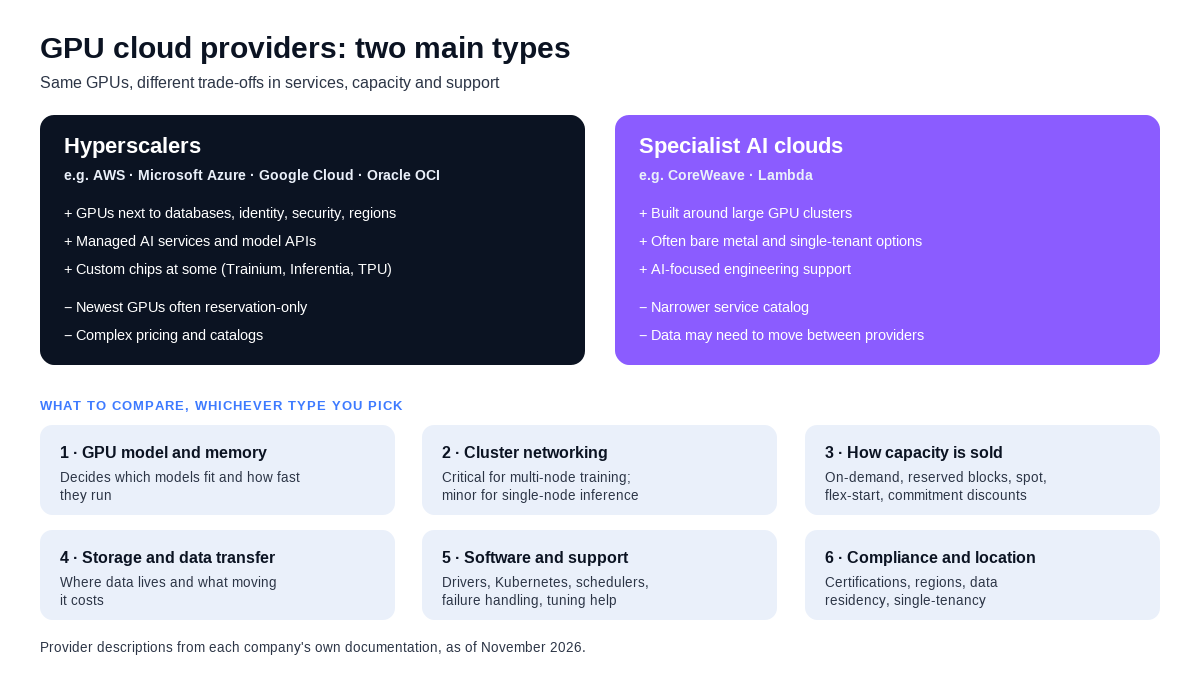
GPU cloud providers rent out graphics processors, and clusters of them, by the hour, by reservation or as managed services. They fall into two main groups. Hyperscalers (AWS, Microsoft Azure, Google Cloud and Oracle Cloud Infrastructure) sell GPUs alongside a broad catalog of other cloud services [1][3][4][6]. Specialist AI clouds, such as CoreWeave and Lambda, focus on large GPU clusters, often bare metal and single-tenant [7][8]. The right choice depends less on the brand than on four things: the exact GPU and its memory, the network between servers, how capacity is sold, and how much surrounding software and support you need [2][4][10].
This guide compares provider types. For how AI workloads use cloud infrastructure in general, see cloud computing for AI workloads. For the chips themselves, see AI chips vs CPUs vs GPUs vs TPUs.
What you're actually renting
"A GPU in the cloud" can mean very different things:
- A virtual machine with one or more GPUs. This is the most common unit. Azure's ND H100 v5, for example, starts at a single VM with eight NVIDIA H100 GPUs [3].
- A bare metal server. You get the whole machine with no virtualization layer. Oracle offers both VMs and bare metal GPU instances [6], CoreWeave emphasizes bare metal [7], and Google Cloud's A4X Max machine type is available only as bare metal [4].
- A rack-scale system. NVIDIA's GB200 NVL72 joins up to 72 Blackwell GPUs, paired with Arm-based Grace CPUs, in one NVLink domain. AWS sells it as P6e-GB200 UltraServers [1], and CoreWeave offers it too [7].
- A cluster. Thousands of GPUs joined by a dedicated high-speed network, sold as a reserved block [9][10].
- A managed service. Training or inference platforms, or model APIs, where the provider runs the GPUs for you [5].
Type 1: hyperscalers
Provider | Notable GPU and accelerator options (as of November 2026) |
|---|---|
AWS | NVIDIA H100/H200 (P5 family), Blackwell (P6-B200, P6-B300, P6e-GB200 UltraServers), inference GPUs (G6/G7 families), plus its own Trainium and Inferentia chips [1] |
Microsoft Azure | ND-family VMs, including ND H100 v5 (NVIDIA) and ND MI300X v5 (8 AMD Instinct MI300X GPUs) [3] |
Google Cloud | A3 (H100/H200), A4 (B200), A4X (GB200), A4X Max (GB300), A5X (NVIDIA Vera Rubin), G2 (NVIDIA L4) [4]; plus its own Cloud TPUs [5] |
Oracle (OCI) | NVIDIA and AMD GPUs on VMs and bare metal; Superclusters that Oracle says scale to 131,072 Blackwell B200 GPUs; up to 3,200 Gb/s RDMA cluster networking [6] |
Strengths. Everything else you need sits next to the GPUs: databases, identity, security tooling and global regions. You also get mature compliance programs and managed AI services. Some hyperscalers also offer custom accelerators (AWS Trainium and Inferentia, Google TPUs) as alternatives to NVIDIA hardware [1][5].
For context on Oracle's AI infrastructure push, see our report on Oracle's 2026 AI cloud restructuring.
Watch-outs. The newest GPUs often can't be launched on demand. Google says unreserved on-demand capacity isn't available for its A5X, A4X Max, A4X, A4 and A3 Ultra machine types [4]. Pricing and service catalogs can also be complex.
Type 2: specialist AI clouds
Specialist providers build their business around GPU compute. From their own descriptions (as of November 2026):
- CoreWeave says its GPU compute is purpose-built for demanding AI workloads, from training to production. It cites a fleet across 40+ data centers, bare-metal access to NVIDIA GPUs including GB200 NVL72, and liquid-cooled racks supporting 130 kW of power [7].
- Lambda offers GPU instances, "1-Click Clusters" and large "Superclusters." It lists NVIDIA hardware including GB300 NVL72, HGX B300 and HGX B200, and emphasizes single-tenant infrastructure and SOC 2 Type II compliance [8].
Strengths. Their catalogs center on NVIDIA's latest rack-scale systems (GB200 NVL72 at CoreWeave, GB300 NVL72 at Lambda), cluster designs tuned for AI, and hands-on help; Lambda, for example, advertises managed clusters and co-engineering [7][8].
Watch-outs. These providers have narrower service catalogs, so you may need storage, databases or identity from elsewhere, and data moving between providers can add cost and complexity. Check regions, compliance certifications and contract terms carefully.
How capacity is sold
This is often the biggest practical difference between offers. The main models, using AWS and Google as reference points:
Model | What it means | Typical use |
|---|---|---|
On-demand | Pay by the hour or second, no commitment [2] | Experiments; short jobs |
Commitment discounts | AWS Savings Plans: up to 72% off on-demand prices for a usage commitment [2] | Steady inference |
Reserved blocks | AWS Capacity Blocks for ML reserve GPU instances in UltraClusters for a future start date [9]; Google's future reservations for capacity blocks are the only option for its A5X, A4X Max and A4X machines [4] | Planned training runs |
Spot / preemptible | Spare capacity, up to 90% off on AWS, but it can be taken back [2]; Google recommends Spot only for fault-tolerant, checkpointed jobs [4] | Interruptible batch work |
Flex-start | Google provisions instances, for up to seven days, when capacity becomes available [4] | Batch training that can wait |
Specialist clouds also sell dedicated clusters, such as Lambda's single-tenant Superclusters [8].
Be careful with headline price comparisons. Providers publish selective comparisons. Oracle, for example, claims GPUs at other cloud providers "can be up to 220% more expensive," based on on-demand pricing as of June 2024 [6]. Compare the same GPU, memory, networking and commitment term, and include storage, data transfer and support.
The comparison checklist
- GPU model and memory. An H100 instance and a Blackwell instance are different products. Check GPU memory per accelerator and per server, because it decides which models fit [1][3].
- Cluster networking. For multi-node training, look for a dedicated low-latency fabric. AWS EFA uses an operating-system-bypass design for low-latency, low-jitter communication [10]. Azure's ND H100 v5 gives each GPU a 400 Gbps InfiniBand link [3]. For single-node inference this matters much less.
- Capacity guarantees. Ask whether you can get the GPUs you need, where and when, and in writing [4][9].
- Storage and data transfer. Where does your data live, and what does it cost to move?
- Software stack. Drivers, Kubernetes support, schedulers and managed AI services. Custom chips such as TPUs need specific toolchains; TPU code must be compiled with XLA [5].
- Support and reliability. Response times, hardware-failure handling, and help with performance tuning.
- Compliance and location. Certifications, data residency and single-tenant options [8].
Which type fits which team
Situation | Usually a good fit |
|---|---|
Already all-in on one cloud, with moderate GPU needs | That hyperscaler: same identity, data and tooling |
Large training run needing thousands of the newest GPUs | Reserved blocks from a hyperscaler or a specialist; get quotes from both [4][7][9] |
Startup experimenting with fine-tuning | On-demand instances from either type [2][8] |
Cost-sensitive batch inference | Spot or flex-start capacity [2][4] |
Strict regulatory requirements | The provider with the right certifications and regions; consider single-tenant [8] |
Many organizations use more than one: a hyperscaler for their main platform and a specialist for burst training capacity.
Limitations and risks
- Supply constraints. Top-end GPUs are reservation-driven at major providers [4].
- Vendor concentration. Most offerings are built on NVIDIA hardware. AMD options (Azure ND MI300X v5; AMD GPUs at OCI) and custom chips widen the choice [3][5][6].
- Hidden costs. Idle reserved capacity, storage and data transfer can outweigh hourly GPU savings.
- Provider claims. Performance and price claims on vendor pages are marketing. Benchmark your own workload.
Frequently asked questions
What is a GPU cloud provider?
A company that rents GPU-equipped servers or clusters over the internet, by the hour, by reservation or as managed AI services. Hyperscalers such as AWS, Azure, Google Cloud and Oracle offer them alongside general cloud services [1][3][4][6]. Specialist providers such as CoreWeave and Lambda focus on GPU compute [7][8].
Are specialist GPU clouds cheaper than AWS, Azure or Google?
Sometimes, but there's no universal answer. Prices depend on the GPU, commitment term and contract. Hyperscalers' own discounts, such as AWS Savings Plans at up to 72% or Spot at up to 90%, change the math too [2]. Compare total cost for your workload.
Why can't I get the newest GPUs on demand?
Demand exceeds supply. Google, for example, doesn't offer unreserved on-demand capacity for several of its newest GPU machine types. For A5X, A4X Max and A4X, future reservations for capacity blocks are the only supported option [4].
Do I need bare metal GPUs?
Only if you need full control of the hardware or maximum performance for large distributed jobs. Most teams do fine with GPU virtual machines or managed services [3][6].
Does the network matter if I only use one GPU server?
Much less. Fast inter-server fabrics such as AWS EFA or InfiniBand matter for distributed training across many servers [3][10]. For single-node inference, focus on GPU memory, price and availability.
Sources
- Amazon Web Services. "Amazon EC2 Accelerated Computing instances." https://aws.amazon.com/ec2/instance-types/accelerated-computing/
- Amazon Web Services. "Amazon EC2 pricing." https://aws.amazon.com/ec2/pricing/
- Microsoft Learn. "ND family virtual machine size series." https://learn.microsoft.com/en-us/azure/virtual-machines/sizes/gpu-accelerated/nd-family
- Google Cloud. "GPU machine types" (Compute Engine documentation). https://cloud.google.com/compute/docs/gpus
- Google Cloud. "Introduction to Cloud TPU." https://cloud.google.com/tpu/docs/intro-to-tpu
- Oracle. "GPU, Virtual Machines and Bare Metal." https://www.oracle.com/cloud/compute/gpu/
- CoreWeave. "GPU Compute." https://www.coreweave.com/products/gpu-compute
- Lambda. Homepage and products overview. https://lambda.ai/
- Amazon Web Services. "Amazon EC2 Capacity Blocks for ML." https://aws.amazon.com/ec2/capacityblocks/
- Amazon Web Services. "Elastic Fabric Adapter." https://aws.amazon.com/hpc/efa/