Cloud Computing for AI Workloads: Compute, Network, Storage, Cost
How the cloud runs AI: GPU and TPU instances, high-speed networking, storage, managed services and how to buy scarce capacity, with a guide for each workload.
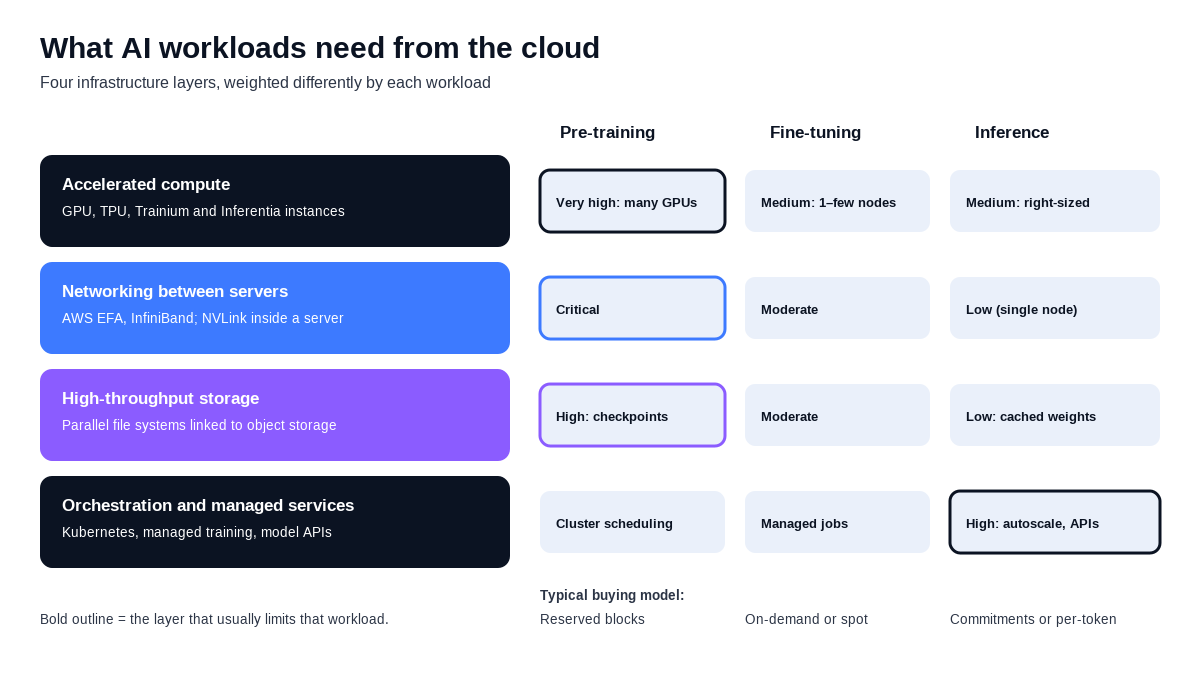
Running AI in the cloud means renting four things that ordinary web apps barely need. First, accelerated compute: GPUs, Google's TPUs or AWS's Trainium chips [1][7]. Second, very fast networking between servers so many accelerators can work as one [3][9]. Third, storage that can keep those accelerators fed with data [4]. Fourth, orchestration or managed services that hide much of the complexity [10]. Training a large model leans hardest on networking and reserved capacity. Inference leans on cost per request, latency and autoscaling. Getting that match right is most of the job.
New to cloud basics? Start with what cloud computing is. For the difference between building a model and running one, see AI model training vs inference.
Why AI workloads are different
A typical web app spreads lots of small, independent requests across many ordinary servers. AI workloads look different:
- Huge amounts of matrix math. Google describes TPUs as hardware designed for the large matrix operations common in machine learning [7]. GPUs fill the same role. See our explainer on AI chips vs CPUs vs GPUs vs TPUs.
- Tightly coupled servers. In distributed training, accelerators across many machines exchange results constantly, so the network between servers becomes part of the computer [3].
- Memory-hungry models. Model size is often limited by accelerator memory. An AWS P5 instance carries up to 8 NVIDIA H100 GPUs with up to 640 GB of high-bandwidth memory in total, and P5e/P5en with H200s go up to 1,128 GB [2].
- Scarce, expensive hardware. The newest accelerators often can't be bought on demand at all. They have to be reserved [8].
Layer 1: accelerated compute
The three biggest clouds offer broadly similar menus (as of November 2026):
Cloud | Training-class options | Inference-oriented options |
|---|---|---|
AWS | P5/P5e/P5en (NVIDIA H100/H200), P6-B200 and P6-B300 (Blackwell), P6e-GB200 UltraServers with up to 72 Blackwell GPUs in one NVLink domain; Trn2 (AWS Trainium2) [1] | G6/G6e/G7/G7e (NVIDIA inference and graphics GPUs); Inf2 (AWS Inferentia2) [1] |
Google Cloud | A3 (H100/H200), A4 (B200), A4X (GB200), A4X Max (GB300), A5X (NVIDIA Vera Rubin) [8]; Cloud TPUs, including TPU v5e, v5p, v6e and TPU7x (Ironwood) [12] | G2 (NVIDIA L4, described as ideal for cost-optimized inference) [8]; TPUs for online prediction [7] |
Microsoft Azure | ND-family VMs such as ND H100 v5 (8 NVIDIA H100) and ND MI300X v5 (8 AMD Instinct MI300X) [9] | Other GPU VM families (not covered here) |
GPU or TPU? Google's own guidance is a useful rule of thumb [7]:
- TPUs suit models dominated by matrix computations, with no custom operations in the main training loop, that train for weeks or months with large batch sizes.
- GPUs suit models with many custom PyTorch/JAX operations, or operations TPUs don't support.
- CPUs suit quick prototyping and small, simple models.
TPU code must be compiled with the XLA compiler, and models with dynamic tensor shapes are a poor fit [7]. Custom chips such as AWS Trainium and Inferentia, or Google TPUs, can lower cost, but they tie you more closely to one cloud's software stack.
Layer 2: networking between servers
Training a model across hundreds or thousands of accelerators only works if they can exchange data quickly. Clouds build dedicated "back-end" networks for this:
- AWS Elastic Fabric Adapter (EFA) is a network interface with an operating-system-bypass design for low-latency, low-jitter communication between instances. It lets tightly coupled HPC and distributed ML jobs scale to thousands of cores [3]. P5-family instances offer up to 3,200 Gbps of EFA networking and are deployed in EC2 UltraClusters [2].
- Azure ND H100 v5 gives each GPU its own 400 Gbps NVIDIA Quantum-2 InfiniBand connection, for 3.2 Tbps per VM, and supports scaling to thousands of GPUs [9].
- Inside a server, GPUs talk over NVLink. P5 instances support up to 900 GB/s of NVSwitch GPU interconnect [2].
For inference, the inter-server network matters much less unless a model is too big for one machine. That's one reason inference can often run on cheaper, more widely available instances.
Layer 3: storage that keeps accelerators busy
Expensive accelerators sitting idle while waiting for data waste money. AI stacks typically pair cheap object storage, which holds the dataset, with a high-throughput file system for active training. AWS's FSx for Lustre, for example, links to S3 buckets. AWS says it delivers up to terabytes per second of throughput, millions of IOPS and sub-millisecond latency, with up to 1,200 Gbps per client using EFA and NVIDIA GPUDirect Storage [4]. Checkpointing (saving training progress regularly) also depends on fast storage, so a hardware failure doesn't cost days of work.
Layer 4: orchestration and managed services
You can manage accelerators yourself, typically with Kubernetes (see our Kubernetes architecture explainer), or hand more of the work to the provider:
- Managed model access. Services such as Amazon Bedrock offer access to hundreds of foundation models through one platform, with tools for evaluation, customization (knowledge bases, fine-tuning) and building agents [10].
- Managed training and serving platforms run jobs on clusters for you. Google, for example, offers TPUs through Compute Engine, Google Kubernetes Engine and its Gemini Enterprise Agent Platform [7].
- Serverless-style inference bills per request or token. It's the best fit for spiky traffic; see serverless computing explained.
How to get capacity, and pay for it
For top-end accelerators, getting capacity at all is often the hardest part. The buying options (as of November 2026):
Option | How it works | Best for |
|---|---|---|
On-demand | Pay by the hour or second, no commitment [5] | Experiments; inference baselines |
Reserved capacity | AWS Capacity Blocks for ML reserve GPU or Trainium instances in UltraClusters for a future start date [6]; Google offers future reservations for capacity blocks [8] | Planned training runs |
Commitment discounts | AWS Savings Plans cut up to 72% off on-demand prices in exchange for a usage commitment [5] | Steady inference fleets |
Spot / preemptible | Spare capacity at up to 90% off on AWS; it can be reclaimed [5] | Fault-tolerant jobs with frequent checkpoints |
Flex-start | Google's Dynamic Workload Scheduler provisions instances (up to seven days) when capacity frees up [8] | Batch training that can wait |
Supply is tight at the very top. Google states that unreserved on-demand capacity isn't available for its A5X, A4X Max, A4X, A4 and A3 Ultra machine types. For A5X, A4X Max and A4X, future reservations for capacity blocks are the only supported option [8].
Matching the setup to the workload
Workload | Compute | Network | Storage | Buying model |
|---|---|---|---|---|
Pre-training a large model | Many top-end GPUs or TPUs | Critical: EFA/InfiniBand-class [3][9] | Parallel file system plus object store [4] | Reserved blocks [6][8] |
Fine-tuning | One to a few GPU instances | Moderate | Object storage is often enough | On-demand or spot with checkpoints [5] |
Real-time inference | Inference GPUs or custom chips [1] | Low (single node) | Model weights cached locally | Savings Plans or managed per-token [5][10] |
Batch inference | Any spare accelerators | Low | Object storage | Spot or flex-start [5][8] |
Retrieval-augmented apps | Inference plus CPU for search | Low | Vector database | Managed services [10] |
Not every AI project needs a cluster. Smaller models can be cheaper to serve. See our comparison of small vs large language models.
Limitations and risks
- Cost overruns. Idle accelerators are expensive. Monitor utilization and shut down idle capacity.
- Lock-in. Custom chips and managed AI platforms speed you up but make moving harder. Portable containers and open frameworks reduce the risk.
- Capacity risk. The newest hardware may only be available by reservation [8].
- Energy and location. AI is driving data center power demand. Lawrence Berkeley National Laboratory found US data center electricity use reached 176 TWh in 2023, 4.4% of US consumption. It projects 325 to 580 TWh by 2028, or 6.7% to 12% of the forecast total [11]. Power availability increasingly shapes where new capacity appears. See the future of cloud infrastructure.
How to choose: a short checklist
- Define the workload: training, fine-tuning or inference, and the model size.
- Start managed (model APIs, managed training) unless you have a clear reason to run clusters yourself [10].
- Size memory first. Will the model fit on one accelerator or one server [2]?
- Plan capacity early for training runs, using reservations [6][8].
- Use spot capacity for anything that can checkpoint and restart [5].
- Compare the total bill: compute, storage, networking and data transfer.
Frequently asked questions
Do I need GPUs to run AI in the cloud?
Not always. Google recommends CPUs for quick prototyping and small, simple models [7], and managed model APIs such as Amazon Bedrock let you pick a model rather than an instance [10]. Large-model training and high-volume inference generally need GPUs, TPUs or custom accelerators [1][7].
What's the difference between GPUs and TPUs in the cloud?
TPUs are Google's custom chips for matrix-heavy ML and need the XLA compiler. GPUs are more flexible for custom operations [7]. Google suggests TPUs for large, matrix-dominated models that train for weeks, and GPUs where models use many custom operations [7].
Why does networking matter so much for AI training?
Distributed training splits a model's work across many accelerators that must constantly exchange results. Dedicated low-latency networks such as AWS EFA or Azure's InfiniBand let jobs scale to thousands of accelerators [3][9].
How can I reduce the cost of AI in the cloud?
Use spot capacity, up to 90% off on AWS, for interruptible jobs with checkpoints. Use commitment discounts such as Savings Plans, up to 72% off, for steady inference [5]. Choose the smallest model that does the job, and keep accelerators busy.
Why can't I just launch the newest GPUs on demand?
Demand outstrips supply for top-end hardware. Google, for example, doesn't offer unreserved on-demand capacity for several of its newest GPU machine types, which must be reserved in advance [8].
Sources
- Amazon Web Services. "Amazon EC2 Accelerated Computing instances." https://aws.amazon.com/ec2/instance-types/accelerated-computing/
- Amazon Web Services. "Amazon EC2 P5 Instances." https://aws.amazon.com/ec2/instance-types/p5/
- Amazon Web Services. "Elastic Fabric Adapter." https://aws.amazon.com/hpc/efa/
- Amazon Web Services. "Amazon FSx for Lustre." https://aws.amazon.com/fsx/lustre/
- Amazon Web Services. "Amazon EC2 pricing." https://aws.amazon.com/ec2/pricing/
- Amazon Web Services. "Amazon EC2 Capacity Blocks for ML." https://aws.amazon.com/ec2/capacityblocks/
- Google Cloud. "Introduction to Cloud TPU." https://cloud.google.com/tpu/docs/intro-to-tpu
- Google Cloud. "GPU machine types" (Compute Engine documentation). https://cloud.google.com/compute/docs/gpus
- Microsoft Learn. "ND family virtual machine size series." https://learn.microsoft.com/en-us/azure/virtual-machines/sizes/gpu-accelerated/nd-family
- Amazon Web Services. "Amazon Bedrock." https://aws.amazon.com/bedrock/
- Shehabi, A., et al. "2024 United States Data Center Energy Usage Report." Lawrence Berkeley National Laboratory, December 2024. https://eta-publications.lbl.gov/sites/default/files/2024-12/lbnl-2024-united-states-data-center-energy-usage-report_1.pdf
- Google Cloud. "TPU architecture" (Cloud TPU documentation). https://docs.cloud.google.com/tpu/docs/system-architecture-tpu-vm