Cloud Networking Explained: VPCs, Subnets, Gateways and More
How cloud networking works: virtual networks, subnets, route tables, NAT and internet gateways, security groups, peering, VPNs, load balancers and DNS.
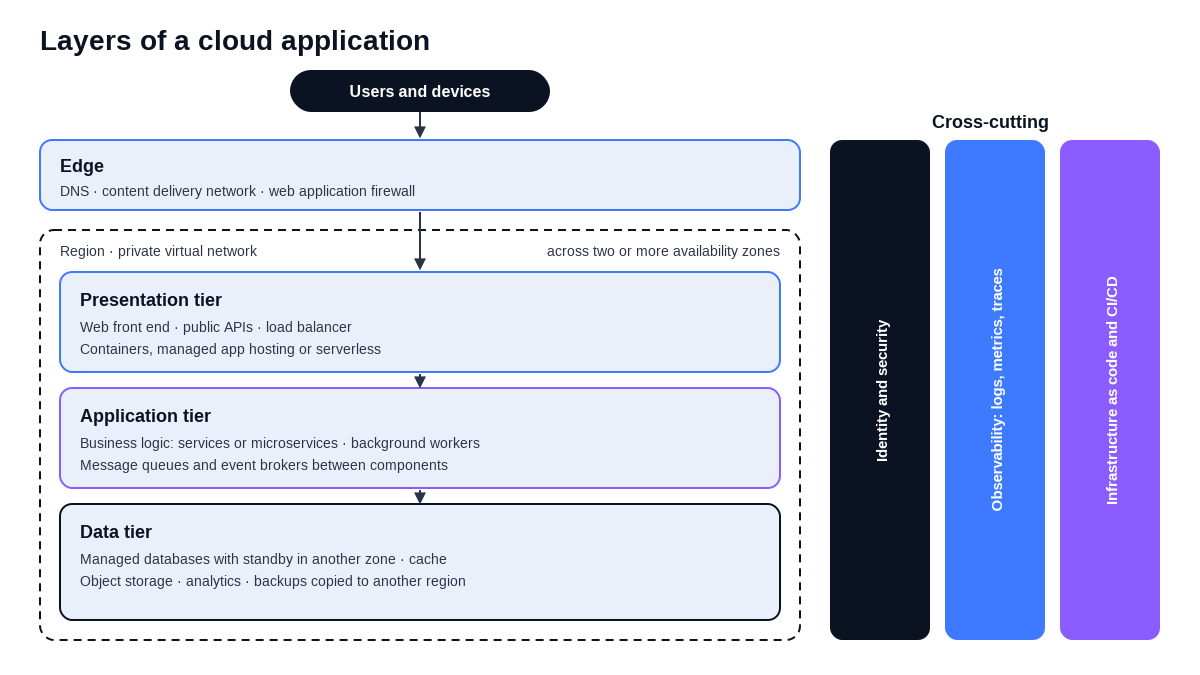
Cloud networking is the set of software-defined building blocks that connect your cloud resources to each other, to the internet and to your own offices or data centers. At its center is a private virtual network (a VPC on AWS and Google Cloud, a VNet on Azure) divided into subnets. Route tables, gateways and firewall rules control where traffic can go, and load balancers, DNS and content delivery networks sit in front of your applications.
If you're new to the cloud itself, start with our cloud computing guide.
The virtual network
AWS describes a VPC as "a logically isolated virtual network" that closely resembles a traditional network in your own data center, but runs on AWS's scalable infrastructure [1]. Azure Virtual Network is described the same way: the fundamental building block for a private network in Azure, letting resources communicate with each other, the internet and on-premises networks [8].
You choose the private IP address range (a CIDR block such as 10.0.0.0/16), and everything you launch inside gets addresses from it. Plan that range carefully. Overlapping ranges cause trouble later: AWS, for example, won't let you peer two VPCs whose CIDR blocks overlap [5].
A key difference between providers: scope
The three big clouds don't scope networks the same way (as of November 2026):
- AWS: you create VPCs per Region (every account gets a default VPC in each Region), and each subnet must sit in a single Availability Zone [1].
- Azure: resources are created in a region, and a resource can only join a virtual network in the same region and subscription, though you can connect virtual networks across subscriptions and regions [9]. Virtual networks and subnets span all availability zones in their region [8].
- Google Cloud: VPC networks, including their routes and firewall rules, are global resources not tied to any region or zone, while subnets are regional [10].
That difference shapes multi-region design. On Google Cloud, one network can span regions. On AWS and Azure, you build one network per region and connect them.
Subnets: public and private
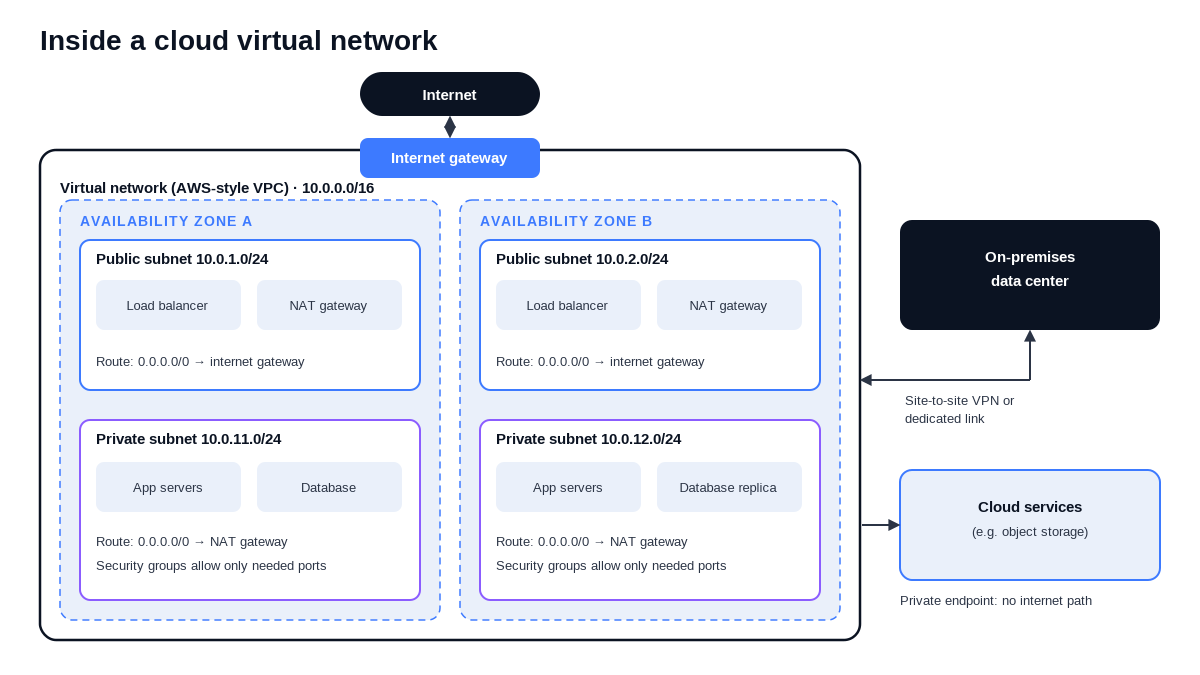
A subnet is a range of IP addresses within the virtual network [1]. On AWS, what makes a subnet "public" or "private" isn't a setting on the subnet. It's how you configure routing for it [15].
- Public subnet: it has a direct route to an internet gateway [15]. Load balancers and bastion hosts usually live here.
- Private subnet: no direct route to an internet gateway; its resources need a NAT device to reach the internet [15]. Application servers and databases usually live here.
A common AWS pattern places one public and one private subnet in each of at least two Availability Zones [15], so the application survives the loss of one zone. On Azure, where subnets already span zones, you deploy resources to different zones within the same virtual network instead [8][9]. Our cloud computing architecture guide covers that layout in more detail.
Routing and gateways
Route tables decide where traffic from a subnet or gateway goes [1]. The main gateway types:
- Internet gateway: connects the VPC to the internet [1].
- NAT gateway: lets instances in a private subnet connect out to services beyond the VPC, while external services can't initiate connections to them [2]. On AWS, a public NAT gateway sits in a public subnet with an Elastic IP address and routes its traffic through the internet gateway [2]. Servers can download updates without being reachable from the internet.
- VPC endpoints and private links: connect to cloud services privately, without an internet gateway or NAT device [1]. AWS PrivateLink lets you reach services "as if they were in your VPC," without public IP addresses [7].
Private endpoints matter for both security and cost: traffic to storage or databases stays on the provider's network instead of looping out through NAT.
Firewalls: security groups and network ACLs
Cloud networks usually offer two layers of filtering. AWS's version shows the difference clearly.
Security group | Network ACL | |
|---|---|---|
Applies to | The resources it's associated with [3] | A whole subnet [4] |
State | Stateful: responses to allowed traffic are automatically allowed [3] | Stateless: responses must be allowed explicitly [4] |
Typical use | Main, fine-grained control ("app servers accept port 443 from the load balancer only") | Coarse extra layer, such as blocking a known-bad address range |
Azure's network security groups and Google Cloud's VPC firewall rules fill the same role [8][10]. A good rule of thumb is to reference other security groups or service identities instead of IP ranges where possible, because cloud IP addresses change. For the broader principle of not trusting traffic based on network location, see our guide to zero trust cloud security.
Connecting networks to each other
As you grow, you'll have many networks: per environment, per team, per region.
- Peering joins two virtual networks so they route traffic privately [1]. On AWS, peering is one-to-one and not transitive: if VPC A peers with B and C, B and C still can't talk through A [5].
- Transit hubs solve that at scale. An AWS transit gateway "acts as a central hub" to route traffic between VPCs, VPN connections and Direct Connect connections [1]. On Azure, you can combine peering and a VPN gateway into a hub-and-spoke network [9].
With a handful of networks, peering is simpler. With dozens, a hub-and-spoke design is easier to manage and audit.
Connecting to on-premises
There are two main options for linking your data center or offices to the cloud:
- Site-to-site VPN: an encrypted tunnel over the internet between your VPN device and a cloud VPN gateway. Azure's documentation describes exactly this model [8]. It's usually quicker and cheaper to set up than a dedicated link, but performance depends on the internet path.
- Dedicated connections: AWS Direct Connect links your network to a Direct Connect location over a standard Ethernet fiber-optic cable, bypassing internet service providers in your network path [6]. Azure ExpressRoute is a private connection through a partner, where traffic doesn't go over the internet [8]. Google Cloud connects VPC networks to on-premises networks with Cloud VPN or Cloud Interconnect [10].
Many organizations run both: a dedicated link for steady traffic, with a VPN as backup.
In front of the application: load balancers, CDN and DNS
- Load balancers spread traffic across healthy servers. AWS's Application Load Balancer works at layer 7 of the OSI model (HTTP), evaluating listener rules in priority order to decide where each request goes [11]. Its Network Load Balancer works at layer 4 and can handle millions of requests per second [12].
- Content delivery networks cache content close to users. Amazon CloudFront delivers content through a worldwide network of edge locations, routing each request to the location with the lowest latency [13].
- DNS turns names into addresses. Amazon Route 53 provides domain registration, DNS routing and health checking [14], and DNS-based failover is a common building block for disaster recovery.
Visibility and troubleshooting
You can't put a packet sniffer on the provider's switches, so use the provider's tools. AWS offers VPC Flow Logs, which capture information about IP traffic to and from network interfaces, and Traffic Mirroring, which copies traffic to security and monitoring appliances for deep packet inspection [1]. Send flow logs to your monitoring stack; our explainer on observability vs monitoring explains how this fits.
Common mistakes
- Address ranges that overlap with on-premises networks or other VPCs, which blocks peering later [5].
- Everything in public subnets. Databases and app servers rarely need public IP addresses.
- Over-broad firewall rules, such as allowing
0.0.0.0/0to administrative ports. - All traffic through NAT, including traffic to cloud storage that could use private endpoints [1][7].
- A peering mesh nobody can follow when a transit hub would be clearer [1][5].
- Single-zone designs that put every subnet in one Availability Zone.
Frequently asked questions
What is a VPC in cloud computing?
A virtual private cloud is a logically isolated virtual network inside a cloud provider, where you choose the IP address range, subnets, routes and gateways. AWS says it closely resembles a traditional data center network [1]. Azure calls its equivalent a virtual network (VNet) [8].
What's the difference between a public and a private subnet?
On AWS, a public subnet has a direct route to an internet gateway, so resources with public IPs can be reached from the internet [15]. A private subnet doesn't; its resources can still reach out through a NAT gateway, but external services can't initiate connections to them [2].
What is the difference between a security group and a network ACL?
On AWS, security groups apply to individual resources and are stateful, so return traffic is allowed automatically [3]. Network ACLs apply to a whole subnet and are stateless, so you must allow return traffic explicitly [4].
When should I use a transit gateway instead of VPC peering?
Peering suits a few networks, but on AWS it isn't transitive, so every pair needs its own connection [5]. A transit gateway acts as a central hub for many VPCs and on-premises links [1], which becomes simpler once you have more than a handful of networks.
Is a VPN or a dedicated connection better for hybrid cloud?
A site-to-site VPN runs through an encrypted tunnel over the internet [8] and is usually quicker to set up. A dedicated link such as AWS Direct Connect or Azure ExpressRoute avoids the public internet path [6][8], giving more predictable performance at higher cost. Many companies use both.
Sources
- Amazon Web Services, "What is Amazon VPC?"
- Amazon Web Services, "NAT gateways"
- Amazon Web Services, "Control traffic to your AWS resources using security groups"
- Amazon Web Services, "Network ACL basics"
- Amazon Web Services, "VPC peering basics"
- Amazon Web Services, "What is Direct Connect?"
- Amazon Web Services, "What is AWS PrivateLink?"
- Microsoft Learn, "What is Azure Virtual Network?"
- Microsoft Learn, "Plan virtual networks"
- Google Cloud, "VPC networks"
- Amazon Web Services, "What is an Application Load Balancer?"
- Amazon Web Services, "What is a Network Load Balancer?"
- Amazon Web Services, "What is Amazon CloudFront?"
- Amazon Web Services, "What is Amazon Route 53?"
- Amazon Web Services, "Subnets for your VPC"