Endpoint Detection and Response (EDR) Explained
How EDR agents record endpoint activity, detect attacks by behavior and let responders isolate devices, plus kernel-access risks, evasion and how to choose.
Endpoint detection and response (EDR) is security software that continuously records what happens on laptops, desktops and servers, detects attacks from that activity, and lets defenders respond, for example by cutting a device off the network. The US Office of Management and Budget describes EDR as combining real-time continuous monitoring and collection of endpoint data with rules-based automated response and analysis [1]. Where classic antivirus asks "is this file known to be bad?", EDR asks "is this behavior an attack?"
For how EDR compares with XDR and SIEM, see our XDR vs EDR vs SIEM guide. This article explains how EDR itself works.
How EDR works
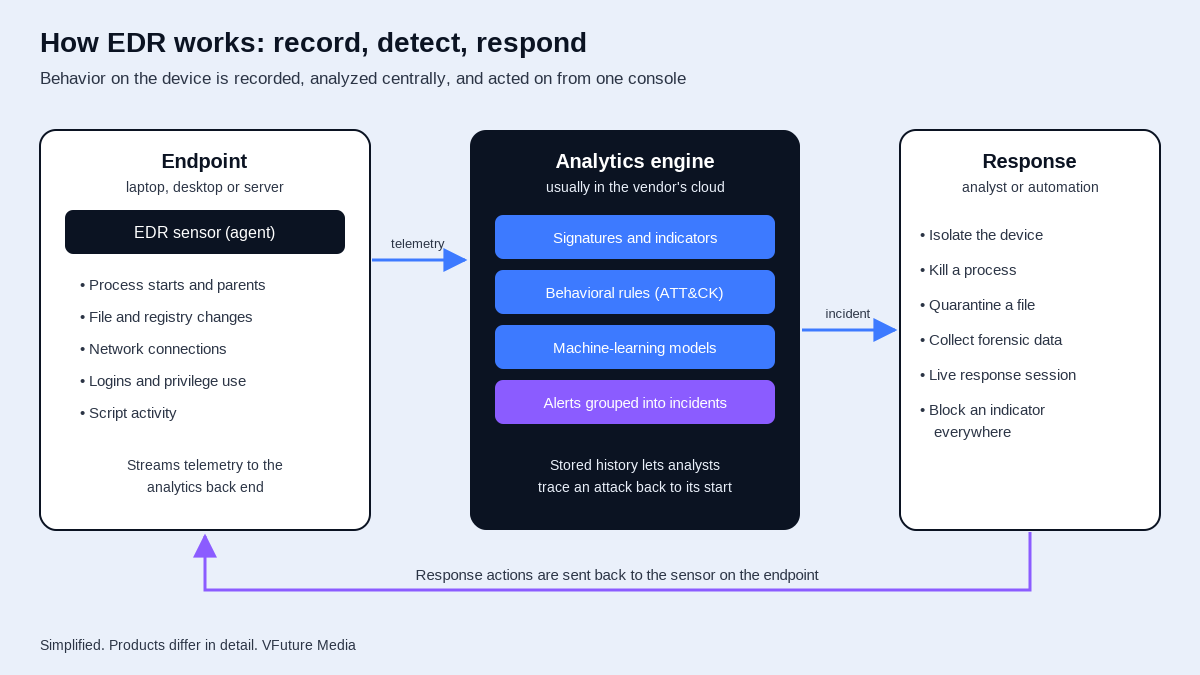
An EDR product has three parts (see the diagram).
1. The sensor on each endpoint
A lightweight agent runs on every device and records security-relevant activity. Microsoft's documentation for its EDR lists the kinds of telemetry involved: process information, network activity, deep optics into the kernel and memory manager, user logins, and registry and file system changes [2]. In plain terms, the sensor sees:
- Processes: what started, what launched it, and with which command line.
- Files and registry: what was created, changed or deleted.
- Network connections: which process talked to which address.
- Logins and privilege use: who signed in, how, and with what rights.
- Scripts: PowerShell and other script activity, a favorite tool of attackers.
2. The analytics engine
Telemetry streams to a back end, usually in the vendor's cloud, where it's analyzed with several methods:
- Signatures and indicators catch known malware and known-bad domains.
- Behavioral rules catch techniques rather than files: a Word document spawning PowerShell, or a process reading the memory of the Windows credential subsystem.
- Machine-learning models score unusual behavior.
- Threat intelligence links activity to known attacker groups.
Good products map detections to MITRE ATT&CK, a knowledge base of adversary tactics and techniques based on real-world observations [7], so analysts can see which stage of an attack they're looking at.
Related alerts are grouped. Microsoft, for instance, aggregates alerts with the same attack techniques or attacker into a single incident [2], which keeps analysts from chasing fifty alerts that are really one intrusion.
3. Response actions
This is the "R" in EDR. From one console, a responder or an automated playbook can:
- Isolate a device from the network while it stays connected to the EDR service, which keeps monitoring it [8].
- Kill a process and quarantine a file.
- Collect forensic data, such as memory or file samples.
- Open a live response session to investigate the machine remotely.
- Block an indicator across every endpoint at once.
Why recorded history matters
Most intrusions aren't spotted at the first step. EDR's stored telemetry lets investigators go back in time. Microsoft says its EDR keeps this data for six months, so an analyst can trace an attack back to its start [2]. Retention varies by product and license, so check it. Without that history, a team that finds ransomware on day 30 may never learn how the attacker got in on day one. Our guide to how ransomware attacks work shows how long those early stages can last.
EDR vs antivirus vs MDR
Traditional antivirus | EDR | MDR (managed detection and response) | |
|---|---|---|---|
Main question | Is this file known to be malicious? | Is this behavior an attack? | Who watches and responds 24/7? |
Data kept | Little; mostly verdicts | Detailed activity history | Uses the EDR's data |
Catches fileless and hands-on-keyboard attacks | Rarely | Designed to | Yes, via the EDR |
Response | Delete or quarantine files | Isolate, kill, collect, remote shell | Provider's analysts take the actions |
Who operates it | IT | Security team | An external provider |
Many products now bundle antivirus-style prevention (often called EPP, endpoint protection platform) with EDR in one agent. MDR isn't a different technology. It's a service in which a provider's analysts run the EDR for you.
EDR in US federal policy
EDR became a federal priority after Executive Order 14028, Improving the Nation's Cybersecurity [1]. OMB memo M-22-01 (October 2021) directed agencies to work with CISA on EDR deployment, giving CISA access to agency EDR deployments, and tied EDR adoption to the shift in cyber defense from a reactive to a proactive posture [1]. It set deadlines, such as 90 days for agencies to give CISA access to their current enterprise EDR deployments or engage with CISA on future options [1].
The kernel question
To see and stop attacks, many Windows EDR agents have historically run a driver inside the operating system kernel. That gives deep visibility and makes the agent harder for malware to kill. It also means a bug in the agent can crash the whole machine.
That risk became real on July 19, 2024. A faulty content update to CrowdStrike's Falcon sensor crashed Windows systems worldwide. Microsoft estimated that 8.5 million Windows devices were affected, less than one percent of all Windows machines, but with broad economic and societal impact because of the critical services involved [4]. CrowdStrike's own root cause analysis traced it to a mismatch: a new template type defined 21 input fields, but the code that used it supplied only 20 [5].
The industry response is a gradual move away from kernel dependence. In November 2026, Microsoft announced that its Windows endpoint security platform is reaching general availability on Windows 11, describing it as work with security partners to reduce reliance on kernel drivers while preserving the capabilities security tools depend on [6]. Vendor adoption is happening product by product, so check your EDR vendor's roadmap.
How attackers try to evade EDR
Because EDR is effective, attackers target it directly. MITRE ATT&CK documents a technique in which adversaries disable, degrade or tamper with security tools, explicitly including EDR. Methods include stopping services, killing processes, changing configurations, blocking updates and, in more advanced cases, abusing legitimate drivers to render tools non-functional [3]. Attackers also try to blind the telemetry that EDR relies on, such as Windows event tracing [3].
Defenses include tamper protection, alerts when an agent goes silent, and forwarding telemetry off the device quickly so there's a record even if the agent is later disabled.
Benefits
- Catches what file scanning misses, including fileless attacks and attackers using legitimate admin tools.
- Fast containment. Isolating a laptop takes seconds and can stop ransomware spreading.
- Evidence for investigations, with a timeline of what happened on each device [2].
- Consistent action across thousands of devices from one console.
Limitations and risks
- Coverage gaps. Unmanaged devices, network appliances, many IoT and OT systems, and some legacy servers can't run an agent.
- Alert volume. Behavioral detection produces false positives that need tuning and skilled triage.
- Agent risk. A privileged agent on every machine is itself a single point of failure, as July 2024 showed [4].
- Evasion. Determined attackers try to disable or blind the sensor [3].
- Identity and cloud blind spots. An attacker who signs in to a SaaS app with stolen credentials may never touch an endpoint. That's where XDR and SIEM help.
How to choose an EDR
- Platform coverage: Windows, macOS, Linux servers, containers and mobile, at the depth you need on each.
- Detection quality: Test with your own red-team or simulation tools rather than relying on marketing.
- Response features: isolation, live response, rollback and scripted actions, and how granular the permissions are.
- Telemetry retention and search: how long, how fast, and whether you can export to your SIEM.
- Update safety: Ask how the vendor stages sensor and content updates, whether you can control rollout rings, and its plans for the Windows endpoint security platform [6].
- Staffing: If you can't watch alerts around the clock, budget for MDR or a security operations center service.
- Integration: EDR data is most useful when correlated with identity, email and cloud signals, which is the case for XDR or a SIEM. See our upcoming SIEM explainer.
Outlook
EDR is becoming the endpoint layer of broader XDR platforms rather than a standalone product. Two trends are likely to shape the next few years: the shift of Windows security agents toward less kernel dependence [6], and more automation, with vendors adding AI to triage alerts and suggest responses. Those features should be judged on measured false-positive and miss rates, not demos. For more on that, see our upcoming AI-powered cybersecurity explainer.
Frequently asked questions
What does EDR stand for?
Endpoint detection and response: software that monitors endpoints such as laptops and servers, detects threats from their activity, and provides tools to respond [1].
Is EDR the same as antivirus?
No. Antivirus mainly blocks known malicious files. EDR records ongoing activity, detects suspicious behavior, keeps a history for investigation, and offers response actions such as isolating a device [1][2]. Many products combine both in one agent.
Does EDR slow down computers?
Modern agents are designed to be lightweight, but impact varies by product, configuration and workload. Test on representative machines, including developer workstations and busy servers, before a full rollout.
What is device isolation?
A response action that cuts an endpoint off from the network while keeping its connection to the EDR service, so responders can investigate without the attacker or malware spreading [8].
Can attackers disable EDR?
They try. MITRE ATT&CK documents techniques for disabling or tampering with security tools, including EDR [3]. Tamper protection and alerts when sensors go quiet are the main defenses.
What is the difference between EDR and MDR?
EDR is the technology. MDR is a service in which an outside provider monitors your EDR alerts and responds on your behalf, often around the clock.
Sources
- Office of Management and Budget, "M-22-01, Improving Detection of Cybersecurity Vulnerabilities and Incidents on Federal Government Systems through Endpoint Detection and Response," October 8, 2021. https://bidenwhitehouse.archives.gov/wp-content/uploads/2021/10/M-22-01.pdf
- Microsoft, "Overview of endpoint detection and response capabilities," Microsoft Defender for Endpoint documentation (vendor documentation). https://learn.microsoft.com/en-us/defender-endpoint/overview-endpoint-detection-response
- The MITRE Corporation, "Disable or Modify Tools, Technique T1685," MITRE ATT&CK Enterprise. https://attack.mitre.org/techniques/T1685/
- David Weston, Microsoft, "Helping our customers through the CrowdStrike outage," July 20, 2024. https://blogs.microsoft.com/blog/2024/07/20/helping-our-customers-through-the-crowdstrike-outage/
- CrowdStrike, "External Technical Root Cause Analysis — Channel File 291," August 6, 2024 (company's own analysis). https://www.crowdstrike.com/wp-content/uploads/2024/08/Channel-File-291-Incident-Root-Cause-Analysis-08.06.2024.pdf
- Microsoft, "Windows security at Ignite 2026: start secure, protect what matters, prepare for AI," Windows Experience Blog, November 17, 2026. https://blogs.windows.com/windowsexperience/2026/11/17/windows-security-at-ignite-2026-start-secure-protect-what-matters-prepare-for-ai/
- The MITRE Corporation, "MITRE ATT&CK." https://attack.mitre.org/
- Microsoft, "Take response actions on a device," Microsoft Defender for Endpoint documentation (vendor documentation). https://learn.microsoft.com/en-us/defender-endpoint/respond-machine-alerts