Secrets Management and Key Vaults Explained
How secrets managers and key vaults store, rotate and audit API keys, passwords and encryption keys, plus dynamic secrets, envelope encryption and pitfalls.
Secrets management is the practice of storing, handing out, rotating and auditing the credentials that software uses: API keys, database passwords, tokens, certificates and encryption keys. A secrets manager or key vault centralizes those values behind access control and logging, so they stop living in source code, config files and chat messages [1]. The aim is simple: every secret has an owner, a scope, a lifetime and an audit trail.
What counts as a secret
A secret is anything that grants access or protects data if someone else gets hold of it. In practice that covers:
- Credentials for machines: database passwords, service account keys, cloud access keys, SSH keys.
- Tokens: API keys for SaaS services, OAuth client secrets, signing keys for session tokens.
- Certificates and private keys for TLS.
- Encryption keys that protect data at rest.
Human passwords are a related problem, but they belong to identity and access management. For that side, see our guide to identity and access management. This article is about the secrets that software holds.
Why secrets sprawl
Secrets leak because they're convenient to copy. A developer pastes a key into code to get a test working. A CI job prints an environment variable into a log. Two services share one database password, so nobody can tell which one leaked it. OWASP's cheat sheet makes the point that shared secrets make it hard to identify the source of a compromise, and it recommends centralizing storage, provisioning, auditing and rotation [1].
Platform defaults can mislead, too. Kubernetes Secrets sound protected, but the Kubernetes documentation warns that they are, by default, stored unencrypted in the API server's data store (etcd), and anyone with API access, or with access to etcd, can retrieve or modify them [2]. The values are base64-encoded, which is an encoding, not encryption. Clusters need encryption at rest and tight access control on top, or an external secrets manager. Our Kubernetes architecture guide explains where etcd sits.
How a secrets manager works
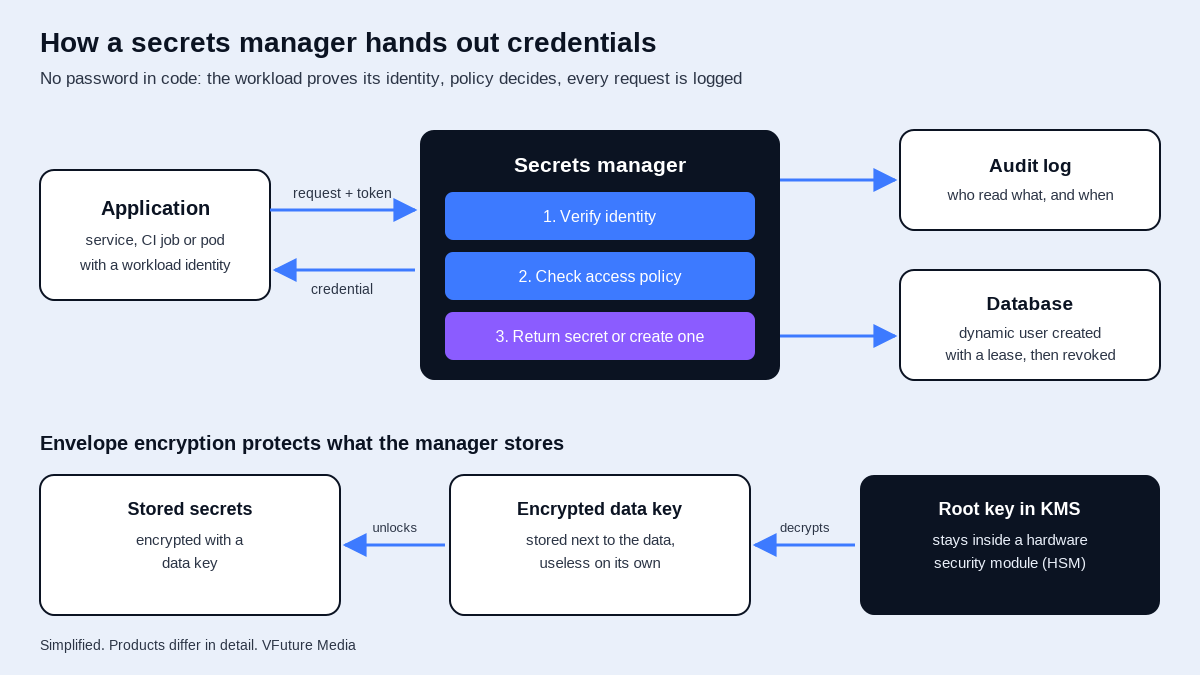
A secrets manager is a service that holds secrets encrypted and releases them only to callers that pass an access check. Products differ, but the flow is broadly the same (see the diagram):
- The workload authenticates. Ideally it uses an identity the platform already gives it, such as a cloud role or a Kubernetes service account, rather than another stored password.
- A policy decides. Fine-grained policies say which identity can read which secret. OWASP stresses least privilege here: engineers and services shouldn't be able to read every secret in the system [1].
- The request is logged. Every read, write and rotation lands in an audit trail.
- The secret is returned, either a stored value or a freshly generated credential.
The service itself has to protect what it stores. That's where key management comes in.
Key vaults and envelope encryption
"Key vault" is often used loosely for any secrets store, but there are really two jobs:
- Secrets storage keeps arbitrary values such as passwords and tokens and gives them back to authorized callers.
- Key management creates and holds cryptographic keys and performs operations with them (encrypt, decrypt, sign), usually without ever exporting the key.
The two meet in envelope encryption. AWS defines it as encrypting plaintext data with a data key, then encrypting the data key under another key [4]. The outer key, the root key, stays inside the key management service. AWS says its KMS root keys never leave its FIPS 140-3 Security Level 3 validated hardware security modules (HSMs) unencrypted [4]. Only the small encrypted data key travels with the data. To read the data, a caller asks the key service to decrypt the data key, which the service does only if policy allows.
This layering is why one key service can protect huge volumes of data, and why cutting off access to one root key can make everything under it unreadable.
NIST's key-management guidance, SP 800-57 Part 1, covers the protection each type of key needs and the functions involved in managing keys over their lifetime [9]. A central idea is the cryptoperiod, the time span during which a key is authorized for use [10]. Shorter cryptoperiods limit how much data any single compromised key exposes.
Static, rotated and dynamic secrets
Approach | How it works | Risk if leaked | Typical use |
|---|---|---|---|
Static secret | The same value is used until someone changes it | Valid until manually changed | Legacy systems, third-party API keys that can't be automated |
Automatically rotated | The manager replaces the value on a schedule and updates the target system | Valid until the next rotation | Database passwords, service accounts |
Dynamic secret | A unique credential is generated for each consumer or session, with a lease | Expires on its own when the lease ends | Databases and cloud access that support on-demand credentials |
Rotation is easy to get wrong by hand. AWS Secrets Manager's rotation, for example, runs as a four-step function: create a new version of the secret, set it in the database or service, test it, then finish by promoting it to current [3]. The new value carries a pending label and only becomes current in that final step, after the test, and the previous version is kept as the last known good value [3].
Dynamic secrets go further. HashiCorp Vault's database engine creates credentials on demand, so every service connects with its own unique username and password [6]. Each dynamic secret carries a lease with a time to live, and once the lease expires Vault can revoke it automatically [7]. OWASP recommends dynamic secrets where possible, with short leases, and adds a caution: restarting an application does not revoke stolen credentials. They stay usable until the backing service expires or revokes them [1].
Getting rid of the "secret zero" problem
Every secrets manager raises an awkward question: how does the application prove who it is without a password of its own? If it needs a stored credential to fetch its other credentials, you've only moved the problem.
The modern answer is workload identity. AWS, for instance, recommends that applications outside AWS not store long-term AWS credentials at all, and instead request temporary credentials through OIDC federation when they need them [11]. A CI pipeline can present a signed token from its platform and receive short-lived cloud credentials in return. Kubernetes service accounts and cloud instance roles work the same way inside each platform. This fits the zero trust idea of verifying every request rather than trusting a network location.
Stopping leaks before they happen
Central storage doesn't help if secrets still get committed to Git. Secret scanning tools look for credential patterns in code. GitHub's push protection goes a step further: it blocks a push that contains a detected secret before it reaches the repository, with a message explaining the reason for the block [8]. Scanning matters for the software supply chain, since a leaked publishing token can let an attacker ship malicious releases.
If a secret does leak, deleting the commit isn't enough. Treat the value as compromised: revoke or rotate it, then check the audit trail for use.
Benefits
- One place to answer "who can read this?" Policies and audit logs replace scattered config files.
- Smaller blast radius. Per-service and short-lived credentials limit what one leak exposes.
- Rotation becomes routine instead of a risky manual change window.
- Cleaner separation of duties. Key administrators don't have to be able to read the data those keys protect.
Limitations and risks
- It's a critical dependency. If the secrets manager is down, applications may not start. Plan caching, regional redundancy and break-glass access.
- Deletion can be catastrophic. Losing an encryption key can make data permanently unreadable. Azure Key Vault's soft-delete keeps deleted objects recoverable for a configurable 7 to 90 days (90 by default). Purge protection, which blocks permanent deletion during that window, is optional and off by default [5]. Microsoft recommends it when keys are used for encryption [5].
- The root credentials still need a home. OWASP notes that even a single central solution needs its own primary secret protected somewhere else [1].
- Rotation can break things. Rotating encryption keys may trigger full or partial re-encryption, and rotation can break upstream or downstream dependencies, so OWASP advises documenting them first [1].
- Logs can leak secrets too. Debug output and crash dumps should be scrubbed.
How to choose
- Mostly on one cloud? The provider's native secrets and key services integrate with its identity system and are usually the simplest start.
- Multi-cloud or on-premises? A cloud-agnostic tool can give one policy model across environments. OWASP notes that many organizations run more than one solution and should standardize carefully [1].
- Need dynamic credentials? Check which databases and platforms each tool can generate credentials for.
- Regulated data? Check FIPS 140-3 validation of the key hardware, audit log retention and key-deletion safeguards.
- Kubernetes-heavy? Decide whether apps read secrets through mounted files, environment variables or a sidecar or operator that syncs from an external store, and turn on encryption at rest for etcd either way.
Outlook
The direction is away from secrets that anyone has to store at all. Workload identity federation and short-lived, dynamically generated credentials shrink the number of long-lived values that can leak. The secrets that remain, such as third-party API keys, still need a vault, rotation and scanning. The other long-term change is cryptographic: key-management systems will need to support post-quantum algorithms (our upcoming post-quantum cryptography explainer covers the standards).
Frequently asked questions
What is the difference between a secrets manager and a key vault?
A secrets manager stores arbitrary sensitive values and returns them to authorized callers. A key management service creates and uses cryptographic keys, usually without exporting them [4]. Some products, such as Azure Key Vault, do both, which is why the terms blur.
Are environment variables a safe place for secrets?
They're better than hardcoding, but they can leak through logs, crash reports and child processes. A common pattern is to fetch the secret from a manager at runtime and keep it in memory only, or to mount it as a file with tight permissions.
Are Kubernetes Secrets encrypted?
Not by default. Kubernetes stores them unencrypted in etcd unless you configure encryption at rest, and base64 is only an encoding [2]. Restrict API access with RBAC, enable encryption, or sync from an external secrets manager.
How often should secrets be rotated?
There's no single number. NIST frames it as a cryptoperiod set by the key type, how much it protects and the risk of exposure [9][10]. In practice, automate rotation so it can happen often, and rotate immediately after any suspected leak.
What are dynamic secrets?
Credentials generated on demand for a single consumer or session, each with a lease. When the lease expires, the system can revoke them automatically [6][7]. A leaked dynamic credential is useful to an attacker for minutes or hours, not months.
What should I do if I commit a secret to GitHub?
Revoke or rotate it first, because removing it from history doesn't undo the exposure. Then review access logs for misuse. Turning on push protection helps prevent a repeat [8].
Sources
- OWASP Cheat Sheet Series, "Secrets Management Cheat Sheet." https://cheatsheetseries.owasp.org/cheatsheets/Secrets_Management_Cheat_Sheet.html
- The Kubernetes Authors, "Secrets," Kubernetes documentation. https://kubernetes.io/docs/concepts/configuration/secret/
- Amazon Web Services, "Lambda rotation functions," AWS Secrets Manager User Guide (vendor documentation). https://docs.aws.amazon.com/secretsmanager/latest/userguide/rotate-secrets_lambda-functions.html
- Amazon Web Services, "AWS KMS cryptography essentials," AWS KMS Developer Guide (vendor documentation). https://docs.aws.amazon.com/kms/latest/developerguide/kms-cryptography.html
- Microsoft, "Azure Key Vault soft-delete overview" (vendor documentation). https://learn.microsoft.com/en-us/azure/key-vault/general/soft-delete-overview
- HashiCorp, "Database secrets engine," Vault documentation (vendor documentation). https://developer.hashicorp.com/vault/docs/secrets/databases
- HashiCorp, "Lease, Renew, and Revoke," Vault documentation (vendor documentation). https://developer.hashicorp.com/vault/docs/concepts/lease
- GitHub, "About push protection," GitHub Docs (vendor documentation). https://docs.github.com/en/code-security/secret-scanning/introduction/about-push-protection
- Elaine Barker, NIST, "SP 800-57 Part 1 Rev. 5, Recommendation for Key Management: Part 1 – General," May 2020. https://csrc.nist.gov/pubs/sp/800/57/pt1/r5/final
- NIST, Computer Security Resource Center Glossary, "cryptoperiod." https://csrc.nist.gov/glossary/term/cryptoperiod
- Amazon Web Services, "OIDC federation," AWS IAM User Guide (vendor documentation). https://docs.aws.amazon.com/IAM/latest/UserGuide/id_roles_providers_oidc.html