Kubernetes Security Architecture: Layers, Defaults and Controls
How Kubernetes security works layer by layer: API authentication, RBAC, admission and Pod Security Standards, network policies, secrets and audit logging.
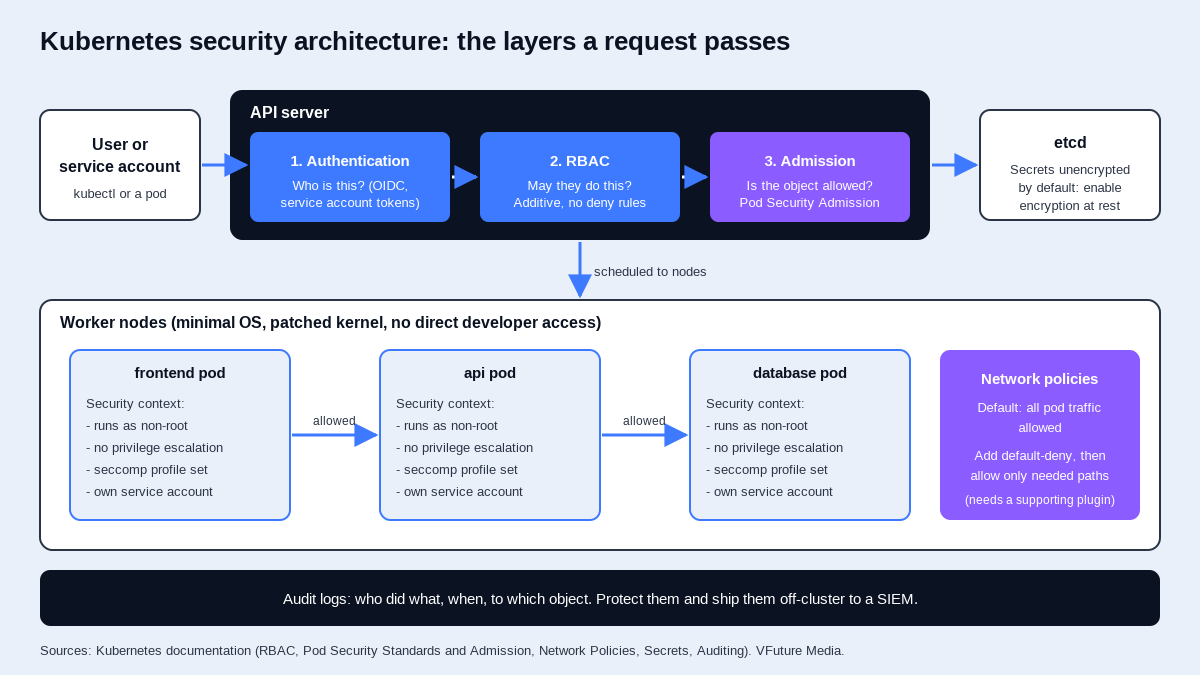
Kubernetes security architecture is a set of layers wrapped around the cluster's API server and workloads. Requests are authenticated, authorized with role-based access control (RBAC) and checked by admission controllers before anything is stored or scheduled. Pods are then constrained by security contexts, Pod Security Standards and network policies. The catch is that several of these layers are permissive by default. Pods accept traffic from any other pod until a network policy selects them [5], and Secrets are stored unencrypted in etcd unless you configure encryption [6].
This article covers the security design. For how the control plane and nodes work in the first place, read our Kubernetes architecture explainer. For container-level risks such as image scanning and runtime escapes, see our container security guide.
How a request moves through the security layers
Almost everything in Kubernetes is an API call: a developer running kubectl apply, a controller reconciling state, or a pod's service account reading a ConfigMap. Every request passes through the API server's gates, and requests that create, change or delete objects pass all three:
- Authentication: who is this? Users usually authenticate through an external identity provider (OIDC is common), and workloads use service account tokens.
- Authorization: may they do this? RBAC is the standard mechanism. Its permissions are "purely additive (there are no 'deny' rules)." A Role sets permissions within one namespace, while a ClusterRole is a non-namespaced object. A RoleBinding grants a role's permissions within one namespace (it can even reference a ClusterRole), and a ClusterRoleBinding grants access cluster-wide [2].
- Admission control: is this object acceptable? After authorization, mutating admission controllers can modify a write request, then validating controllers (including any validating webhooks or policies) can reject it. Read requests skip this step. The built-in Pod Security Admission controller enforces the Pod Security Standards [4], and policy engines can add organization-specific rules.
Only then is the object written to etcd, the cluster's key-value store.
Layer 1: Lock down the control plane and RBAC
The Kubernetes project's own security checklist starts with access. Its first item: the system:masters group shouldn't be used for user or component authentication after bootstrapping, and should be only a "break-glass mechanism" [1]. Members of that group bypass all RBAC checks, and removing role bindings can't revoke that access [9].
Good RBAC practice follows from the additive model [2][9]:
- Grant per namespace, not cluster-wide, unless a role truly spans the cluster.
- Avoid wildcards on resources and verbs. Because Kubernetes is extensible, a wildcard grants access to resource types added later [9].
- Treat some permissions as near-admin. Kubernetes' RBAC good-practices guide flags listing or reading Secrets and creating workloads as permissions that can be used to escalate privileges [9].
- Give each workload its own service account with only what it needs, and don't mount tokens into pods that never call the API.
Over-broad component permissions turn single bugs into cluster-wide breaches. CVE-2025-1974 in the ingress-nginx controller (CVSS 3.1 score 9.8, Critical, as scored by the Kubernetes project in its NVD record) could, under certain conditions, let an unauthenticated attacker with pod-network access execute code in the controller's context. That could expose Secrets the controller could read. NVD notes that "in the default installation, the controller can access all Secrets cluster-wide" [7].
Layer 2: Constrain what pods can do
The Pod Security Standards define three cumulative profiles [3]:
Profile | Description (Kubernetes docs) | Typical use |
|---|---|---|
Privileged | "Unrestricted policy, providing the widest possible level of permissions. This policy allows for known privilege escalations." | System and infrastructure components that genuinely need host access |
Baseline | "Minimally restrictive policy which prevents known privilege escalations." | A sensible floor for most namespaces |
Restricted | "Heavily restricted policy, following current Pod hardening best practices." | Application workloads |
Restricted requires, among other things, that containers run as non-root, disallow privilege escalation and set a seccomp profile [3].
Pod Security Admission, stable since Kubernetes v1.25, applies these profiles per namespace in three modes. enforce rejects violating pods, audit records violations in the audit log, and warn shows a user-facing warning [4]. The checklist suggests using warn and audit to roll out the right level gradually before enforcing it [1]. A practical pattern is to enforce Baseline everywhere, warn on Restricted, and fix workloads until Restricted can be enforced in application namespaces.
Layer 3: Segment the network
By default, a pod is "non-isolated" in both directions: all inbound and outbound connections are allowed [5]. A pod becomes isolated only once a NetworkPolicy selects it, and then only the traffic the policies allow is permitted. Two caveats:
- Policies need a network plugin that enforces them. The NetworkPolicy API is part of Kubernetes, but enforcement depends on the cluster's network plugin [5].
- Allow rules combine additively. If several policies select a pod, the allowed traffic is the union of their rules [5].
The usual design is a default-deny policy per namespace, for ingress and egress, followed by narrow allow rules: frontend to API, API to database, everything to DNS. This puts zero trust ideas into practice inside the cluster; see our zero trust architecture explainer for the broader model. NIST's container guide makes the same point. It recommends separating inter-container traffic by sensitivity, and not mixing workloads of different sensitivity on the same hosts [8].
Layer 4: Protect Secrets and etcd
Kubernetes' documentation is blunt: Secrets are "by default, stored unencrypted in the API server's underlying data store (etcd). Anyone with API access can retrieve or modify a Secret, and so can anyone with access to etcd" [6]. Its minimum recommendations [6]:
- Enable encryption at rest for Secrets.
- Configure RBAC rules with least-privilege access to Secrets.
- Restrict Secret access to specific containers.
- Consider external Secret store providers.
It also warns that any container running with privileged: true on a node can access all Secrets used on that node [6], which is one more reason to keep privileged pods rare. Our upcoming article on secrets management and key vaults compares external stores.
Layer 5: Watch everything with audit logs
Kubernetes auditing produces a chronological set of security-relevant records of activity against the API. It lets administrators answer what happened, when, who initiated it and on what [10]. The security checklist says audit logs, if enabled, should be protected from general access [1]. Audit annotations from Pod Security Admission's audit mode also land here [4], so the log serves both forensics and policy rollout. Ship audit logs off-cluster to your SIEM so an attacker who gains cluster-admin can't erase them; our XDR vs EDR vs SIEM explainer covers where they fit.
Node and workload hygiene
The API layers protect the cluster's brain. Nodes still need traditional hardening:
- Minimal node OS and fast patching, since every container shares the node kernel [8].
- A default AppArmor or seccomp profile applied to workloads; the checklist lists both [1].
- Placement by sensitivity. The checklist says pod placement should follow tiers of sensitivity [1]. Use node pools, taints and tolerations to keep sensitive workloads apart.
- No direct node access for developers. Use the API and its audit trail instead of SSH.
A practical rollout order
Step | Control | Why first |
|---|---|---|
1 | Identity provider for humans; retire shared admin credentials and | Every other control assumes you know who is acting [1] |
2 | Least-privilege RBAC and per-workload service accounts | Limits blast radius of any compromised credential [2] |
3 | Encryption at rest for Secrets; restrict Secret reads | Secrets are plaintext in etcd by default [6] |
4 | Pod Security Admission: enforce Baseline, warn on Restricted | Blocks the easiest container-to-node escalations [3][4] |
5 | Default-deny network policies with explicit allows | Pods accept all traffic by default [5] |
6 | Audit logging shipped off-cluster | Detection and forensics [1] |
Frequently asked questions
Is Kubernetes secure by default?
Not fully. Several defaults favor ease of use. Pods are non-isolated on the network until a policy selects them [5], Secrets are unencrypted in etcd unless you configure encryption [6], and Pod Security Admission applies only the levels you configure, typically through namespace labels [4]. Managed Kubernetes services change some defaults, so check your provider's documentation.
What replaced PodSecurityPolicy?
Pod Security Admission, which enforces the Pod Security Standards through namespace labels and has been stable since Kubernetes v1.25 [4]. Organizations needing finer-grained rules often add a policy engine as an additional admission controller.
Can RBAC deny a specific action?
No. Kubernetes RBAC permissions are purely additive, with no deny rules [2]. To restrict something, don't grant it, and review every binding that might include it, including wildcard rules.
Do network policies work on every cluster?
The API exists everywhere, but enforcement requires a network plugin that implements NetworkPolicy. On a cluster without one, policies have no effect [5].
Are Kubernetes Secrets safe to use?
They can be, with configuration. Enable encryption at rest, restrict who can read Secrets with RBAC, limit which containers mount them, and consider an external secret store for high-value credentials [6].
Sources
- The Kubernetes Authors, "Security Checklist." https://kubernetes.io/docs/concepts/security/security-checklist/
- The Kubernetes Authors, "Using RBAC Authorization." https://kubernetes.io/docs/reference/access-authn-authz/rbac/
- The Kubernetes Authors, "Pod Security Standards." https://kubernetes.io/docs/concepts/security/pod-security-standards/
- The Kubernetes Authors, "Pod Security Admission." https://kubernetes.io/docs/concepts/security/pod-security-admission/
- The Kubernetes Authors, "Network Policies." https://kubernetes.io/docs/concepts/services-networking/network-policies/
- The Kubernetes Authors, "Secrets." https://kubernetes.io/docs/concepts/configuration/secret/
- NIST National Vulnerability Database, "CVE-2025-1974," published March 25, 2025. https://nvd.nist.gov/vuln/detail/CVE-2025-1974
- Murugiah Souppaya, John Morello and Karen Scarfone, NIST, "SP 800-190, Application Container Security Guide," September 2017. https://nvlpubs.nist.gov/nistpubs/SpecialPublications/NIST.SP.800-190.pdf
- The Kubernetes Authors, "Role Based Access Control Good Practices." https://kubernetes.io/docs/concepts/security/rbac-good-practices/
- The Kubernetes Authors, "Auditing." https://kubernetes.io/docs/tasks/debug/debug-cluster/audit/