Cloud Security Architecture Explained: Layers and Controls
How cloud security architecture is built: shared responsibility by service model, account structure, identity, network, data, logging and automated guardrails.
Cloud security architecture is the overall design of the controls that protect an organization's cloud environment: how accounts are structured, who can access what, how networks are segmented, how data is encrypted, and how activity is logged and checked. It starts from the shared responsibility model. The provider secures the underlying infrastructure, and the customer secures what they build and configure on top [1]. Good architecture makes the secure way the default way, using automation rather than manual reviews.
New to cloud basics? Start with our complete guide to cloud computing.
Start with shared responsibility
Every cloud security design begins by drawing the line between provider and customer. AWS describes it as "security of the cloud" (the provider's job) versus "security in the cloud" (the customer's) [1]. The provider runs everything from the physical facilities up through the host operating system and virtualization layer. The customer handles the guest operating system, applications and configuration, including firewall settings [1].
Where the line falls depends on the service model. NIST's guidance on cloud access control treats IaaS, PaaS and SaaS as layered, with different components to manage in each [3]. CISA's cloud reference architecture likewise notes that the service models vary in who is responsible for which layers, and tells agencies to confirm which services and functions their vendors are and aren't providing [2].
Layer | IaaS (e.g., virtual machines) | PaaS (e.g., managed databases, serverless) | SaaS (e.g., email, CRM) |
|---|---|---|---|
Physical facilities, hardware, host and virtualization | Provider | Provider | Provider |
Operating system patching | Customer | Provider | Provider |
Application code | Customer | Customer | Provider |
Configuration of the service | Customer | Customer | Customer |
Identities and access | Customer | Customer | Customer |
Data classification and protection | Customer | Customer | Customer |
The bottom three rows never move. Even in SaaS, the customer decides who has access, how data is shared and how the service is configured. That's why misconfiguration is such a persistent cloud risk. CISA's 2024 cloud directive for federal civilian agencies notes that improper configuration of security controls has resulted in actual compromises [7].
The layers of a cloud security architecture
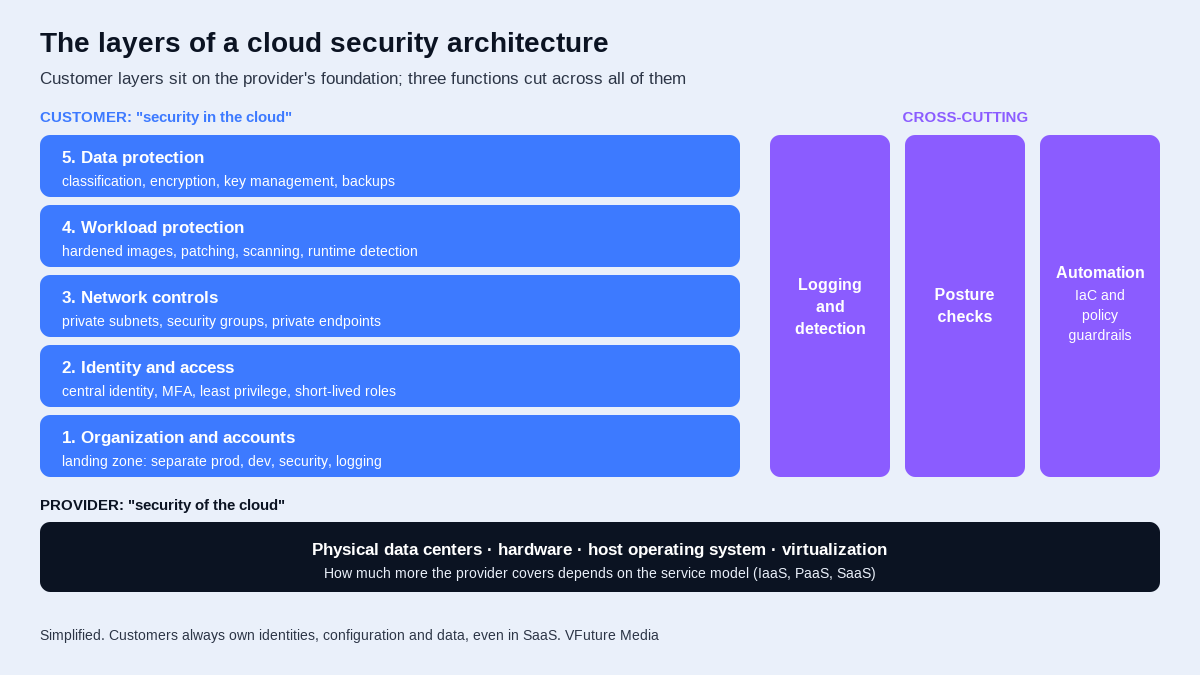
Think of the architecture as stacked layers with three cross-cutting functions running through all of them (see the diagram).
1. Organization and account structure
Separate accounts (AWS), subscriptions (Azure) or projects (Google Cloud) act as hard security boundaries. Production, development, security tooling and logging should live in different ones, so a compromise in a test environment can't touch production.
Providers offer a pre-built pattern for this, called a landing zone. Microsoft describes an Azure landing zone as an architecture for governing, securing and scaling a multi-subscription environment [5]. AWS Control Tower sets up and governs a multi-account AWS environment based on best practices [6]. A landing zone sets up the shared plumbing (identity, logging, network hubs and guardrail policies) before any application team arrives.
2. Identity and access
In the cloud, identity is the main perimeter. Anyone with the right credentials can reach the control plane from anywhere. AWS lists "implement a strong identity foundation" first among its security design principles, alongside least privilege and separation of duties [4]. Key practices:
- One central identity provider with single sign-on and phishing-resistant MFA for people.
- Roles and short-lived credentials for workloads instead of long-lived access keys.
- Least-privilege policies, reviewed regularly.
- Break-glass accounts that are locked away and monitored.
Our guides to identity and access management and zero trust architecture go deeper. Machine credentials need their own controls; see our upcoming secrets management guide.
3. Network controls
Cloud networks are software-defined, so segmentation is a configuration choice. Common patterns include private subnets for workloads, tightly scoped security groups, private endpoints so services reach managed databases and storage without crossing the internet, and central inspection points for traffic in and out. AWS's "apply security at all layers" principle sums it up: defense in depth rather than one edge firewall [4]. Our upcoming cloud networking explainer covers the building blocks.
4. Workload protection
Virtual machines, containers and serverless functions all need hardening. That means minimal, patched images, vulnerability scanning, runtime threat detection, and for containers, admission controls and image signing. See our guides to containers vs virtual machines and Kubernetes architecture, and the upcoming container security and Kubernetes security explainers.
5. Data protection
Classify data, then encrypt it at rest and in transit. Cloud key management services make encryption close to free to switch on. They typically use envelope encryption, where a data key encrypts the data and a root key held in the provider's hardware security modules encrypts the data key [8]. Architecture decisions here include who controls keys (provider-managed or customer-managed), how keys are separated per environment, and how backups are protected. AWS's principle "keep people away from data" means favoring automated access over people handling data directly [4].
The cross-cutting functions
Logging and detection
Every API call that changes the cloud should be logged, the logs should flow to a separate, locked-down account, and detections should run on them. AWS calls this "maintain traceability": monitor, alert and audit actions and changes in real time [4]. Our XDR vs EDR vs SIEM guide explains the detection tools, and observability vs monitoring covers the operational side.
Posture management
Configurations drift. Continuous posture checks compare every resource against benchmarks and flag risky settings, such as public storage or disabled logging. CISA's reference architecture devotes a section to cloud security posture management as a continuous process [2]. Our upcoming CSPM explainer covers how it works.
Automation and guardrails
Manual configuration doesn't scale and is hard to audit. Defining infrastructure as code makes every change reviewable and repeatable. See our guide to infrastructure as code. Organization-wide policies then act as guardrails, blocking actions such as disabling audit logs or creating public storage, whatever an individual team does. AWS's "automate security best practices" principle points the same way [4].
Design principles that hold across providers
AWS's Well-Architected security pillar lists seven design principles that map well to any cloud [4]:
- Implement a strong identity foundation.
- Maintain traceability.
- Apply security at all layers.
- Automate security best practices.
- Protect data in transit and at rest.
- Keep people away from data.
- Prepare for security events.
The last one is easy to skip. Incident response in the cloud needs pre-approved access for responders, forensic-ready logging and practiced playbooks, before anything goes wrong.
Benefits of getting the architecture right
- Smaller blast radius. Account boundaries, least privilege and segmentation contain mistakes and breaches.
- Faster, safer delivery. Teams build inside guardrails instead of waiting for manual security reviews.
- Audit readiness. Central logs and codified policies produce evidence automatically.
- Consistency across teams and providers.
Limitations and risks
- Complexity. Each provider has hundreds of services, each with its own security settings.
- Identity sprawl. Machine identities (roles, service accounts, keys) can outnumber people and are harder to govern.
- Multicloud doubles the work. Controls, logs and skills rarely transfer cleanly between providers.
- Provider-side risk is real but out of your control. Your design should assume a provider-side incident is possible, through backups in separate accounts, tested recovery and, where justified, multi-region designs.
- Guardrails can be bypassed by over-privileged administrators. Protect the management accounts most of all.
How to approach it
- Map responsibilities for every service you use, using the provider's shared responsibility documentation [1] and, for US federal work, FedRAMP and CISA guidance [2].
- Build or adopt a landing zone before migrating workloads [5][6].
- Centralize identity and logging first. They're hardest to retrofit.
- Codify everything: infrastructure, policies and detection rules.
- Measure posture continuously and fix the highest-risk findings first.
- Practice incidents with tabletop exercises that use real cloud scenarios.
Outlook
Cloud security architecture is converging on a few ideas: identity as the perimeter, zero trust access, everything as code, and continuous verification of configuration. Providers are bundling posture, workload and threat detection into unified platforms, and US federal policy is pushing secure configuration baselines from guidance toward requirements [7]. The fundamentals of shared responsibility, least privilege, logging and automation stay the same as the tools change. Our upcoming zero trust cloud security explainer applies those principles specifically to cloud environments.
Frequently asked questions
What is cloud security architecture?
The design of the controls that protect a cloud environment, covering account structure, identity, network, workloads, data, logging, posture checks and automation, built on the shared responsibility model [1][2].
What is the shared responsibility model?
The split of security duties between provider and customer. The provider secures the infrastructure ("security of the cloud") and the customer secures their data, identities, applications and configuration ("security in the cloud") [1].
What is a landing zone?
A pre-configured, multi-account (or multi-subscription) cloud environment with identity, logging, networking and guardrail policies already set up, so teams can deploy workloads securely from day one [5][6].
Is the cloud less secure than on-premises?
Not inherently. Major providers invest heavily in infrastructure security, but customers remain responsible for configuration, identities and data [1]. CISA notes that customer-side misconfigurations have led to real compromises [7], and those are exactly what good architecture and automation address.
What are the most important cloud security controls?
Strong identity with MFA and least privilege, centralized and protected logging, encryption with well-managed keys, network segmentation, continuous posture monitoring, and infrastructure as code with policy guardrails [4].
How does cloud security architecture relate to zero trust?
Zero trust is a principle: never trust by network location, always verify. Cloud security architecture is how you implement it in a specific environment, through identity-based access, segmentation and continuous monitoring. See our zero trust architecture guide.
Sources
- Amazon Web Services, "Shared Responsibility Model" (vendor documentation). https://aws.amazon.com/compliance/shared-responsibility-model/
- CISA, USDS and FedRAMP, "Cloud Security Technical Reference Architecture," Version 2, June 2022. https://www.cisa.gov/sites/default/files/publications/Cloud%20Security%20Technical%20Reference%20Architecture.pdf
- NIST, "SP 800-210, General Access Control Guidance for Cloud Systems," July 2020. https://csrc.nist.gov/pubs/sp/800/210/final
- Amazon Web Services, "Security pillar: design principles," AWS Well-Architected Framework (vendor documentation). https://docs.aws.amazon.com/wellarchitected/latest/security-pillar/security.html
- Microsoft, "What is an Azure landing zone?" Cloud Adoption Framework (vendor documentation). https://learn.microsoft.com/en-us/azure/cloud-adoption-framework/ready/landing-zone/
- Amazon Web Services, "What Is AWS Control Tower?" (vendor documentation). https://docs.aws.amazon.com/controltower/latest/userguide/what-is-control-tower.html
- CISA, "BOD 25-01: Implementing Secure Practices for Cloud Services," December 17, 2024. https://www.cisa.gov/news-events/directives/bod-25-01-implementing-secure-practices-cloud-services
- Amazon Web Services, "AWS KMS cryptography essentials," AWS KMS Developer Guide (vendor documentation). https://docs.aws.amazon.com/kms/latest/developerguide/kms-cryptography.html